Facetune AI Photo/Video Editor app cover art for Android
Facetune AI Photo/Video Editor Icon

Facetune AI Photo/Video Editor APK for Android

89M+
Free
Jun 29, 2024

Editor for selfies and portraits

Download Facetune AI Photo/Video Editor APK 2.40.0.2 210MB

What is Facetune AI Photo/Video Editor?

Facetune AI Photo/Video Editor is a photo editor that guarantees professional results with minimal effort on the part of the user. Surely many have noticed that the models on the covers of glossy magazines look flawless, which is not surprising, since in the process of processing these photographs a lot of complex tools and exclusive filters are used. Now ordinary people have a similar tool – lovers of selfies and portrait modes will appreciate the capabilities and potential of this mobile application.

The secret to the effectiveness of the Facetune AI Photo/Video Editor product is simple – powerful professional tools do their job quickly and without any user intervention, you just need to set the “vector” and mark the area that needs to be changed or transformed. For example, the editor will easily correct minor imperfections on the facial skin such as moles, acne, age spots and scars. With one touch you can whiten your teeth, giving your smile a completely flawless look. Get rid of red eyes, smooth unruly curls and remove gray hair.

The editor Facetune AI Photo/Video Editor is even able to correct the contours of the face, for example, slightly reducing the volume of the cheeks or emphasizing the contour of the cheekbones. Magic filters, “playing” with shadows and light, mirror images, beautiful frames and unusual artistic effects – this program will give the photo individuality, requiring only a creative approach from the user to the changes made. The edited photo can be compared with the original at any time and, if you are completely satisfied with the result, share it with your friends and family via instant messengers, email or social networks.
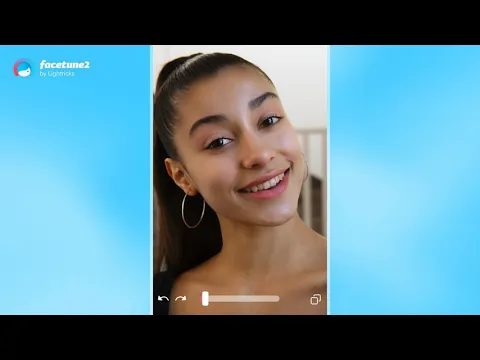
Video of Facetune AI Photo/Video Editor
Screenshot Facetune AI Photo/Video Editor 1
Screenshot Facetune AI Photo/Video Editor 2
Screenshot Facetune AI Photo/Video Editor 3
Screenshot Facetune AI Photo/Video Editor 4
Screenshot Facetune AI Photo/Video Editor 5
Screenshot Facetune AI Photo/Video Editor 6
Screenshot Facetune AI Photo/Video Editor 7
Screenshot Facetune AI Photo/Video Editor 8

Download Facetune AI Photo/Video Editor APK for Android

What's New in Version 2.40.0.2

No official changelog provided for Facetune AI Photo/Video Editor version 2.40.0.2-free. This update likely includes general stability improvements and bug fixes.

Available Files

System Requirements

OS Version
Android 8.0 (OREO) or higher
Architecture
Varies by file (Which one do I need?)
Disk Space
~350 MB free space required
RAM
2 GB
Internet
Not required
Permissions (21)
  • Requires Google Play Services to launch:
    Note: This is an original file. Unlike modded versions with no verification, it validates via your store account. Details
  • Internet
  • Access Network State
  • Read External Storage
  • Write External Storage
  • Vibrate

APK File Details

Package ID com.lightricks.facetune.free
Available on Google Play
Developer Lightricks Ltd.
License Free
Monetization Contains Ads   In-App Purchases
Content Rating Everyone
Interface Language
12 languages

Japanese, German, Hindi, Korean, French, Turkish, Spanish, Italian, Portuguese, Russian, Chinese, + 1 localization

APK Verification & Virus Scan Results

No Virus Signature Verified Safe & Original

Virus scan: Clean (0/45) View report. This APK is free of malware and its signature matches the official developer release.

Show File Details (SHA-256, SHA-1, MD5)

SHA-1 Signature:

e39d274a1c6f3604466e6a28868c182e7746f6d3

SHA-256 Hash:

954244c4886b06426424d18afab8cc60ecf6bd9d791651fe0f7538ddc1722b0c

MD5 Checksum:

c577cd2fab1f9127d2e16f2ca5588580

Frequently Asked Questions

Is Facetune AI Photo/Video Editor safe to download?

Yes, Facetune AI Photo/Video Editor is safe to download. The APK is scanned on every update — no malware or viruses detected. You can verify the full scan report in the Security section above.

How to install Facetune AI Photo/Video Editor APK on Android?

Download the APK using the button above. Then open the file and tap Install. If prompted, enable "Install from unknown sources" in Settings → Security. The process takes under a minute. Read more

What Android version does Facetune AI Photo/Video Editor require?

Facetune AI Photo/Video Editor requires Android 8.0 (API 26) or higher. Optimized for Android 13 (API 33).

Is Facetune AI Photo/Video Editor free?

Yes, it is free to download and use, but it contains ads and offers in-app purchases.

Does Facetune AI Photo/Video Editor require a license check?

Yes, this app performs a license check. You may need to have the Google Play Store installed and be logged in to verify the license.

How to update Facetune AI Photo/Video Editor to the latest version?

Download the latest APK from this page and install it over your existing version — no need to uninstall first. Your data and settings will be preserved. We update the file as soon as a new version is released.

What processor architecture does Facetune AI Photo/Video Editor support?

Facetune AI Photo/Video Editor supports arm64-v8a, armeabi-v7a. This build does not support x86/x86_64 processors, so it will not run on most PC emulators. If you are unsure about your device architecture, check the Device Info section on this page.

If you have found any issue or are having difficulty with this page, please .

User Reviews & Ratings

Global rating(Play Store): 4.33(472.3K)
Site Rating: 1(1)
Rate this app

1.00

12345

1

Share your experience with other users.