Calendar Planner - Agenda App app cover art for Android
Calendar Planner - Agenda App Icon

Calendar Planner - Agenda App APK for Android

10M+
Free
Apr 15, 2026

Consolidate every schedule, perfectly organized in one intuitive calendar.

Download Calendar Planner - Agenda App APK 2.07.09.0403 83MB

What is Calendar Planner?

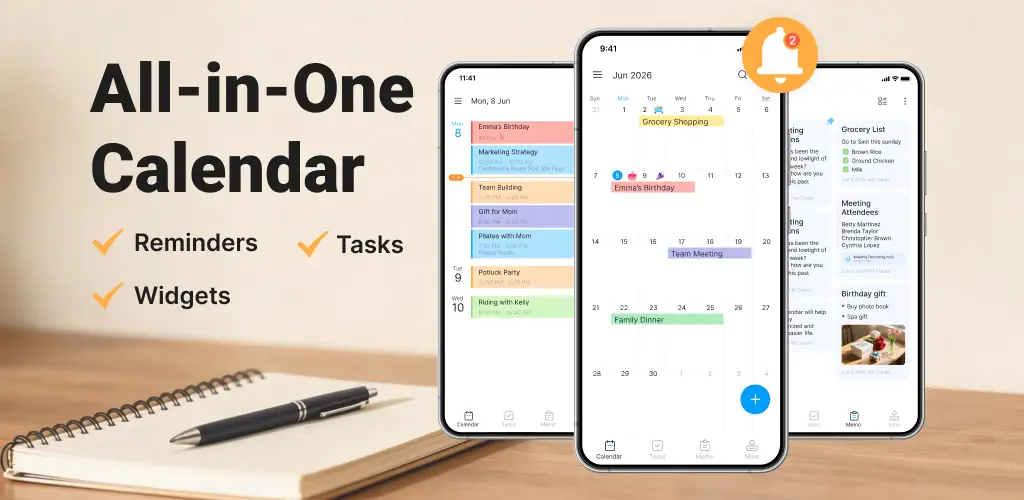
Calendar Planner - Agenda App isn’t just another calendar; it’s a unified command center for your entire life, merging every schedule into one vibrant, customizable view.

Ever find yourself juggling work deadlines, family birthdays, and personal appointments across multiple platforms? Your phone’s native calendar feels overwhelmed, and the dread of a missed event looms. This is precisely where Calendar Planner - Agenda App steps in, transforming that daily chaos into a clear, cohesive agenda.

I found its interface remarkably clean and intuitive. Setting up new events takes mere seconds. Unlike most generic calendar apps that offer bland, fixed layouts, Calendar Planner - Agenda App lets you tailor your view—from a quick daily glance to a detailed monthly spread. Want to see your entire week at a glance? Done. The choice of theme colors also makes a surprising difference, making long planning sessions less straining on the eyes. Who knew a calendar could feel so personal?

Beyond just scheduling, Calendar Planner - Agenda App excels at ensuring nothing slips through the cracks. Its robust reminder system means you’ll never forget an important meeting or anniversary again. I appreciated the ability to attach notes and even media to events, turning simple entries into rich records. Ever wish your schedule was just… simpler? The customizable widgets are a lifesaver, offering instant access to your agenda without opening the app. And for peace of mind, syncing with Google Calendar ensures your plans are always backed up and accessible across devices.

Unified Scheduling

  • All-in-One Calendar: Consolidates personal, business, and public calendars.
  • Event Reminders: Set alarms for critical appointments and anniversaries.
  • Calendar Notes: Add memos, attachments, and locations to any event.

Personalized Experience

  • Custom Views: Switch between daily, weekly, monthly, and list views.
  • Theme Colors & Widgets: Personalize the app’s look and home screen access.
  • Google Calendar Sync: Securely back up and access your agenda across devices.

If managing a busy life feels like a constant struggle, Calendar Planner - Agenda App offers a refreshing solution to bring clarity and control to your daily routine. Download it and reclaim your time.

Also known as: Good Calendar
Screenshot Calendar Planner - Agenda App 1
Screenshot Calendar Planner - Agenda App 2
Screenshot Calendar Planner - Agenda App 3
Screenshot Calendar Planner - Agenda App 4
Screenshot Calendar Planner - Agenda App 5
Screenshot Calendar Planner - Agenda App 6
Screenshot Calendar Planner - Agenda App 7
Screenshot Calendar Planner - Agenda App 8

Download Calendar Planner - Agenda App APK for Android

What's New in Version 2.07.09.0403

🌟 Easy and beautiful digital calendar app
🌟 Rich calendar widgets and themes
🌟 Create events and plan agenda easy and fast
🌟 Stable calendar with reminder & Alarm.
🌟 Colorize calendar category, clear agenda planner
🌟 All in one free calendar app

Available Files

System Requirements

OS Version
Android 8.0 (OREO) or higher
Architecture
Varies by file (Which one do I need?)
Disk Space
~100 MB free space required
RAM
1 GB
Internet
Not required
Google Services
Required
Permissions (44)
  • Internet
  • Record Audio
  • Access Network State
  • Read External Storage
  • Write External Storage

APK File Details

Package ID calendar.agenda.calendarplanner.agendaplanner
Available on Google Play
Developer Dairy App & Notes & Audio Editor & Voice Recorder
License Free
Monetization Contains Ads   In-App Purchases
Content Rating Everyone
Interface Language
English +77

English, Arabic, Bulgarian, Czech, German, Spanish, French, Hindi, Hungarian, Indonesian, Italian, Japanese, Korean, Polish, Portuguese, Romanian, Russian, Thai, Turkish, Ukrainian, Vietnamese, Chinese, + 56 localizations

APK Verification & Virus Scan Results

No Virus Signature Verified Safe & Original

Virus scan: Clean (0/64) View report. This APK is free of malware and its signature matches the official developer release.

Show File Details (SHA-256, SHA-1, MD5)

SHA-1 Signature:

d7a7df9b1692cae7c6f18bc5df51668db9ee5b7d

SHA-256 Hash:

90e94e883c3a24bcbbdc1bc695f99619abb3f92631012e7e8c9348b9da95937a

MD5 Checksum:

2950a997e20dfadcb096d86c3beb17ce

Frequently Asked Questions

Is Calendar Planner safe to download?

Yes, Calendar Planner is safe to download. The APK is scanned on every update — no malware or viruses detected. You can verify the full scan report in the Security section above.

How to install XAPK file?

XAPK is a split APK package. Standard Android installer cannot open it directly. Use 'SAI' or 'XAPK Installer' — they handle XAPK files automatically. Download the installer, open the XAPK file with it, and follow the on-screen steps. Read more

What Android version does Calendar Planner require?

Calendar Planner requires Android 8.0 (API 26) or higher. Optimized for Android 15 (API 35).

Is Calendar Planner free?

Yes, it is free to download and use, but it contains ads and offers in-app purchases.

How to update Calendar Planner to the latest version?

Download the latest APK from this page and install it over your existing version — no need to uninstall first. Your data and settings will be preserved. We update the file as soon as a new version is released.

What processor architecture does Calendar Planner support?

Calendar Planner supports armeabi-v7a. This build does not support x86/x86_64 processors, so it will not run on most PC emulators. If you are unsure about your device architecture, check the Device Info section on this page.

How to enable installation from unknown sources on Android?

Go to Settings → Security (or Settings → Apps → Special access on Android 8+) and enable "Install unknown apps" for your browser or file manager. On Android 8 and above this setting is per-app, not global. Read more

If you have found any issue or are having difficulty with this page, please .

User Reviews & Ratings

Global rating(Play Store): 4.44(47.9K)
Site Rating: 5(1)
Rate this app

5.00

12345

1

Share your experience with other users.