Floating Apps Icon

Floating Apps APK for Android

- (multitasking)
LWi s.r.o. Original
18M+
Free
May 24, 2026

Multitasker - try what it's like to be Julius Caesar.

Download Floating Apps APK 4.23.2 31MB Old versions

What is Floating Apps?

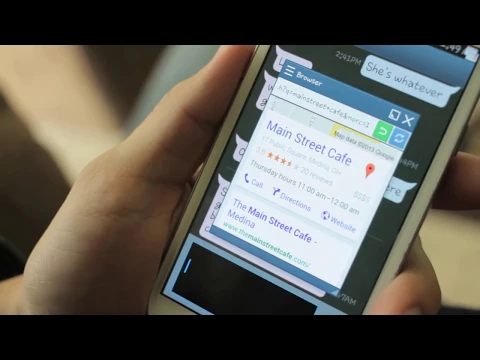
Floating Apps – this application allows you to keep in sight (open on the phone screen) at the same time so many interfaces of various applications. Each active application interface is a floating window that can be moved around the phone screen to a convenient place for the user. In the settings of our multitasking window, you can set the size and transparency; For more information, windows can also be assigned icons.

Floating Apps – how does it work? The application contains mini versions of more than 40 applications, such as:

  • Browsers,
  • Offices,
  • Calendar and calculator,
  • YouTube and social networks Facebook, Twitter, Google+,
  • Contacts,
  • Messengers,
  • File manager,
  • Wi-Fi manager,
  • Audio and video player,
  • Image editor,
  • Video games ,
  • Google Maps and more.

You select one or more applications and display their interfaces as floating windows on your phone’s desktop. Thus, at the same time you can, for example, watch a YouTube channel and chat with friends on social networks, or edit the same document in the windows of different office applications.

Using Floating Apps , as floating windows, you can also display the interfaces of applications installed on your phone (including third-party ones), and simply URL addresses of Internet resources. Applications whose interfaces are displayed on the phone screen , they all remain active until you close the selected window and close the application corresponding to the window.

Details.

  • Application Floating Apps supports more than 25 languages, including both Russian and Ukrainian.
  • The application works correctly only on devices running Android 7 and above.
Also known as: Floating Apps (multitasking)
Video of Floating Apps
Screenshot Floating Apps 1
Screenshot Floating Apps 2
Screenshot Floating Apps 3
Screenshot Floating Apps 4
Screenshot Floating Apps 5
Screenshot Floating Apps 6
Screenshot Floating Apps 7

Download Floating Apps (multitasking) APK for Android

What's New in Version 4.23.2

4.23.2
- Support for Android 16+
- Browser improvements
- Fixes UI glitches
- Minor fixes and improvements

Other versions

System Requirements

OS Version
Android 5.0 (Lollipop) or higher
Architecture
Varies by file (Which one do I need?)
Disk Space
~50 MB free space required
RAM
1 GB
Internet
Not required
Permissions (46)
  • Internet
  • Record Audio
  • Camera
  • Access Network State
  • Read External Storage

APK File Details

Package ID com.lwi.android.flapps
Available on Google Play
Developer LWi s.r.o.
License Free
Monetization Contains Ads   In-App Purchases
Content Rating Everyone
Interface Language
English +77

English, Japanese, Indonesian, German, Bulgarian, Thai, Chinese, Hindi, Vietnamese, Ukrainian, Polish, Korean, Romanian, Arabic, French, Turkish, Czech, Spanish, Italian, Portuguese, Hungarian, Russian, + 56 localizations

APK Verification & Virus Scan Results

No Virus Signature Verified Safe & Original

Virus scan: Clean (0/67) View report. This APK is free of malware and its signature matches the official developer release.

Show File Details (SHA-256, SHA-1, MD5)

SHA-1 Signature:

070586424b7b8aecdb1649bc65c3cbeedaea5665

SHA-256 Hash:

1dca400eac34fc4155223a5f6db2ec40f2d92bc48af657e432947c20cd6e2a53

MD5 Checksum:

5e56c81166d341a83b0780a721475425

Frequently Asked Questions

Is Floating Apps safe to download?

Yes, Floating Apps is safe to download. The APK is scanned on every update — no malware or viruses detected. You can verify the full scan report in the Security section above.

How to install Floating Apps APK on Android?

Download the APK using the button above. Then open the file and tap Install. If prompted, enable "Install from unknown sources" in Settings → Security. The process takes under a minute. Read more

What Android version does Floating Apps require?

Floating Apps requires Android 5.0 (API 21) or higher. Optimized for Android 14 (API 34).

Is Floating Apps free?

Yes, it is free to download and use, but it contains ads and offers in-app purchases.

How to update Floating Apps to the latest version?

Download the latest APK from this page and install it over your existing version — no need to uninstall first. Your data and settings will be preserved. We update the file as soon as a new version is released.

What processor architecture does Floating Apps support?

Floating Apps supports x86. If you are unsure about your device architecture, check the Device Info section on this page.

How to enable installation from unknown sources on Android?

Go to Settings → Security (or Settings → Apps → Special access on Android 8+) and enable "Install unknown apps" for your browser or file manager. On Android 8 and above this setting is per-app, not global. Read more

If you have found any issue or are having difficulty with this page, please .

User Reviews & Ratings

Global rating(Play Store): 3.84(62.7K)
Site Rating: 5(1)
Rate this app

5.00

12345

1

Share your experience with other users.