Notebook Icon

Notebook APK for Android

- Notes, Lists, Planner
6M+
Free
Apr 23, 2025

Digital notebook for storing notes and to-do lists

Download Notebook APK 6.5.3 79MB

What is Notebook?

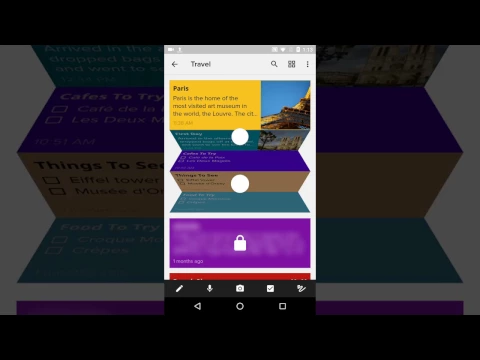
Notebook is a mobile notepad for quickly creating and storing notes with any content. By analogy with multi-colored paper stickers, virtual media will instantly, at the request of the user, become a platform for expressing thoughts and ideas, creating a shopping and to-do list, and entering other important information.

In addition, the functionality of the program is not limited to text only, offering to supplement notes with photos and short videos, voice recordings and audio files, documents, tables, links, quotes. To create a new entry, just click on the “+” sign and start filling a virgin blank sheet with information – add a title, basic information, use the tools from the working panel that allow you to adjust the size and color of the font, the color of the canvas, and so on.

Features:

  • create colorful cards with text, photos, videos, pictures, files, and more;
  • writing text in manual mode or using voice typing;
  • quickly search for content using custom filters;
  • arbitrary change in the order of displaying notes;
  • undo last action with arrow;
  • automatic saving of materials.

If necessary, set a reminder for the recording by specifying the date and time when the sound signal will sound, informing about plans and calendar events. If you want to send Notebook notepad pages to friends, then use the Zoho platform account – this guarantees complete confidentiality and security of transferred files.
Also known as: Notebook–Notes, Lists, Planner
Video of Notebook
Screenshot Notebook 1
Screenshot Notebook 2
Screenshot Notebook 3
Screenshot Notebook 4
Screenshot Notebook 5

Download Notebook–Notes, Lists, Planner APK for Android

What's New in Version 6.5.3

No official changelog provided for Notebook version 6.5.3. This update likely includes general stability improvements and bug fixes.

Available Files

  • 6.5.3 (latest) 79MB Android 6.0+ arm64-v8a Download
  • 5.3.2 29MB Android 5.0+ arm64-v8aarmeabi-v7a Download

System Requirements

OS Version
Android 6.0 (Marshmallow) or higher
Architecture
Varies by file (Which one do I need?)
Disk Space
~100 MB free space required
RAM
1 GB
Internet
Not required
Google Services
Required   GMS dependent
Permissions (46)
  • Requires Google Play Services to launch:
    Note: This is an original file. Unlike modded versions with no verification, it validates via your store account. Details
  • Internet
  • Record Audio
  • Camera
  • Access Network State
  • Read External Storage

APK File Details

Package ID com.zoho.notebook
Available on Google Play
Developer Zoho Corporation
License Free ( No Ads)
Monetization In-App Purchases
Content Rating Everyone
Interface Language
English +16

English, Japanese, Portuguese, Chinese, Thai, German, Hindi, Korean, French, Turkish, Italian, Russian, Vietnamese, Arabic, Spanish, + 2 localizations

APK Verification & Virus Scan Results

Scan In Queue Signature Verified Safe & Original

Antivirus scan in queue, will be scanned soon. This APK is free of malware and its signature matches the official developer release.

Show File Details (SHA-256, SHA-1, MD5)

SHA-1 Signature:

5d870c0503ba30d843db481631ac654b45eab205

SHA-256 Hash:

871aa9b6610bfc138722e2bd250bdb25b03002e67b9e1c143608eb8ca8c54ebb

MD5 Checksum:

439e5f4d8c503411bf6a5bc0a461d2b4

Frequently Asked Questions

Is Notebook safe to download?

Notebook has passed a basic integrity check. A full antivirus scan is pending. You can check the current scan status in the Security section above.

How to install XAPK file?

XAPK is a split APK package. Standard Android installer cannot open it directly. Use 'SAI' or 'XAPK Installer' — they handle XAPK files automatically. Download the installer, open the XAPK file with it, and follow the on-screen steps. Read more

What Android version does Notebook require?

Notebook requires Android 6.0 (API 23) or higher. Optimized for Android 14 (API 34).

Is Notebook free?

Yes, the app is free to download, but it contains in-app purchases for additional content.

Does Notebook require a license check?

Yes, this app performs a license check. You may need to have the Google Play Store installed and be logged in to verify the license.

How to update Notebook to the latest version?

Download the latest APK from this page and install it over your existing version — no need to uninstall first. Your data and settings will be preserved. We update the file as soon as a new version is released.

What processor architecture does Notebook support?

Notebook supports arm64-v8a. This build does not support x86/x86_64 processors, so it will not run on most PC emulators. If you are unsure about your device architecture, check the Device Info section on this page.

If you have found any issue or are having difficulty with this page, please .

User Reviews & Ratings

Global rating(Play Store): 4.41(46.1K)
Rate this app

0.00

12345

not yet rated

Share your experience with other users.