Simple Alarm Clock app cover art for Android
Simple Alarm Clock Icon

Simple Alarm Clock APK for Android

50M+
Free
Sep 6, 2026

Keypad-based alarm clock utility with loud volume override and timers.

Download Simple Alarm Clock APK 8.7.1 13MB

What is Simple Alarm Clock?

Downloading the Simple Alarm Clock gives you a straightforward time-management utility focused on rapid setup and reliable wake-up calls. Most system clock apps rely on awkward scroll wheels that slow down your morning routine. This lightweight tool strips away unnecessary fluff, substituting radial dials with a direct numeric keypad so you can program alarms in seconds.

What is Simple Alarm Clock?

Setting an alarm shouldn't feel like solving a puzzle. Instead of spinning digital wheels back and forth across your screen, you tap digits directly on a layout resembling a standard phone dialer. The main menu automatically reorganizes your list according to which alarm triggers next, eliminating guesswork about upcoming alerts.

Heavy sleepers who regularly slap snooze in a half-conscious haze benefit from built-in wake safeguards. You can activate an optional three-button dismissal process that forces your brain to register distinct touchscreen targets before silence hits. A soft fade-in mode gently ramps up vibration and volume, though the default tone is engineered to blast through system silent settings if you fail to wake up. Beyond morning wake-up routines, integrated timer and stopwatch tools handle quick kitchen tasks or workout intervals. It runs light on phone resources.

Key Features:

  • Direct Keypad Input: Type precise times using a standard number pad rather than swiping through endless scroll loops.
  • Chrono-Sorted List: Alarms arrange themselves dynamically based on activation sequence, showing your immediate upcoming alert at the top.
  • Three-Button Turnoff: Multi-tap dismissal prevents accidental shutoffs during deep sleep phases.
  • Volume Ramp-Up: Optional audio fade starts softly before swelling to maximum volume to prevent sudden morning panic.

Simple Alarm Clock Options and Alarm Scheduling

Selecting custom wake sounds takes just a few taps through your local audio files or phone ringtones. Recurring schedules can be assigned to specific days of the week, allowing distinct setups for weekday shifts versus weekend routines. Smart suggestions also anticipate repeat schedules based on past entry habits.

Simple Alarm Clock vs similar apps

Compared to Google Clock, Simple Alarm Clock offers faster keypad entry and an aggressive volume override that forces sound through silent profiles. It skips the sleep-tracking graphs found in complex tools like Sleep as Android, prioritizing immediate setup speed over health analytics.

Shift workers and deep sleepers who need dependable alarms without wading through complex menus will appreciate this focused design. The user interface looks somewhat dated and ad banners pop up on the free version, but the underlying trigger mechanics remain rock-solid.
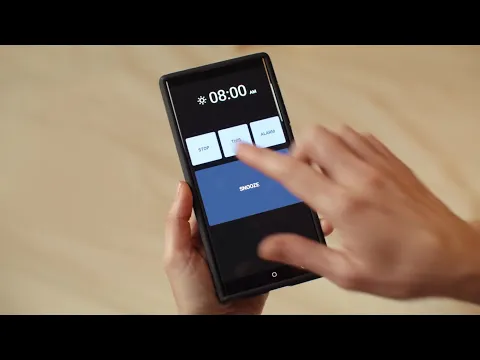
Simple Alarm Clock screenshot 1
Simple Alarm Clock screenshot 2
Simple Alarm Clock screenshot 3
Simple Alarm Clock screenshot 4
Simple Alarm Clock screenshot 5
Simple Alarm Clock screenshot 6
Simple Alarm Clock screenshot 7
Simple Alarm Clock screenshot 8

Simple Alarm Clock APK Download

What's New in Version 8.7.1

Added support for 8 new languages (Farsi/Persian, Greek, Hebrew, Dutch, Malay, Ukrainian, Thai, Vietnamese) and improved multiple texts.
Fixed an issue with the Pro version in the last release. Improved Pro version messaging for clarity.

Download Link:

System Requirements

OS Version
Android 7.0 (Nougat) or higher
Architecture
Varies by file (Which one do I need?)
Disk Space
~20 MB free space required
RAM
1 GB
Internet
Not required
Google Services
Required   GMS dependent

APK File Details

Package ID ar.com.basejuegos.simplealarm
Available on Google Play
Developer Moula Software
License Free
Monetization Contains Ads   In-App Purchases
Content Rating Everyone
Interface Language
English +16

English, French, Japanese, Korean, Thai, Arabic, Italian, Portuguese, Turkish, Vietnamese, Chinese, German, Spanish, Hindi, Russian, + 2 localizations

Required Permissions (27)
  • Requires Google Play Services to launch:
    Note: This is an original file. Unlike modded versions with no verification, it validates via your store account. Details
  • Internet
  • Access Network State
  • Read External Storage
  • Read Phone State
  • Vibrate

APK Verification & Virus Scan Results

No Virus Signature Verified Safe & unmodified

Virus scan: Verified safe (0/66) View report. This APK is free of malware and its signature matches the official developer release.

Show File Details (SHA-256, SHA-1, MD5)

SHA-1 Signature:

d9e01bb00e90540c14d792ff48bcb978fa767e6c

SHA-256 Hash:

178191c1127c8de50c70a8c9930bdf432e5420bb5ad45263981986d47232825a

MD5 Checksum:

4567780167231b594065806c69934c67

Frequently Asked Questions

Is Simple Alarm Clock safe to download?

Yes, Simple Alarm Clock is safe to download. The APK is scanned on every update — no malware or viruses detected. You can verify the full scan report in the Security section above.

How to install XAPK file?

XAPK is a split APK package. Standard Android installer cannot open it directly. Use 'SAI' or 'XAPK Installer' — they handle XAPK files automatically. Download the installer, open the XAPK file with it, and follow the on-screen steps. Read more

What Android version does Simple Alarm Clock require?

Simple Alarm Clock requires Android 7.0 (API 24) or higher. Optimized for Android 16 (API 36).

Is Simple Alarm Clock free?

Yes, it is free to download and use, but it contains ads and offers in-app purchases.

Does Simple Alarm Clock require a license check?

Yes, this app performs a license check. You may need to have the Google Play Store installed and be logged in to verify the license.

How to update Simple Alarm Clock to the latest version?

Download the latest APK from this page and install it over your existing version — no need to uninstall first. Your data and settings will be preserved. We update the file as soon as a new version is released.

What processor architecture does Simple Alarm Clock support?

Simple Alarm Clock supports armeabi-v7a. This build does not support x86/x86_64 processors, so it will not run on most PC emulators. If you are unsure about your device architecture, check the Device Info section on this page.

Found a problem on this page?

User Reviews & Ratings

Global rating (Play Store): 4.52(554.9K)
Site Rating: 5(1)
Rate this app

5.00

12345

1

Share your experience with other users.

Download Simple Alarm Clock APK - Latest version

Get the official APK file for your Android device. Fast, safe, and free. Download APK