
What is Solid Explorer?
What makes Solid Explorer File Manager so special? Imagine having two windows open side-by-side, allowing you to just drag and drop files from one folder to another. That’s the magic of its dual-pane layout, making moving files ridiculously simple. Whether you’re cleaning up your internal storage or organizing files on your SD card, this feature is a total game-changer.
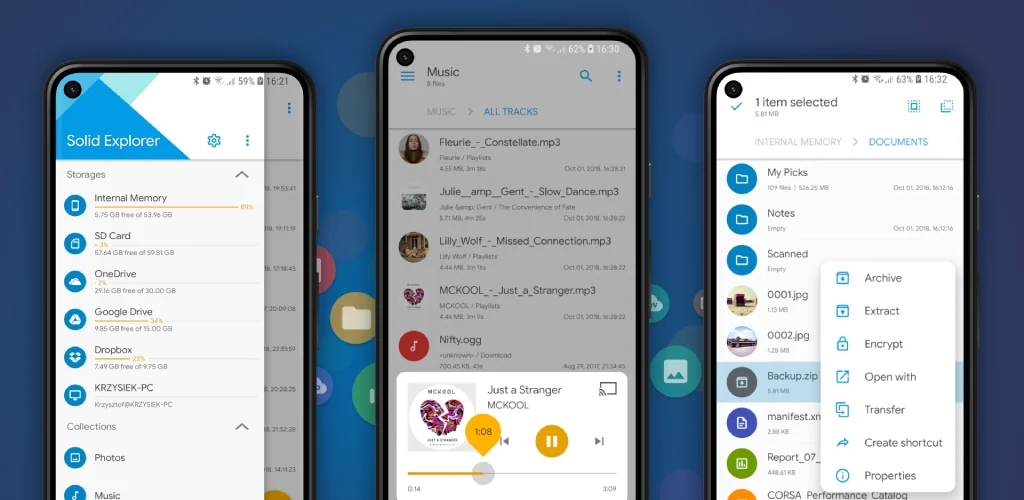
But it’s not just about local files. Have documents scattered across Google Drive, Dropbox, or OneDrive? Solid Explorer brings all your cloud accounts together in one place. You can also connect to your home computer or network storage (NAS) using common protocols like FTP or SMB. It’s like having your entire digital world at your fingertips.
Worried about prying eyes? The app has you covered with strong AES encryption. You can lock away sensitive files in a secure folder, protected by a password or your fingerprint. Even if you uninstall the app, those files stay locked and safe.
Here are some of the standout features:
- Dual-Pane Management: Effortlessly drag and drop files between two folders at once.
- Total Cloud Control: Connect and manage all your favorite cloud services (Google Drive, Dropbox, etc.).
- Rock-Solid Security: Protect your private files with password and fingerprint-enabled encryption.
- Network Access: Easily browse files on your shared network drives (NAS) via FTP, SFTP, and more.
- Smart Organization: Your files are automatically sorted into helpful collections like Photos, Music, and Documents.
- Root Explorer: For advanced users, it offers access to your Android system files on rooted devices.
Stop struggling with file chaos. Download Solid Explorer and discover how simple and streamlined managing your files can be!




Share your experience with other users.