BestWhozi Icon

BestWhozi APK for Android

100K+
Free
Jul 26, 2021

Powerful analytics tool to manage your Instagram account

Download BestWhozi APK 6.0.0 29MB

What is BestWhozi?

BestWhozi is a social network profile analysis tool Instagram , which helps to quickly learn about new subscribers and people who have canceled their subscription to your page. Access to information is opened only after authorization, that is, you will need to enter a username and password.

Many people are sensitive to the attendance of their page. For some, this is just a tribute to fashion and a reason to show off the number of active subscribers to friends. For others, attendance is essential to doing business or promoting the services or products offered. It doesn’t matter which category of users you belong to, because from now on it will not be a secret for you who visited the page and when, what ratings he gave and comments left.

Features:

  • “smart” search for quick finding of any user;
  • manage subscriptions to people and information about subscribers;
  • intuitive interface and comfortable navigation through sections.

The process of managing an account with the BestWhozi mobile platform will become much easier and more efficient. True, in order to get advanced functionality, you will need to buy VIP access – the developers offer a choice of five packages that differ in cost.

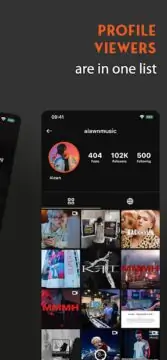
Screenshot BestWhozi 1
Screenshot BestWhozi 2
Screenshot BestWhozi 3
Screenshot BestWhozi 4
Screenshot BestWhozi 5
Screenshot BestWhozi 6

Download BestWhozi APK for Android

What's New in Version 6.0.0

No official changelog provided for BestWhozi version 6.0.0. This update likely includes general stability improvements and bug fixes.

Available Files

  • BestWhozi 6.0.0 29MB Android 4.4+ arm64-v8aarmeabi-v7ax86x86_64 Download

System Requirements

OS Version
Android 4.4 (Kit Kat) or higher
Architecture
Varies by file (Which one do I need?)
Disk Space
~50 MB free space required
RAM
1 GB
Internet
Required
Permissions (10)
  • Internet
  • Access Network State
  • Read External Storage
  • Write External Storage
  • Wake Lock

APK File Details

Package ID com.bestwho.zi
Developer BestWhozi Inc.
License Free ( No Ads)
Interface Language
English +74

English, Japanese, German, Bulgarian, Thai, Hindi, Vietnamese, Ukrainian, Polish, Korean, Romanian, Arabic, French, Turkish, Czech, Spanish, Italian, Portuguese, Hungarian, Russian, Chinese, + 54 localizations

APK Verification & Virus Scan Results

No Virus Signature Verified Safe & Original

Virus scan: Clean (0/65) View report. The APK file is digitally signed.

Show File Details (SHA-256, SHA-1, MD5)

SHA-1 Signature:

6d1ad44f90b99f77c05a4f7223c554c344d3bb01

SHA-256 Hash:

e8ccccd3d3a75fdb48b3b912608a266605ffe0a9c6c04d2995b13ef67a853f43

MD5 Checksum:

1ba54e707ad61d7705170657373ffc7a

Frequently Asked Questions

Is BestWhozi safe to download?

Yes, BestWhozi is safe to download. The APK is scanned on every update — no malware or viruses detected. You can verify the full scan report in the Security section above.

How to install BestWhozi APK on Android?

Download the APK using the button above. Then open the file and tap Install. If prompted, enable "Install from unknown sources" in Settings → Security. The process takes under a minute. Read more

Why does installation fail on newer Android versions (14 - 16)?

Newer Android versions strictly block the installation of apps built for older Android versions (API < 23) for security reasons. Standard installation is not possible. Read our step-by-step guide on how to bypass this restriction using ADB or Shizuku.

What Android version does BestWhozi require?

BestWhozi requires Android 4.4 (API 19) or higher. Optimized for Android 10 (API 29).

Is BestWhozi free?

Yes, this app is completely free to download and use.

What processor architecture does BestWhozi support?

BestWhozi supports arm64-v8a, armeabi-v7a, x86, x86_64. If you are unsure about your device architecture, check the Device Info section on this page.

How to enable installation from unknown sources on Android?

Go to Settings → Security (or Settings → Apps → Special access on Android 8+) and enable "Install unknown apps" for your browser or file manager. On Android 8 and above this setting is per-app, not global. Read more

If you have found any issue or are having difficulty with this page, please .

User Reviews & Ratings

Global rating(Play Store): 3.2(2.4K)
Rate this app

0.00

12345

not yet rated

Share your experience with other users.