What is AI Cam Translate: Text, Voice?
Most language apps make you juggle between separate tools for different tasks, forcing you to copy-paste or switch modes constantly. But then I tried AI Cam Translate: Text, Voice, and it’s a completely different story. This app pulls everything into one place, making global communication feel genuinely simple.
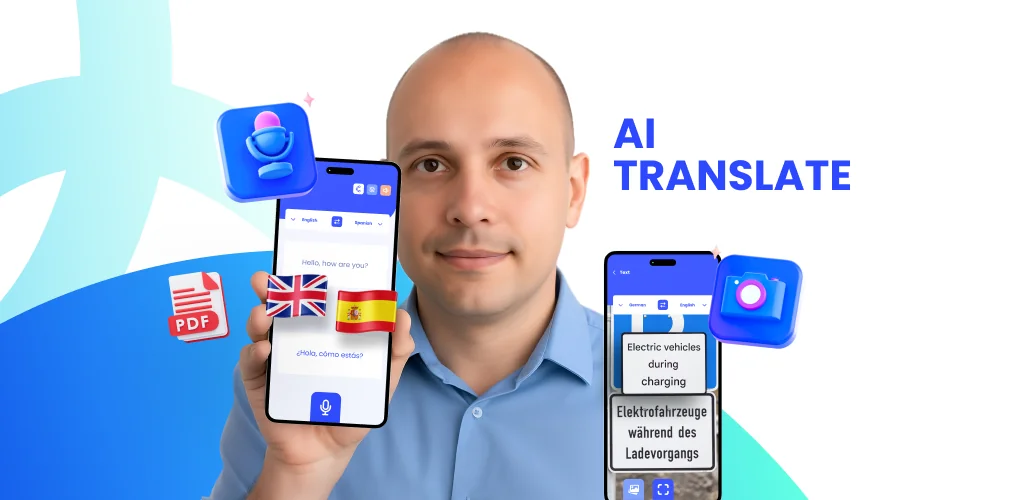
Imagine you’re exploring a new city, staring at a restaurant menu written in an unfamiliar script. Or maybe a friend sends you a message in a language you’re just learning. Instead of fumbling with dictionaries or multiple apps, what if you could just point your phone or type a reply? That’s where AI Cam Translate: Text, Voice steps in. I found myself using the camera translator constantly; just aim your lens at a sign or document, and boom – instant understanding. It felt like having a personal interpreter in my pocket.
Unlike most apps that only handle basic text, this one keeps conversations flowing naturally. I spoke into my phone, and it translated my words in real-time, making chats with international friends surprisingly smooth. It even has a keyboard translator built right in, so you can type and translate within any messaging app. No more awkward pauses or switching screens. It’s truly designed for real-world interactions, whether you’re traveling, learning, or just connecting.
Key Features:
- Camera Translator: Point your camera at text, signs, or menus for instant, on-screen translations in over 100 languages.
- Voice Translator: Speak naturally and hear your words translated in real-time, perfect for live conversations.
- Text Translator: Type or paste any text, from phrases to full documents, and get immediate translations.
- Chat & Keyboard Translator: Translate messages instantly within your favorite chat apps or directly as you type.
- Learn Quick Word: Build your vocabulary with smart suggestions and translations, expanding your language skills daily.
If you’re tired of language barriers slowing you down, you’re missing out on a truly integrated experience. Don’t let another foreign menu or message leave you guessing.



Share your experience with other users.