Bugjaeger Mobile ADB Icon

Bugjaeger Mobile ADB APK for Android

- USB OTG
Roman Sisik Original
4M+
Free
May 14, 2026

A tool that removes the intermediary in the form of a computer for working with the Android Debug Bridge

Download Bugjaeger Mobile ADB APK 8.0 52MB Old versions

What is Bugjaeger Mobile ADB?

Bugjaeger Mobile ADB is a software product that allows you to debug a mobile Android device using the ADB protocol not from a PC, but from another smartphone. Now you can diagnose problems, view log files, verify copies of data, execute user scripts, install and uninstall programs, create screenshots, manage network settings, and so on without using a laptop.

By the way, all of the above can be performed not only on smartphones and tablets, but also on other gadgets controlled by a “green robot” – watches or Android TV. Much more detailed information about application usage scenarios is given in the user manual on the developer’s page. Well, according to tradition, it should be said that the premium version of the program has wider functionality, and advertising does not interfere with user experiments.

Features:

  • FAQ section with detailed answers to the most common questions;
  • access to configuration information and process monitoring;
  • more features in the paid version of the application;
  • intuitive algorithm for connecting two devices;
  • file system operations.

To get started and use the above functions, you need to switch to developer mode, activate the “USB debugging” slider, and then connect the two devices via a USB OTG cable. The Bugjaeger Mobile ADB tool demonstrates stability, but we strongly recommend that only tech-savvy people who understand what they are dealing with interact with it.
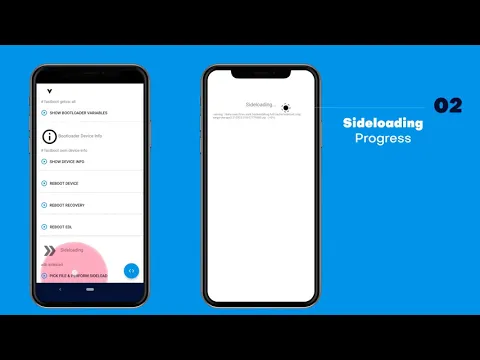
Also known as: Bugjaeger, Bugjaeger Mobile ADB - USB OTG
Video of Bugjaeger Mobile ADB
Screenshot Bugjaeger Mobile ADB 1
Screenshot Bugjaeger Mobile ADB 2
Screenshot Bugjaeger Mobile ADB 3
Screenshot Bugjaeger Mobile ADB 4
Screenshot Bugjaeger Mobile ADB 5
Screenshot Bugjaeger Mobile ADB 6
Screenshot Bugjaeger Mobile ADB 7
Screenshot Bugjaeger Mobile ADB 8

Download Bugjaeger Mobile ADB - USB OTG APK for Android

What's New in Version 8.0

Some important bug/crash fixes

Other versions

System Requirements

OS Version
Android 7.0 (Nougat) or higher
Architecture
Varies by file (Which one do I need?)
Disk Space
~70 MB free space required
RAM
1 GB
Internet
Not required
Google Services
Required   GMS dependent
Permissions (24)
  • Requires Google Play Services to launch:
    Note: This is an original file. Unlike modded versions with no verification, it validates via your store account. Details
  • Internet
  • Access Network State
  • Read External Storage
  • Write External Storage
  • Wake Lock

APK File Details

Package ID eu.sisik.hackendebug
Available on Google Play
Developer Roman Sisik
License Free
Monetization Contains Ads  
Content Rating Everyone
Interface Language
English +16

English, Arabic, German, Spanish, French, Hindi, Italian, Japanese, Korean, Portuguese, Russian, Thai, Turkish, Vietnamese, Chinese, + 2 localizations

APK Verification & Virus Scan Results

No Virus Signature Verified Safe & Original

Virus scan: Clean (0/65) View report. This APK is free of malware and its signature matches the official developer release.

Show File Details (SHA-256, SHA-1, MD5)

SHA-1 Signature:

6be614d14d151ee1089c35e359adace9a2125842

SHA-256 Hash:

6f49e715a889bc81d1e1abe25e3b393a771f92cd887fe3ed69426d840ae66642

MD5 Checksum:

7cd5cd83b74e7d272f7376d187d38a8c

Frequently Asked Questions

Is Bugjaeger Mobile ADB safe to download?

Yes, Bugjaeger Mobile ADB is safe to download. The APK is scanned on every update — no malware or viruses detected. You can verify the full scan report in the Security section above.

How to install XAPK file?

XAPK is a split APK package. Standard Android installer cannot open it directly. Use 'SAI' or 'XAPK Installer' — they handle XAPK files automatically. Download the installer, open the XAPK file with it, and follow the on-screen steps. Read more

What Android version does Bugjaeger Mobile ADB require?

Bugjaeger Mobile ADB requires Android 7.0 (API 24) or higher. Optimized for Android 15 (API 35).

Is Bugjaeger Mobile ADB free?

Yes, it is free to use, but it is ad-supported.

Does Bugjaeger Mobile ADB require a license check?

Yes, this app performs a license check. You may need to have the Google Play Store installed and be logged in to verify the license.

How to update Bugjaeger Mobile ADB to the latest version?

Download the latest APK from this page and install it over your existing version — no need to uninstall first. Your data and settings will be preserved. We update the file as soon as a new version is released.

Does Bugjaeger Mobile ADB require Root access?

No root is required for basic use. Bugjaeger Mobile ADB works on standard Android for CPU info, RAM, battery, sensors, and network stats. Root unlocks a small set of advanced system parameters that Android restricts by default.

If you have found any issue or are having difficulty with this page, please .

User Reviews & Ratings

Global rating(Play Store): 3.77(3.5K)
Site Rating: 4(3)
Rate this app

4.00

12345

3

Share your experience with other users.