
Gamepad Tester app cover art for Android
Gamepad Tester Icon

Gamepad Tester APK for Android

2M+
Free
Aug 13, 2025

The simple way to see if your gamepad is game-ready

Download Gamepad Tester APK 7.9.2 10MB

What is Gamepad Tester?

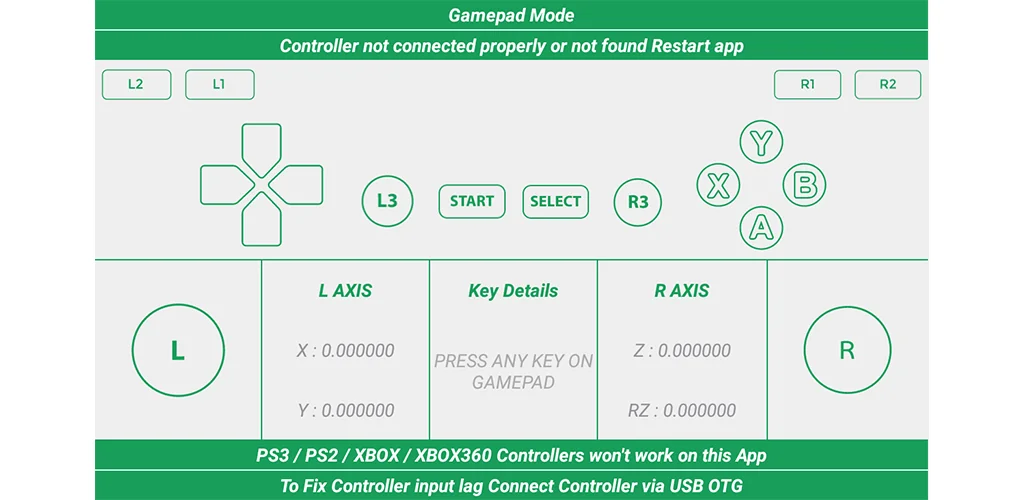
Gamepad Tester is a super handy utility that acts as a health check-up for your controller. It’s a straightforward diagnostic tool that gives you a clear picture of your gamepad’s performance in real-time. Simply connect your controller to your Android phone or tablet, and the app gives you instant visual feedback. You can see every button press, trigger pull, and analog stick movement light up on your screen. It’s the easiest way to spot a sticky button or a drifting joystick.

The app is incredibly versatile and works with the two main ways you connect controllers to an Android device: wirelessly via Bluetooth or with a cable (what’s known as a USB OTG connection). It supports a wide range of gamepads, from standard Android controllers to popular ones from Xbox and PlayStation.

Here’s what makes it a must-have tool:

  • Complete Controller Test: Checks every button, D-pad, trigger, and analog stick.
  • Real-Time Feedback: Instantly see your inputs on a graphical display.
  • Universal Compatibility: Works with both wired and wireless controllers.
  • Broad Support: Detects most popular gamepad models.
  • Simple Interface: It’s incredibly easy to use, even if you’re not a tech expert.

Don’t let a faulty controller ruin your gaming fun. Stop guessing what the problem is and get a definitive answer. Download Gamepad Tester to give your gamepad a quick test and ensure it’s in perfect shape for your next adventure!

Screenshot Gamepad Tester 1
Screenshot Gamepad Tester 2
Screenshot Gamepad Tester 3
Screenshot Gamepad Tester 4
Screenshot Gamepad Tester 5
Screenshot Gamepad Tester 6
Screenshot Gamepad Tester 7
Screenshot Gamepad Tester 8

Download Gamepad Tester APK for Android

What's New in Version 7.9.2

Introduced a refreshed and modernized user interface
Resolved issues in Universal Mode
Enhanced the Vibrate Tester for improved accuracy and reliability
Overall performance optimizations and stability improvements

Available Files

System Requirements

OS Version
Android 6.0 (Marshmallow) or higher
Architecture
Varies by file (Which one do I need?)
Disk Space
~20 MB free space required
RAM
1 GB
Internet
Not required
Google Services
Required   GMS dependent
Permissions (12)
  • Requires Google Play Services to launch:
    Note: This is an original file. Unlike modded versions with no verification, it validates via your store account. Details
  • Internet
  • Access Network State
  • Vibrate
  • Wake Lock
  • In-app billing

APK File Details

Package ID com.chimera.saturday.evogamepadtester
Available on Google Play
Developer selva sundar
License Free
Monetization Contains Ads   In-App Purchases
Content Rating Everyone
Interface Language
English +0

English

APK Verification & Virus Scan Results

No Virus Signature Verified Safe & Original

Virus scan: Clean (0/65) View report. This APK is free of malware and its signature matches the official developer release.

Show File Details (SHA-256, SHA-1, MD5)

SHA-1 Signature:

e2a2139feffe6fe4d0e1fc272679c1b4428c178a

SHA-256 Hash:

4c9399a6fbe3520a537f79b082f7670c47d874a13ec30d665a1caddb1b0b2f14

MD5 Checksum:

db6508cb7ff2862d3e9fe0e2791666ae

Frequently Asked Questions

Is Gamepad Tester safe to download?

Yes, Gamepad Tester is safe to download. The APK is scanned on every update — no malware or viruses detected. You can verify the full scan report in the Security section above.

How to install XAPK file?

XAPK is a split APK package. Standard Android installer cannot open it directly. Use 'SAI' or 'XAPK Installer' — they handle XAPK files automatically. Download the installer, open the XAPK file with it, and follow the on-screen steps. Read more

What Android version does Gamepad Tester require?

Gamepad Tester requires Android 6.0 (API 23) or higher. Optimized for Android 16 (API 36).

Is Gamepad Tester free?

Yes, it is free to download and use, but it contains ads and offers in-app purchases.

Does Gamepad Tester require a license check?

Yes, this app performs a license check. You may need to have the Google Play Store installed and be logged in to verify the license.

How to update Gamepad Tester to the latest version?

Download the latest APK from this page and install it over your existing version — no need to uninstall first. Your data and settings will be preserved. We update the file as soon as a new version is released.

Does Gamepad Tester require Root access?

No root is required for basic use. Gamepad Tester works on standard Android for CPU info, RAM, battery, sensors, and network stats. Root unlocks a small set of advanced system parameters that Android restricts by default.

If you have found any issue or are having difficulty with this page, please .

User Reviews & Ratings

Global rating(Play Store): 3.24(3K)
Site Rating: 4(1)
Rate this app

4.00

12345

1

Share your experience with other users.