T-Cast Icon

T-Cast APK for Android

- Android Roku TV Remote
TCL Group Original
11M+
Free
May 11, 2025

Remote control of TCL TVs from a mobile device

Download T-Cast APK 10.1.2460 78MB Old versions

What is T-Cast?

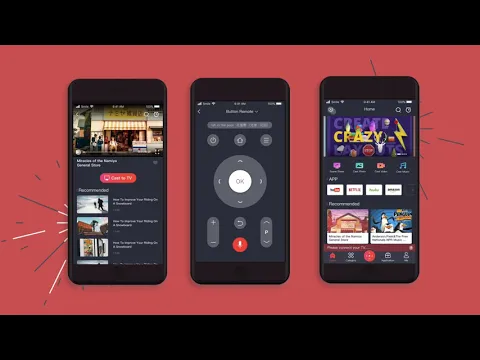
MagiConnect – transformation of a smartphone or tablet into a universal remote control for TCL TVs. To organize a bundle, both connected devices must be in the same Wi-Fi network, and the T-Cast proprietary software must be present on the TV receiver (in most models this is a pre-installed option).

After installation and pairing, the program completely replaces the physical remote control, allowing you to comfortably and without delay navigate through the menu, change channels, adjust the sound, launch applications on smart TV with one touch, and so on. The utility is good in itself, and in the event of a loss or breakdown of the original remote control, it will become a true salvation for users.

Features:

  • control TCL Smart TV from phone or tablet screen via Wi-Fi network;
  • is a great alternative and replacement for the standard remote control;
  • range of supported models from the manufacturer;
  • broadcast content from the smartphone display to the TV screen;
  • intuitively organized pairing script.

In addition to the key one, the additional functionality of the MagiConnect assistant is no less interesting – send a picture and content from a mobile gadget (pictures, videos, GIF, audio, and so on) to the TV screen.
Also known as: MagiConnect, T-Cast Android Roku TV Remote
Video of T-Cast
Screenshot T-Cast 1
Screenshot T-Cast 2
Screenshot T-Cast 3
Screenshot T-Cast 4
Screenshot T-Cast 5
Screenshot T-Cast 6

Download T-Cast Android Roku TV Remote APK for Android

What's New in Version 10.1.2460

Bug fixed and made adjustments to comply with AdMob Policy

Other versions

System Requirements

OS Version
Android 5.0 (Lollipop) or higher
Architecture
Varies by file (Which one do I need?)
Disk Space
~150 MB free space required
RAM
1 GB
Internet
Not required
Permissions (57)
  • Internet
  • Record Audio
  • Camera
  • Access Network State
  • Read External Storage

APK File Details

Package ID com.tnscreen.main
Available on Google Play
Developer TCL Group
License Free
Monetization Contains Ads   In-App Purchases
Content Rating Everyone
Interface Language
English +78

English, Chinese, Japanese, German, Bulgarian, Thai, Hindi, Vietnamese, Ukrainian, Polish, Korean, Romanian, Arabic, French, Turkish, Czech, Spanish, Italian, Portuguese, Hungarian, Russian, + 58 localizations

APK Verification & Virus Scan Results

1 Detections (Low Risk) Signature Verified Check required

Virus scan: 1/56 Potential Detections View report. False positives may occur, but this APK matches the official developer signature and is safe to install.

Show File Details (SHA-256, SHA-1, MD5)

SHA-1 Signature:

B5DB6EBB6B15245F0DEABB313456444AD73C9E12

SHA-256 Hash:

cfa6fe18bb4fbdb32653bd5c4c34aeac87f782c326c8e68f5025cea634acee65

MD5 Checksum:

c661d206088cf27eaf05474e78353c14

Frequently Asked Questions

Is T-Cast safe to download?

A small number of antivirus engines flagged T-Cast. This may be a false positive, but we recommend reviewing the full scan report in the Security section above before downloading. Download at your own risk.

How to install T-Cast APK on Android?

Download the APK using the button above. Then open the file and tap Install. If prompted, enable "Install from unknown sources" in Settings → Security. The process takes under a minute. Read more

Why does installation fail on newer Android versions (14 - 16)?

Newer Android versions strictly block the installation of apps built for older Android versions (API < 23) for security reasons. Standard installation is not possible. Read our step-by-step guide on how to bypass this restriction using ADB or Shizuku.

What Android version does T-Cast require?

T-Cast requires Android 5.0 (API 21) or higher. Optimized for Android 12 (API 31).

Is T-Cast free?

Yes, it is free to download and use, but it contains ads and offers in-app purchases.

How to update T-Cast to the latest version?

Download the latest APK from this page and install it over your existing version — no need to uninstall first. Your data and settings will be preserved. We update the file as soon as a new version is released.

Does T-Cast require Root access?

No root is required for basic use. T-Cast works on standard Android for CPU info, RAM, battery, sensors, and network stats. Root unlocks a small set of advanced system parameters that Android restricts by default.

If you have found any issue or are having difficulty with this page, please .

User Reviews & Ratings

Global rating(Play Store): 3.85(48.9K)
Site Rating: 4.8(5)
Rate this app

4.80

12345

5

Share your experience with other users.