Tape Measure: Measuring Ruler app cover art for Android
Tape Measure: Measuring Ruler Icon

Tape Measure: Measuring Ruler APK for Android

Also known as: Prime Ruler
39M+
Free
Nov 14, 2026

Measure anything three ways: AR scan, photo reference, or on-screen ruler

Download Tape Measure: Measuring Ruler APK 6.5.4 50MB

What is Tape Measure: Measuring Ruler?

Most measuring apps give you a single camera-based trick and call it done. This one gives you three ways to measure the same object, and lets you pick whichever actually fits the situation. Tape Measure: Measuring Ruler is an AR measuring tool that turns a phone camera into a tape measure, a reference-photo calculator, and a physical ruler all at once.

Point the camera at a floor or a wall and it hunts for a flat surface using ARCore. Once it locks on, you tap to drop points and it reads out the distance, angle, or area between them. Got something too small or too awkward for that? Snap a photo next to a credit card or a coin instead, and the app sizes the object up using that reference. Or skip the camera math entirely and lay a small item straight on your screen, using it like an actual mm ruler with the markers lined up by hand.

The highlights:

  • Scans a detected plane and measures linear distances, angles, and height straight off it.
  • Calculates area and perimeter of a room or surface without a physical tape measure.
  • Works out volume for boxy 3D objects by scanning their edges.
  • Traces a path across a floor and totals up the length.
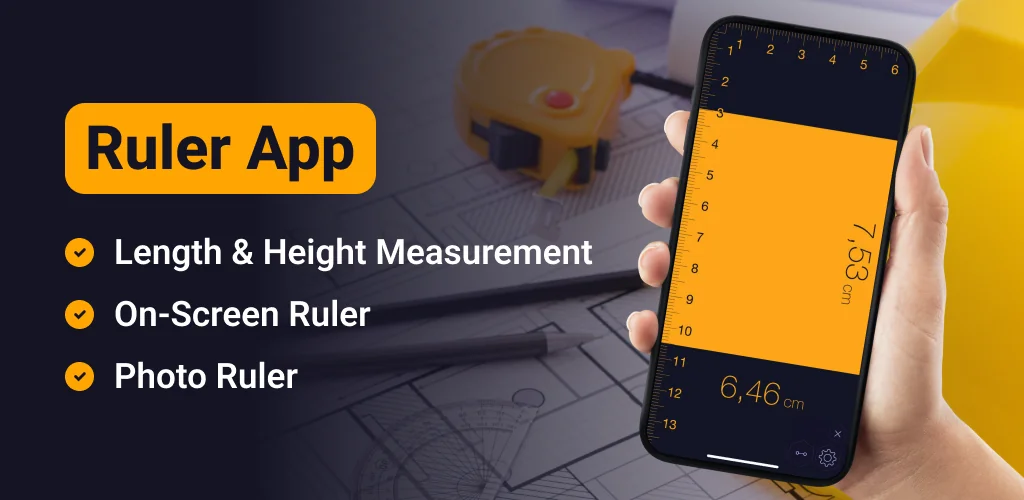
  • Doubles as a screen ruler for small objects, calibrated against a coin or card.

how to measure a room with phone camera

Line mode handles basic lengths, and Distance meter gives you a live readout from the camera to a fixed point, which is handy when you can't get close to what you're measuring. Angle mode reads corners on the same 3D plane, useful for checking whether a wall is actually square. Path mode adds up a route across the floor instead of a single straight line, which comes in useful for mapping out borders or trim. Photo-based measuring works a bit differently: line the blue arrows up against your reference card, the green ones against the object, and the app does the proportional math for you. Accuracy there depends almost entirely on keeping the camera parallel to both objects, so a crooked shot throws the result off.

AR tape measure apps

Google Measure sticks to AR-based surface and distance readings through Google's own ARCore platform, with nothing beyond that. CamToPlan leans into floor plans, built specifically for mapping horizontal and vertical distances in a space. Tape Measure: Measuring Ruler sits apart because it doesn't stop at AR: it adds photo-based reference measuring and an on-screen ruler for the small stuff AR can't handle well.

This suits anyone sizing up furniture before a move, checking if a shelf fits a gap, or sketching rough room dimensions without digging out a real tape measure. It won't work at all on phones lacking ARCore support, and the in-app purchases mean some of the measuring modes sit behind a paywall.

Tape Measure: Measuring Ruler screenshot 1
Tape Measure: Measuring Ruler screenshot 2
Tape Measure: Measuring Ruler screenshot 3
Tape Measure: Measuring Ruler screenshot 4
Tape Measure: Measuring Ruler screenshot 5
Tape Measure: Measuring Ruler screenshot 6
Tape Measure: Measuring Ruler screenshot 7
Tape Measure: Measuring Ruler screenshot 8

Tape Measure: Measuring Ruler APK Download

What's New in Version 6.5.4

No official changelog provided for Tape Measure: Measuring Ruler version 6.5.4. This update likely includes general stability improvements and bug fixes.

Download Links:

System Requirements

OS Version
Android 12L (Snow Cone) or higher
Architecture
Varies by file (Which one do I need?)
Disk Space
~70 MB free space required
RAM
1 GB
Internet
Not required
Google Services
Required

APK File Details

Package ID com.grymala.photoruler
Available on Google Play
Developer Grymala apps
License Free
Monetization Contains Ads   In-App Purchases
Content Rating Everyone
Interface Language
English +79

English, Arabic, Bulgarian, Czech, German, Spanish, French, Hindi, Hungarian, Indonesian, Italian, Japanese, Korean, Polish, Portuguese, Romanian, Russian, Thai, Turkish, Ukrainian, Vietnamese, Chinese, + 58 localizations

Required Permissions (15)
  • Internet
  • Camera
  • Access Network State
  • Read External Storage
  • Write External Storage

APK Verification & Virus Scan Results

No Virus Signature Verified Safe & unmodified

Virus scan: Verified safe (0/62) View report. This APK is free of malware and its signature matches the official developer release.

Show File Details (SHA-256, SHA-1, MD5)

SHA-1 Signature:

2abe7da2828cbb95df62cdab9774a87817a8f314

SHA-256 Hash:

3f20f53a0910cfb916d4e6684c5bf313c299aee533f52a76a5f70fd5db6cca0d

MD5 Checksum:

1e6c548f25c2b14e48e9ce9f8b11c3fe

Frequently Asked Questions

Is Tape Measure: Measuring Ruler safe to download?

Yes, Tape Measure: Measuring Ruler is safe to download. The APK is scanned on every update — no malware or viruses detected. You can verify the full scan report in the Security section above.

How to install XAPK file?

XAPK is a split APK package. Standard Android installer cannot open it directly. Use 'SAI' or 'XAPK Installer' — they handle XAPK files automatically. Download the installer, open the XAPK file with it, and follow the on-screen steps. Read more

What Android version does Tape Measure: Measuring Ruler require?

Tape Measure: Measuring Ruler requires Android 12L (API 32) or higher. Optimized for Android 16 (API 36).

Is Tape Measure: Measuring Ruler free?

Yes, it is free to download and use, but it contains ads and offers in-app purchases.

How to update Tape Measure: Measuring Ruler to the latest version?

Download the latest APK from this page and install it over your existing version — no need to uninstall first. Your data and settings will be preserved. We update the file as soon as a new version is released.

Does Tape Measure: Measuring Ruler require Root access?

No root is required for basic use. Tape Measure: Measuring Ruler works on standard Android for CPU info, RAM, battery, sensors, and network stats. Root unlocks a small set of advanced system parameters that Android restricts by default.

What processor architecture does Tape Measure: Measuring Ruler support?

Tape Measure: Measuring Ruler supports arm64-v8a. This build does not support x86/x86_64 processors, so it will not run on most PC emulators. If you are unsure about your device architecture, check the Device Info section on this page.

Found a problem on this page?

User Reviews & Ratings

Global rating (Play Store): 4.21★ (278.3K)
Site Rating: 5★ (1)
Rate this app

5.00

12345

1

Share your experience with other users.

Download Tape Measure: Measuring Ruler APK - Latest version

Get the official APK file for your Android device. Fast, safe, and free. Download APK