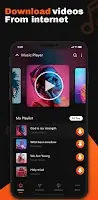
Videoder - HD Video Downloader Icon

Videoder - HD Video Downloader APK for Android

Aug 18, 2022

Capture any video, from any platform, in stunning 4K.

Download Videoder - HD Video Downloader APK 1.0.3 13MB

What is Videoder?

Finding a reliable way to grab videos from the internet can feel like a wild goose chase, but Videoder - HD Video Downloader genuinely stands out by letting you download almost any video, from nearly any popular social platform, in stunning 4K quality. I stumbled upon it looking for a simple solution, and its promise of broad compatibility immediately caught my eye.

What truly impressed me was how straightforward it makes the whole process. You open Videoder - HD Video Downloader, tap on a site, browse for your content, and a little download button appears. That’s it. No complicated steps, no confusing menus. Unlike most generic downloaders that struggle with specific sites or quality settings, this one handles everything from Instagram reels to Vimeo documentaries with surprising ease. The built-in browser is fast and responsive, making discovery a breeze. I found myself quickly saving clips I wanted to rewatch later, all at lightning speed.

Once downloaded, your videos land neatly in the integrated manager. Here, you can play them offline using the smooth media player or share them with friends. It supports everything from standard definition right up to crisp 4K, so your favorite content always looks its best. Have you ever wished you could just save that hilarious tweet video or an important WhatsApp status? Videoder - HD Video Downloader makes it happen without a fuss.

Here’s what you get:

  • Broad Platform Support: Download from Facebook, Instagram, Twitter, WhatsApp, Vimeo, Daily Motion, and more.
  • Ultimate Quality Options: Grab videos in HD, Full HD 1080p, or even crystal-clear 4K.
  • Integrated Browser & Player: Discover, download, and watch all within one convenient app.
  • Smart Download Manager: Keeps your downloaded videos organized and ready for offline viewing.
  • Fast & Free: Enjoy quick downloads without hidden costs or limitations.

If you’re tired of video content disappearing or buffering, and you want a simple, powerful tool to keep your favorite clips handy, you need to check out Videoder - HD Video Downloader. It’s a genuine lifesaver for anyone who loves to consume media on their own terms. Go grab it now and start building your offline library!
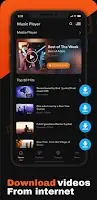
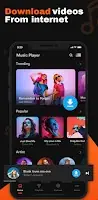
Screenshot Videoder - HD Video Downloader 1
Screenshot Videoder - HD Video Downloader 2
Screenshot Videoder - HD Video Downloader 3
Screenshot Videoder - HD Video Downloader 4

Videoder APK Download

What's New in Version 1.0.3

No official changelog provided for Videoder - HD Video Downloader version 1.0.3. This update likely includes general stability improvements and bug fixes.
  • 1.0.3 13MB Android 5.0+ arm64-v8aarmeabi-v7a Download

System Requirements

OS Version
Android 5.0 (Lollipop) or higher
Architecture
Varies by file (Which one do I need?)
Disk Space
~20 MB free space required
RAM
1 GB
Internet
Not required

APK File Details

Package ID videodownloader.arbisoftapps.xtubedownloader
Developer Arbisoft Apps
License Free ( No Ads)
Interface Language
English +74

English, Japanese, German, Bulgarian, Thai, Hindi, Vietnamese, Ukrainian, Polish, Korean, Romanian, Arabic, French, Turkish, Czech, Spanish, Italian, Hungarian, Russian, Chinese, Portuguese, + 54 localizations

Required Permissions (11)
  • Internet
  • Access Network State
  • Read External Storage
  • Write External Storage
  • Wake Lock

APK Verification & Virus Scan Results

No Virus Signature Verified Safe & Original

Virus scan: Clean (0/64) View report. The APK file is digitally signed.

Show File Details (SHA-256, SHA-1, MD5)

SHA-1 Signature:

cc03747938d92cc7afd8d956e3b8db8c0f5b184a

SHA-256 Hash:

bbd7b35e3c07770e6be1b906a700add90b09ab5f0136dd3f245497ea64c4fa2c

MD5 Checksum:

82ab1334ca380c7bea9d078391c5e44f

Frequently Asked Questions

Is Videoder safe to download?

Yes, Videoder is safe to download. The APK is scanned on every update — no malware or viruses detected. You can verify the full scan report in the Security section above.

How to install Videoder APK on Android?

Download the APK using the button above. Then open the file and tap Install. If prompted, enable "Install from unknown sources" in Settings → Security. The process takes under a minute. Read more

Why does installation fail on newer Android versions (14 - 16)?

Newer Android versions strictly block the installation of apps built for older Android versions (API < 23) for security reasons. Standard installation is not possible. Read our step-by-step guide on how to bypass this restriction using ADB or Shizuku.

What Android version does Videoder require?

Videoder requires Android 5.0 (API 21) or higher. Optimized for Android 12 (API 31).

Does Videoder require Root access?

No root is required for basic use. Videoder works on standard Android for CPU info, RAM, battery, sensors, and network stats. Root unlocks a small set of advanced system parameters that Android restricts by default.

What processor architecture does Videoder support?

Videoder supports arm64-v8a, armeabi-v7a. This build does not support x86/x86_64 processors, so it will not run on most PC emulators. If you are unsure about your device architecture, check the Device Info section on this page.

How to enable installation from unknown sources on Android?

Go to Settings → Security (or Settings → Apps → Special access on Android 8+) and enable "Install unknown apps" for your browser or file manager. On Android 8 and above this setting is per-app, not global. Read more

If you have found any issue or are having difficulty with this page, please .

User Reviews & Ratings

Site Rating: 5(1)
Rate this app

5.00

12345

1

Share your experience with other users.

Ready to use Videoder?

Join millions of users. Download the latest version of Videoder today. Download APK