Age of War Icon

Age of War APK for Android

19M+
Free
Oct 2, 2023

2D battles at the turn of historical eras

Download Age of War APK 2023.1.8 40MB

What is Age of War?

Age of War – a two-dimensional strategy that offers the user to make an excursion into history, starting from the primitive era and ending with the distant future. And we have to deal with the most common thing for mankind – war! The standard situation is that there are two conflicting “divisions” on the display on both sides, one of which must be controlled by the gamer, after setting the complexity of the gameplay. There are four options to choose from, but we don’t advise you to be particularly distracted from the “war” even on the easiest.

After the start Age of War it remains to call on the battlefield fighters of different types, trying to make them eventually defeat computer opponents. For the use of each unit, you will need to pay a certain amount of money, but accumulating it is not a problem, so you should not worry. Unfortunately, only a single-player format is available, it remains to be hoped that the developers will “finish” their product and allow gamers to participate in multiplayer battles. Each of the conflicting sides has a fortress (or main headquarters, if you like) with a health bar – you can celebrate victory when the enemy has this bar reset.

Graphically, the strategy Age of War from the studio Max Games Studios is implemented in the original graphics, each unit looks special, in full accordance with the presented era. Musical accompaniment a la military march, which also fits perfectly into the game concept. By the way, at one time this game was available in the “flash game” format on computers, and the developers simply skillfully transferred it to the mobile Android platform. Both paid content and advertising in the new product are expectedly present, but there is no particular discomfort, according to user reviews in the comments.
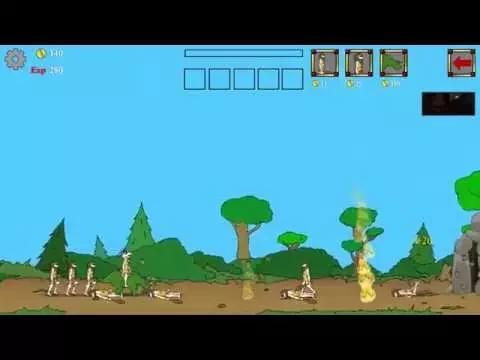
Video of Age of War
Screenshot Age of War 1
Screenshot Age of War 2
Screenshot Age of War 3
Screenshot Age of War 4
Screenshot Age of War 5
Screenshot Age of War 6

Download Age of War APK for Android

What's New in Version 2023.1.8

Bug fixes.

Available Files

System Requirements

OS Version
Android 4.4 (Kit Kat) or higher
Architecture
Varies by file (Which one do I need?)
Disk Space
~60 MB free space required
RAM
2 GB
Internet
Not required (Offline playable)
Permissions (4)
  • Internet
  • Access Network State
  • Ad Id
  • Billing

APK File Details

Package ID com.maxgames.ageofwar1
Available on Google Play
Developer Max Games Studios
License Free
Monetization Contains Ads   In-App Purchases
Age Rating Teen (Violence, Blood)
Interface Language
English +74

English, Japanese, German, Bulgarian, Thai, Hindi, Vietnamese, Ukrainian, Polish, Korean, Romanian, Arabic, French, Turkish, Czech, Spanish, Italian, Portuguese, Hungarian, Russian, Chinese, + 54 localizations

APK Verification & Virus Scan Results

No Virus Signature Verified Safe & Original

Virus scan: Clean (0/60) View report. This APK is free of malware and its signature matches the official developer release.

Show File Details (SHA-256, SHA-1, MD5)

SHA-1 Signature:

e51669301f3f5d4925623f8c417f895231cff8f5

SHA-256 Hash:

f742dc0da0130e811eb5ef4f5b623517ef3bb0d823e60320cf0a1c87101c29d4

MD5 Checksum:

7eaebcb884196fdf439d131156f9d9f0

Frequently Asked Questions

Is Age of War safe to download?

Yes, Age of War is safe to download. The APK is scanned on every update — no malware or viruses detected. You can verify the full scan report in the Security section above.

How to install Age of War APK on Android?

Download the APK using the button above. Then open the file and tap Install. If prompted, enable "Install from unknown sources" in Settings → Security. The process takes under a minute. Read more

What Android version does Age of War require?

Age of War requires Android 4.4 (API 19) or higher. Optimized for Android 13 (API 33).

Is Age of War free?

Yes, it is free to download and use, but it contains ads and offers in-app purchases.

How to update Age of War to the latest version?

Download the latest APK from this page and install it over your existing version — no need to uninstall first. Your data and settings will be preserved. We update the file as soon as a new version is released.

What processor architecture does Age of War support?

Age of War supports armeabi-v7a. This build does not support x86/x86_64 processors, so it will not run on most PC emulators. If you are unsure about your device architecture, check the Device Info section on this page.

How to enable installation from unknown sources on Android?

Go to Settings → Security (or Settings → Apps → Special access on Android 8+) and enable "Install unknown apps" for your browser or file manager. On Android 8 and above this setting is per-app, not global. Read more

If you have found any issue or are having difficulty with this page, please .

User Reviews & Ratings

Global rating(Play Store): 4.38(260K)
Rate this app

0.00

12345

not yet rated

Share your experience with other users.