Arrow game cover art for Android
Arrow Icon

Arrow APK for Android

- Now with 1200 levels
9M+
Free
Mar 7, 2024

Casual arcade game that tests precision and eye

Download Arrow APK 3.5.5 58MB

What is Arrow?

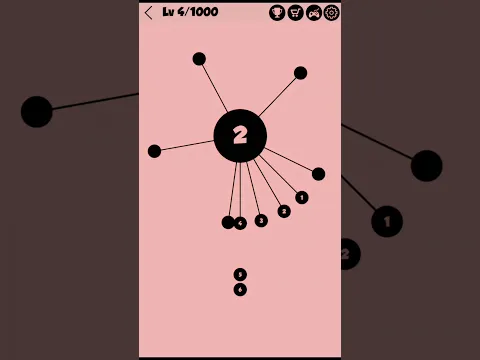
Arrow is a simple mechanics and concisely designed arcade game that captivates and involuntarily forces the player to improve and aim for new records. Imagine a needle bed that you are invited to stick with pins, while the objects should not touch each other. You will have to do something similar when passing the levels of this timekiller.

In theory, the goal seems simple, but the problem lies in the constant rotation of the central element – the rotation is uneven, the pace either speeds up or slows down. You will have to adapt to constantly changing conditions and choose the right moment to tap on the screen and send the pin to the target. The number of objects that should end up in the central circle is reported to the user by the corresponding numerical designation. This helps to choose competent tactics in order to flawlessly and accurately complete the task.

Features:

  • minimalistic design and unobtrusive background music;
  • patience and concentration for an accurate shot;
  • without limits – play at a comfortable pace;
  • one-touch timekiller;
  • share your achievements with your friends.

To stir up interest in the game, the developers have introduced a system of achievements, for which medals are issued. Also, the user is invited to share their records with friends through social networks. Arrow – go through a thousand levels of an unpretentious but exciting arcade game, training your attentiveness and eye along the way.
Also known as: Arrow - Now with 1200 levels
Video of Arrow
Screenshot Arrow 1
Screenshot Arrow 2
Screenshot Arrow 3
Screenshot Arrow 4
Screenshot Arrow 5
Screenshot Arrow 6
Screenshot Arrow 7
Screenshot Arrow 8

Download Arrow - Now with 1200 levels APK for Android

What's New in Version 3.5.5

"What's New

BUG fixed

Thank you for being with us!
We continuously refine the experience to bring you something better.
Make sure to update to the latest version and enjoy!"

Available Files

System Requirements

OS Version
Android 6.0 (Marshmallow) or higher
Architecture
Varies by file (Which one do I need?)
Disk Space
~90 MB free space required
RAM
2 GB
Internet
Not required (Offline playable)
Permissions (17)
  • Internet
  • Access Network State
  • Read External Storage
  • Write External Storage
  • Wake Lock

APK File Details

Package ID com.codef.arrow
Available on Google Play
Developer PuLu Network
License Free
Monetization Contains Ads   In-App Purchases
Age Rating Everyone
Interface Language
English +76

English, Japanese, Indonesian, German, Bulgarian, Thai, Chinese, Hindi, Vietnamese, Ukrainian, Polish, Korean, Romanian, Arabic, French, Turkish, Czech, Spanish, Italian, Portuguese, Hungarian, Russian, + 55 localizations

APK Verification & Virus Scan Results

No Virus Signature Verified Safe & Original

Virus scan: Clean (0/63) View report. This APK is free of malware and its signature matches the official developer release.

Show File Details (SHA-256, SHA-1, MD5)

SHA-1 Signature:

bec18a6cfa686727d08040444ff10babb3b466bb

SHA-256 Hash:

5ee0a7e8618e0d506de3c97dfcf23eefe3ade4c2c38c098499523fa1c6ab1a11

MD5 Checksum:

c0ab36da712d75d7e92920151b8fe512

Frequently Asked Questions

Is Arrow safe to download?

Yes, Arrow is safe to download. The APK is scanned on every update — no malware or viruses detected. You can verify the full scan report in the Security section above.

How to install Arrow APK on Android?

Download the APK using the button above. Then open the file and tap Install. If prompted, enable "Install from unknown sources" in Settings → Security. The process takes under a minute. Read more

What Android version does Arrow require?

Arrow requires Android 6.0 (API 23) or higher. Optimized for Android 13 (API 33).

Is Arrow free?

Yes, it is free to download and use, but it contains ads and offers in-app purchases.

How to update Arrow to the latest version?

Download the latest APK from this page and install it over your existing version — no need to uninstall first. Your data and settings will be preserved. We update the file as soon as a new version is released.

What processor architecture does Arrow support?

Arrow supports arm64-v8a, armeabi-v7a. This build does not support x86/x86_64 processors, so it will not run on most PC emulators. If you are unsure about your device architecture, check the Device Info section on this page.

How to enable installation from unknown sources on Android?

Go to Settings → Security (or Settings → Apps → Special access on Android 8+) and enable "Install unknown apps" for your browser or file manager. On Android 8 and above this setting is per-app, not global. Read more

If you have found any issue or are having difficulty with this page, please .

User Reviews & Ratings

Global rating(Play Store): 4.25(52.7K)
Rate this app

0.00

12345

not yet rated

Share your experience with other users.