Cubeology Icon

Cubeology APK for Android

200K+
Free
Jul 18, 2026

An original interpretation of the classic Mahjong puzzle

Download Cubeology APK 3.2.2 44MB Old versions

What is Cubeology?

Cubeology – disassemble the cubic structure, finding pairs of fragments with the same pattern. Improving logical and spatial thinking, visual memory and fine motor skills – a game, in addition to entertainment functionality, has a powerful developmental potential. Use the zoom and position function to view the 3D design from different angles.

Play at a comfortable pace in classic mode or try to set a level speed record to compete in agility and speed with other users of the global ranking. Improve your memory in the “Image Search” mode, where initially the images are hidden and open only after tapping on the elements. In total, the puzzle has six exciting challenges that have the same goal, but offer the gamer to do it in different ways.

Peculiarities:

  • clear rules and friendly interface;
  • colorful graphics and comfortable navigation;
  • variety of game modes;
  • a set of boosters and bonuses;
  • global ranking.

Collect artifacts that add bonus points to the total score. Perform combinations at a fast pace, finding three or more identical pairs of fragments. Cubeology is a new take on the classic Mahjong puzzle game that will delight the user with a colorful design and intuitive controls.
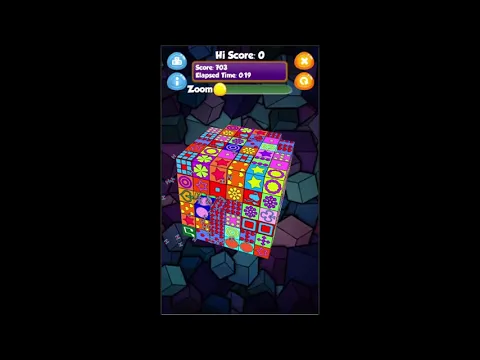
Video of Cubeology
Screenshot Cubeology 1
Screenshot Cubeology 2
Screenshot Cubeology 3
Screenshot Cubeology 4

Download Cubeology APK for Android

What's New in Version 3.2.2

Bug fixes

Other versions

System Requirements

OS Version
Android 6.0 (Marshmallow) or higher
Architecture
Varies by file (Which one do I need?)
Disk Space
~60 MB free space required
RAM
2 GB
Internet
Not required (Offline playable)
Google Services
Required
Permissions (10)
  • Internet
  • Access Network State
  • Wake Lock
  • Android.gms.permission.ad Id
  • Access Adservices Ad Id

APK File Details

Package ID com.doofah.cubeology
Available on Google Play
Developer Doofah Software
License Free
Monetization Contains Ads   In-App Purchases
Age Rating Everyone
Interface Language
English +73

English, Arabic, Bulgarian, Czech, German, Spanish, French, Hindi, Hungarian, Italian, Japanese, Korean, Polish, Portuguese, Romanian, Russian, Thai, Turkish, Ukrainian, Vietnamese, Chinese, + 53 localizations

APK Verification & Virus Scan Results

No Virus Signature Verified Safe & Original

Virus scan: Clean (0/65) View report. This APK is free of malware and its signature matches the official developer release.

Show File Details (SHA-256, SHA-1, MD5)

SHA-1 Signature:

5e8c3f679e6dd725855c0e82ccfa2e8e8b1bdef5

SHA-256 Hash:

0dfe97439b866661946abae3819a30ac798a36578952435ce865d0e752b24f34

MD5 Checksum:

1ffd91f590055d3597e58518ee340ffb

Frequently Asked Questions

Is Cubeology safe to download?

Yes, Cubeology is safe to download. The APK is scanned on every update — no malware or viruses detected. You can verify the full scan report in the Security section above.

How to install XAPK file?

XAPK is a split APK package. Standard Android installer cannot open it directly. Use 'SAI' or 'XAPK Installer' — they handle XAPK files automatically. Download the installer, open the XAPK file with it, and follow the on-screen steps. Read more

What Android version does Cubeology require?

Cubeology requires Android 6.0 (API 23) or higher. Optimized for Android 16 (API 36).

Is Cubeology free?

Yes, it is free to download and use, but it contains ads and offers in-app purchases.

How to update Cubeology to the latest version?

Download the latest APK from this page and install it over your existing version — no need to uninstall first. Your data and settings will be preserved. We update the file as soon as a new version is released.

What processor architecture does Cubeology support?

Cubeology supports arm64-v8a. This build does not support x86/x86_64 processors, so it will not run on most PC emulators. If you are unsure about your device architecture, check the Device Info section on this page.

How to enable installation from unknown sources on Android?

Go to Settings → Security (or Settings → Apps → Special access on Android 8+) and enable "Install unknown apps" for your browser or file manager. On Android 8 and above this setting is per-app, not global. Read more

If you have found any issue or are having difficulty with this page, please .

User Reviews & Ratings

Global rating(Play Store): 4.15(1.2K)
Rate this app

0.00

12345

not yet rated

Share your experience with other users.