Draw Story 3D Icon

Draw Story 3D APK for Android

4M+
Free
Aug 22, 2020

Draw your own story and watch the fun story unfold

Download Draw Story 3D APK 0.2.0 95MB

What is Draw Story 3D?

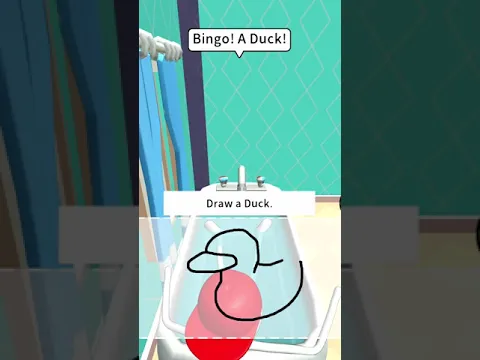
Draw Story 3D is a fun arcade puzzle game that tests the user’s drawing skills and ingenuity. Logic in tandem with creativity promises a powerful positive charge, and at the same time forces the user to connect the imagination – invent and reproduce amazing images with one touch that will help you complete the levels.

The main character Stickman is generally a cheerful and carefree guy, but a positive attitude does not negate the duties of cleaning and ordering the room. Help the main character to do household chores, but not directly, but by creating appropriate items and tools for him. Along the way, you will have to practice minor repairs, for example, picking up a broken vase piece by piece, connecting water pipes in the correct sequence, and so on.

Features:

  • a series of tests of dexterity, logic, ingenuity and fine motor skills of hands;
  • solving game problems through the creation of artistic images;
  • take full control of the life and life of Stickman;
  • comfortable control with one finger.

About the goals and objectives Draw Story 3D gamers are hinted at by text messages that regularly appear above the head of the protagonist – it remains to decipher and understand them correctly in order to start creating the next interactive object. Don’t worry if something doesn’t work the first time, bad strokes are removed with a single touch by a virtual eraser, providing another chance to showcase your artistic talents.
Also known as: Draw Story 3D!
Video of Draw Story 3D
Screenshot Draw Story 3D 1
Screenshot Draw Story 3D 2
Screenshot Draw Story 3D 3
Screenshot Draw Story 3D 4
Screenshot Draw Story 3D 5
Screenshot Draw Story 3D 6
Screenshot Draw Story 3D 7
Screenshot Draw Story 3D 8

Download Draw Story 3D APK for Android

What's New in Version 0.2.0

- Bug fixes

Available Files

  • 0.2.0 95MB Android 4.4+ arm64-v8a Download

System Requirements

OS Version
Android 4.4 (Kit Kat) or higher
Architecture
Varies by file (Which one do I need?)
Disk Space
~150 MB free space required
RAM
2 GB
Internet
Not required (Offline playable)
Permissions (10)
  • Internet
  • Access Network State
  • Write External Storage
  • Access Coarse Location
  • Vibrate

APK File Details

Package ID com.game.jam.draw.story.it.best.color
Developer Gamejam
License Free
Monetization Contains Ads  
Interface Language
English +75

English, Japanese, Indonesian, German, Bulgarian, Thai, Hindi, Vietnamese, Ukrainian, Polish, Korean, Romanian, Arabic, French, Turkish, Czech, Spanish, Italian, Portuguese, Hungarian, Russian, Chinese, + 54 localizations

APK Verification & Virus Scan Results

Scan In Queue Signature Verified Removed from Play Store

Antivirus scan in queue, will be scanned soon. The APK file is digitally signed.

Show File Details (SHA-256, SHA-1, MD5)

SHA-1 Signature:

91fda6d3b89f2b807c23b84baba552c6570c18f9

SHA-256 Hash:

43984f404a8b83ad22d400d774141e2430ae4b899135a506b01de459829a50da

MD5 Checksum:

f73202a6e2e12d8e638ba26f5d7764b7

Frequently Asked Questions

Is Draw Story 3D safe to download?

Draw Story 3D has passed a basic integrity check. A full antivirus scan is pending. You can check the current scan status in the Security section above.

How to install Draw Story 3D APK on Android?

Download the APK using the button above. Then open the file and tap Install. If prompted, enable "Install from unknown sources" in Settings → Security. The process takes under a minute. Read more

Why does installation fail on newer Android versions (14 - 16)?

Newer Android versions strictly block the installation of apps built for older Android versions (API < 23) for security reasons. Standard installation is not possible. Read our step-by-step guide on how to bypass this restriction using ADB or Shizuku.

What Android version does Draw Story 3D require?

Draw Story 3D requires Android 4.4 (API 19) or higher. Optimized for Android 9.0 (API 28).

Is Draw Story 3D free?

Yes, it is free to use, but it is ad-supported.

What processor architecture does Draw Story 3D support?

Draw Story 3D supports arm64-v8a. This build does not support x86/x86_64 processors, so it will not run on most PC emulators. If you are unsure about your device architecture, check the Device Info section on this page.

How to enable installation from unknown sources on Android?

Go to Settings → Security (or Settings → Apps → Special access on Android 8+) and enable "Install unknown apps" for your browser or file manager. On Android 8 and above this setting is per-app, not global. Read more

If you have found any issue or are having difficulty with this page, please .

User Reviews & Ratings

Global rating(Play Store): 3.8(5.4K)
Rate this app

0.00

12345

not yet rated

Share your experience with other users.