Oculux Icon

Oculux APK for Android

91K+
Free
Nov 7, 2023

A zen puzzle game with a beautifully immersive atmosphere to sharpen your mind.

Download Oculux APK 1.4.0 11MB

What is Oculux?

Oculux – соберите все алмазы на игровом поле за оптимальное количество ходов, чтобы заработать за уровень золотую звезду. Эта головоломка улучшает пространственное мышление и учит планированию, заставляя пользователя постоянно проявлять мозговую активность. Оформление привлекает минимализмом, а медиативная композиция способствует плавному погружению в мыслительные процессы.

Управлять геймеру предстоит миниатюрным шаром, который по первому требованию перемещается в любую точку игрового пространства. Остановить сферу способны только блоки, которые и помогают добиваться заданных целей. Уровень завершится только после того, как будут собраны все кристаллы. Оптимальное количество ходов указано вверху экрана, стоит стараться в них укладываться, но это вовсе необязательно.

Особенности:

  • интуитивное и комфортное управление свайпами;
  • лаконичный дизайн в графическом оформлении;
  • подсказки и отмена последнего хода;
  • фоновая релаксирующая музыка.

В случае возникновения проблем предусмотрено обращение к подсказкам, отмена последнего действия или рестарт уровня. Попытайтесь пройти два набора Oculux по сто раундов в каждом, соберите коллекцию игровых достижений и сравните свои успехи с результатами других поклонников неторопливого интеллектуального испытания.
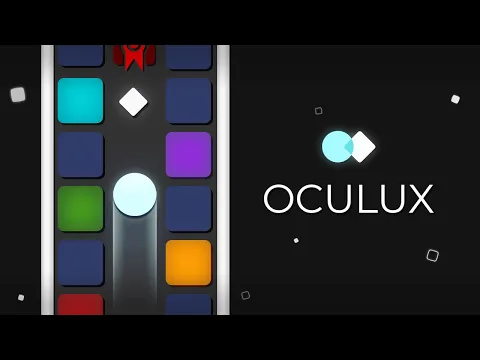
Video of Oculux
Screenshot Oculux 1
Screenshot Oculux 2
Screenshot Oculux 3
Screenshot Oculux 4
Screenshot Oculux 5
Screenshot Oculux 6
Screenshot Oculux 7
Screenshot Oculux 8

Download Oculux APK for Android

What's New in Version 1.4.0

- Updated privacy policy handling
- General fixes and improvements

Available Files

  • 1.4.0 (latest) 11MB Android 5.0+ arm64-v8aarmeabiarmeabi-v7ax86x86_64 Download

System Requirements

OS Version
Android 5.0 (Lollipop) or higher
Architecture
Varies by file (Which one do I need?)
Disk Space
~20 MB free space required
RAM
2 GB
Internet
Not required (Offline playable)
Permissions (11)
  • Internet
  • Access Network State
  • Vibrate
  • Wake Lock
  • Post Notifications

APK File Details

Package ID com.logisk.oculux
Available on Google Play
Developer Logisk Studio
License Free
Monetization Contains Ads   In-App Purchases
Age Rating Everyone
Interface Language
English +74

English, Japanese, German, Bulgarian, Thai, Hindi, Vietnamese, Ukrainian, Polish, Korean, Romanian, Arabic, French, Turkish, Czech, Spanish, Italian, Portuguese, Hungarian, Russian, Chinese, + 54 localizations

APK Verification & Virus Scan Results

No Virus Signature Verified Safe & Original

Virus scan: Clean (0/63) View report. This APK is free of malware and its signature matches the official developer release.

Show File Details (SHA-256, SHA-1, MD5)

SHA-1 Signature:

bf49c4a6d632045093bba036c243050ad9b2c93a

SHA-256 Hash:

7ebae585aaa750987f4b0f6265584c203f297a0b532b3d079d528889aea049fb

MD5 Checksum:

79e26970d43213a5342c942029d46255

Frequently Asked Questions

Is Oculux safe to download?

Yes, Oculux is safe to download. The APK is scanned on every update — no malware or viruses detected. You can verify the full scan report in the Security section above.

How to install Oculux APK on Android?

Download the APK using the button above. Then open the file and tap Install. If prompted, enable "Install from unknown sources" in Settings → Security. The process takes under a minute. Read more

What Android version does Oculux require?

Oculux requires Android 5.0 (API 21) or higher. Optimized for Android 13 (API 33).

Is Oculux free?

Yes, it is free to download and use, but it contains ads and offers in-app purchases.

How to update Oculux to the latest version?

Download the latest APK from this page and install it over your existing version — no need to uninstall first. Your data and settings will be preserved. We update the file as soon as a new version is released.

What processor architecture does Oculux support?

Oculux supports arm64-v8a, armeabi, armeabi-v7a, x86, x86_64. If you are unsure about your device architecture, check the Device Info section on this page.

How to enable installation from unknown sources on Android?

Go to Settings → Security (or Settings → Apps → Special access on Android 8+) and enable "Install unknown apps" for your browser or file manager. On Android 8 and above this setting is per-app, not global. Read more

If you have found any issue or are having difficulty with this page, please .

User Reviews & Ratings

Global rating(Play Store): 4.14(1.3K)
Rate this app

0.00

12345

not yet rated

Share your experience with other users.