Football Kicks Icon

Football Kicks APK for Android

Apr 23, 2018

Send the ball straight into the opponent's goal

Download Football Kicks APK 2.0.0 48MB

What is Football Kicks?

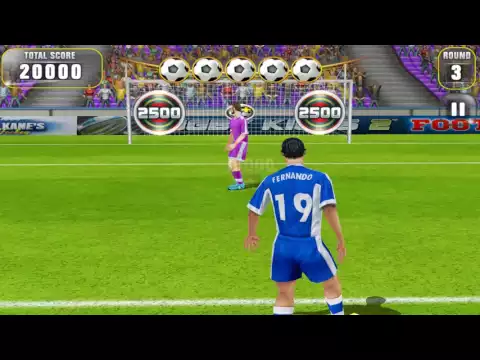
Football Kicks – a football-themed sports game, which is essentially a casual arcade game, since all the gamer has to do is practice free kicks on target, being at different distances from them. It is the simplicity of the gameplay and the one-touch control system that make these games a favorite among the user audience – no long hesitation over the command staff or position selection, a wave of the foot and the ball neatly fell into the far corner.

The only difference between our novelty is the ability to customize the appearance of an athlete – change the uniform, dress up a suit of an animal, a famous football player, and so on. The main task of Football Kicks is not only in delivering the kick itself, because you still need to manage to outwit the goalkeeper – he is not idle, but carefully monitors the situation, ready to make a lightning-fast throw in the direction of the ball’s flight. Having practiced in standard direct strikes, you should start practicing twisted feints, this can significantly increase the effectiveness.

The gameplay consists of passing almost identical levels, so it is inappropriate to talk about the high replay value of the project. Each round Football Kicks sets certain conditions for the user, for example, to meet a given number of shots, or hit the target at least a specified number of times, and so on. Gradually, the skill of the goalkeeper also increases and it is more and more difficult to cope with the task without additional bonuses. Earned points can be spent on changing the appearance of a football player or even a stadium, giving it realism, for example, by filling the stands with cheering fans.
Video of Football Kicks
Screenshot Football Kicks 1
Screenshot Football Kicks 2

Download Football Kicks APK for Android

What's New in Version 2.0.0

No official changelog provided for Football Kicks version 2.0.0. This update likely includes general stability improvements and bug fixes.

Available Files

  • 2.0.0 48MB Android 4.0+ armeabi Download

System Requirements

OS Version
Android 4.0 (Ice Cream Sandwich) or higher
Architecture
Varies by file (Which one do I need?)
Disk Space
~80 MB free space required
RAM
2 GB
Internet
Not required (Offline playable)
Permissions (10)
  • Internet
  • Access Network State
  • Read External Storage
  • Write External Storage
  • Access Coarse Location

APK File Details

Package ID com.distinctivegames.footballkicks
Developer Distinctivegames
License Free ( No Ads)

APK Verification & Virus Scan Results

No Virus Signature Verified Safe & Original

Virus scan: Clean (0/60) View report. The APK file is digitally signed.

Show File Details (SHA-256, SHA-1, MD5)

SHA-1 Signature:

8963BF284824FDC4DDE60059A53F10F6057B333D

SHA-256 Hash:

a5ca0e13e29b1a09f6a346de67136f8ae120d9adfc59a677c07b02c17d66b7a6

MD5 Checksum:

bfa5b8c4fcf05391cb0eeaaadb7cd79b

Frequently Asked Questions

Is Football Kicks safe to download?

Yes, Football Kicks is safe to download. The APK is scanned on every update — no malware or viruses detected. You can verify the full scan report in the Security section above.

How to install Football Kicks APK on Android?

Download the APK using the button above. Then open the file and tap Install. If prompted, enable "Install from unknown sources" in Settings → Security. The process takes under a minute. Read more

Why does installation fail on newer Android versions (14 - 16)?

Newer Android versions strictly block the installation of apps built for older Android versions (API < 23) for security reasons. Standard installation is not possible. Read our step-by-step guide on how to bypass this restriction using ADB or Shizuku.

What Android version does Football Kicks require?

Football Kicks requires Android 4.0 (API 14) or higher. Optimized for Android 6.0 (API 23).

What processor architecture does Football Kicks support?

Football Kicks supports armeabi. This build does not support x86/x86_64 processors, so it will not run on most PC emulators. If you are unsure about your device architecture, check the Device Info section on this page.

How to enable installation from unknown sources on Android?

Go to Settings → Security (or Settings → Apps → Special access on Android 8+) and enable "Install unknown apps" for your browser or file manager. On Android 8 and above this setting is per-app, not global. Read more

If you have found any issue or are having difficulty with this page, please .

User Reviews & Ratings

Site Rating: 4.25(8)
Rate this app

4.25

12345

8

Share your experience with other users.