OrcWar Clash RTS Icon

OrcWar Clash RTS APK for Android

930K+
Free
Jul 27, 2023

Prepare for epic battles in the orc world

Download OrcWar Clash RTS APK 1.130 111MB

What is OrcWar Clash RTS?

Start to revive and raise the greatness of your army, conquer new lands with a new strategy OrcWar Clash RTS. Having gathered your powerful army of orcs, take part in fundamental battles and intense battles. Feel the taste of victory, follow the path of epic adventures and dominate the planet of Orcs.

  • You have 15 single player missions available. Create your army and choose the types of heroes:
  • Peon – skillfully carves wood and collects gold;
  • Archer – a professional archer who will destroy all enemies with arrows;
  • Brut is the most enduring warrior, fights the longest in battle and inflicts the most powerful blows on the enemy;
  • Warrior – a master of hand-to-hand combat, repels enemy attacks manually and without weapons;
  • Gort – a very fast warrior, with the help of two guns repels enemy attacks;
  • Tank – withstands a series of powerful blows without dropping strength and health;
  • Spy – spies on everything around;
  • Mage – with the help of magic spells, kills and enchants the enemy;
  • Kaz is the most insane fighter, boldly enters the fray and crushes the enemy with incredible strength.

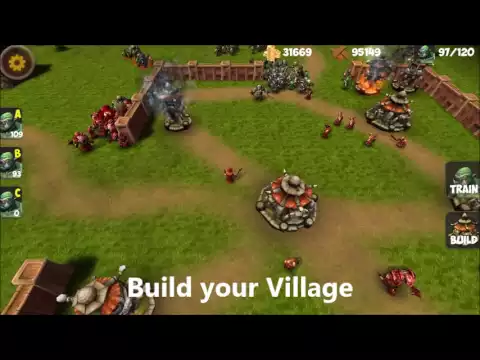
An important element of the strategy of the game is the construction of buildings and the improvement of your village. Available game heroes are able to help in the construction, improvement and defense of the village. Hute – Capable of holding up to 15 building blocks. Tower – protects your village from raids of ill-wishers. Sawmill – has the ability to open Archers and Tanks. Cauldron will open Mages.
Engage in epic battles and land conquests, build an Orc army and engage in intense PvP combat. In the game OrcWar Clash RTS you will definitely experience the taste of victory, feel your emotions and experiences and become the dominant force on the entire planet Earth.
Also known as: FishingPlanet, PES2012
Video of OrcWar Clash RTS
Screenshot OrcWar Clash RTS 1
Screenshot OrcWar Clash RTS 2
Screenshot OrcWar Clash RTS 3
Screenshot OrcWar Clash RTS 4
Screenshot OrcWar Clash RTS 5
Screenshot OrcWar Clash RTS 6

Download OrcWar Clash RTS APK for Android

What's New in Version 1.130

New UI

Available Files

  • 1.130 111MB Android 10+ arm64-v8aarmeabi-v7a Download

System Requirements

OS Version
Android 10 (Q) or higher
Architecture
Varies by file (Which one do I need?)
Disk Space
~200 MB free space required
RAM
2 GB
Internet
Not required (Offline playable)
Permissions (6)
  • Internet
  • Access Network State
  • Receive Boot Completed
  • Post Notifications
  • Ad Id

APK File Details

Package ID net.lowcostapp.orcwar
Developer ZugSoft
License Free
Monetization Contains Ads  
Interface Language
1 language

+ 1 localization

APK Verification & Virus Scan Results

No Virus Signature Verified Safe & Original

Virus scan: Clean (0/63) View report. The APK file is digitally signed.

Show File Details (SHA-256, SHA-1, MD5)

SHA-1 Signature:

bab0ef4cf8e1d80e2447e86f43d2336f285e2f6b

SHA-256 Hash:

7f61fabdd11d34afe6fe05b7711af66fe59296c3d86431bec2fc9fb259ed21b0

MD5 Checksum:

87f19ee87e36cde586873be1831c337d

Frequently Asked Questions

Is OrcWar Clash RTS safe to download?

Yes, OrcWar Clash RTS is safe to download. The APK is scanned on every update — no malware or viruses detected. You can verify the full scan report in the Security section above.

How to install OrcWar Clash RTS APK on Android?

Download the APK using the button above. Then open the file and tap Install. If prompted, enable "Install from unknown sources" in Settings → Security. The process takes under a minute. Read more

What Android version does OrcWar Clash RTS require?

OrcWar Clash RTS requires Android 10 (API 29) or higher. Optimized for Android 13 (API 33).

Is OrcWar Clash RTS free?

Yes, it is free to use, but it is ad-supported.

What processor architecture does OrcWar Clash RTS support?

OrcWar Clash RTS supports arm64-v8a, armeabi-v7a. This build does not support x86/x86_64 processors, so it will not run on most PC emulators. If you are unsure about your device architecture, check the Device Info section on this page.

How to enable installation from unknown sources on Android?

Go to Settings → Security (or Settings → Apps → Special access on Android 8+) and enable "Install unknown apps" for your browser or file manager. On Android 8 and above this setting is per-app, not global. Read more

If you have found any issue or are having difficulty with this page, please .

User Reviews & Ratings

Global rating(Play Store): 3.87(10.9K)
Rate this app

0.00

12345

not yet rated

Share your experience with other users.