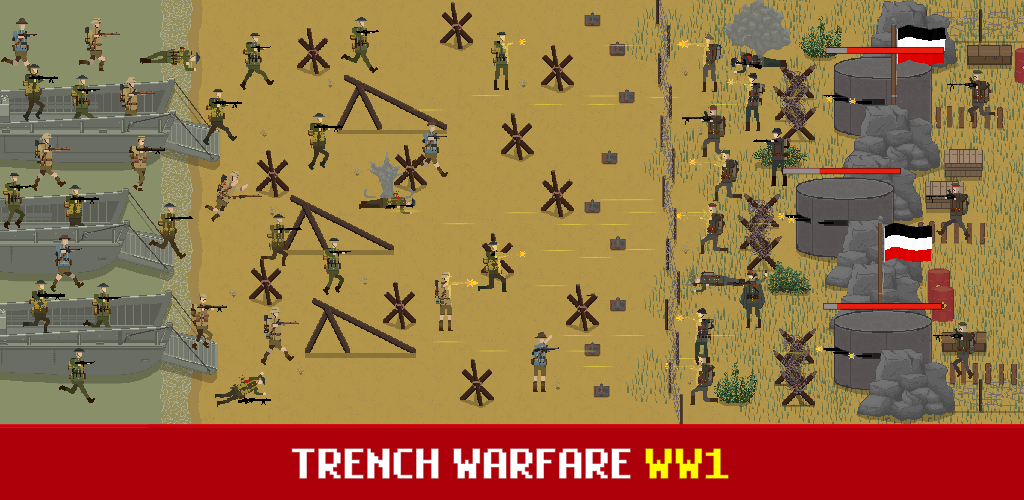
Trench Warfare WW1: RTS Battle game cover art for Android
Trench Warfare WW1: RTS Battle Icon

Trench Warfare WW1: RTS Battle APK for Android

2M+
Free
Nov 20, 2025

Command historical armies and master real-time trench warfare strategy.

Download Trench Warfare WW1: RTS Battle APK 2.5.4 218MB

What is Trench Warfare WW1: RTS Battle?

Ready to dive headfirst into the gritty, strategic world of historical warfare? Trench Warfare WW1: RTS Battle throws you right into the heart of World War I, putting you in command of your very own army. Forget passive observing; this is a real-time strategy (RTS) game where every decision counts as you battle across iconic fronts.

As a general, you’ll orchestrate your forces through intense trench warfare, deploying a mix of soldiers and powerful tanks to outmaneuver the enemy. Can you survive wave after wave of assaults and strategically use artillery strikes to turn the tide? What truly makes this military strategy game shine is the ability to relive legendary historical battles like Somme and Verdun, playing as both the Allied and Central powers. It’s an immersive way to experience the scale of total war.

But why stop at WWI? Trench Warfare WW1: RTS Battle offers an incredible sandbox war simulator that lets you create your own European conflicts. Want to pit WWI soldiers against WW2 tanks in a D-Day scenario? Go for it! You can switch between eras, equip your troops with uniforms from 1914 to 1945, and truly customize your tactical gameplay. I was genuinely impressed by the freedom this mode offers, letting you explore “what if” scenarios.

Key Features:

  • Extensive WWI Campaigns: Command your army across over 100 levels on both Eastern and Western Fronts, experiencing real-life historical battles.
  • Dynamic RTS Gameplay: Master the art of trench warfare by deploying diverse soldiers and tanks, using tactical artillery, and capturing enemy lines.
  • Historical Authenticity: Choose from various WWI nations like the British, Germans, and French, and relive iconic conflicts.
  • Sandbox War Simulator: Unleash your creativity by designing custom battles, even mixing units and eras from WWI to WW2 D-Day scenarios.
  • Unit Upgrades & Customization: Enhance your army commander skills by upgrading your soldiers and unlocking new special troops and period-accurate uniforms.

If you’re a fan of strategy games and military history, Trench Warfare WW1: RTS Battle offers a deep, engaging experience that will keep you strategizing for hours. Download it today and lead your forces to victory, proving your tactical genius on the battlefield!
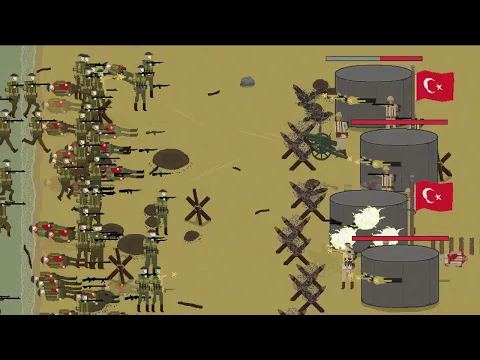
Also known as: Trench Warfare WW1: RTS Army, Trench Warfare WW1, Trench Warfare 1917 Remake
Video of Trench Warfare WW1: RTS Battle
Screenshot Trench Warfare WW1: RTS Battle 1
Screenshot Trench Warfare WW1: RTS Battle 2
Screenshot Trench Warfare WW1: RTS Battle 3
Screenshot Trench Warfare WW1: RTS Battle 4
Screenshot Trench Warfare WW1: RTS Battle 5
Screenshot Trench Warfare WW1: RTS Battle 6
Screenshot Trench Warfare WW1: RTS Battle 7
Screenshot Trench Warfare WW1: RTS Battle 8

Download Trench Warfare WW1: RTS Battle APK for Android

What's New in Version 2.5.4

- Belgium has arrived: 4 new chapters with 24 levels in total. Get ready to fight where the war started!
- New sandbox items: farm and city set
- New sandbox categories and rearrangement, trench, city, farm, train
- New tent and transport truck that can spawn units

Available Files

  • 2.5.4 (latest) 218MB Android 7.0+ arm64-v8aarmeabi-v7a Download
  • 1.1.0 110MB Android 5.1+ arm64-v8aarmeabi-v7a Download

System Requirements

OS Version
Android 7.0 (Nougat) or higher
Architecture
Varies by file (Which one do I need?)
Disk Space
~300 MB free space required
RAM
2 GB
Internet
Not required (Offline playable)
Permissions (16)
  • Internet
  • Access Network State
  • Vibrate
  • Wake Lock
  • Ad Id

APK File Details

Package ID com.SimpleBitStudios.TrenchWarfare1917Remake
Available on Google Play
Developer SimpleBit Studios
License Free
Monetization Contains Ads   In-App Purchases
Age Rating Teen (Violence, Blood)
Interface Language
English +77

English, Japanese, German, Bulgarian, Thai, Hindi, Vietnamese, Ukrainian, Polish, Korean, Romanian, Arabic, French, Turkish, Czech, Spanish, Italian, Portuguese, Hungarian, Russian, Chinese, Indonesian, + 56 localizations

APK Verification & Virus Scan Results

No Virus Signature Verified Safe & Original

Virus scan: Clean (0/66) View report. This APK is free of malware and its signature matches the official developer release.

Show File Details (SHA-256, SHA-1, MD5)

SHA-1 Signature:

6c132aec4017d36196815cbe33c16478377d7d46

SHA-256 Hash:

c82e9fbe9efd36af2d747c1c9f6d9a755265258e9e97e05b9a425fb1655b2775

MD5 Checksum:

49ea5270e9cbf5a5351e29686984fe70

Frequently Asked Questions

Is Trench Warfare WW1: RTS Battle safe to download?

Yes, Trench Warfare WW1: RTS Battle is safe to download. The APK is scanned on every update — no malware or viruses detected. You can verify the full scan report in the Security section above.

How to install XAPK file?

XAPK is a split APK package. Standard Android installer cannot open it directly. Use 'SAI' or 'XAPK Installer' — they handle XAPK files automatically. Download the installer, open the XAPK file with it, and follow the on-screen steps. Read more

What Android version does Trench Warfare WW1: RTS Battle require?

Trench Warfare WW1: RTS Battle requires Android 7.0 (API 24) or higher. Optimized for Android 15 (API 35).

Is Trench Warfare WW1: RTS Battle free?

Yes, it is free to download and use, but it contains ads and offers in-app purchases.

How to update Trench Warfare WW1: RTS Battle to the latest version?

Download the latest APK from this page and install it over your existing version — no need to uninstall first. Your data and settings will be preserved. We update the file as soon as a new version is released.

What processor architecture does Trench Warfare WW1: RTS Battle support?

Trench Warfare WW1: RTS Battle supports arm64-v8a, armeabi-v7a. This build does not support x86/x86_64 processors, so it will not run on most PC emulators. If you are unsure about your device architecture, check the Device Info section on this page.

How to enable installation from unknown sources on Android?

Go to Settings → Security (or Settings → Apps → Special access on Android 8+) and enable "Install unknown apps" for your browser or file manager. On Android 8 and above this setting is per-app, not global. Read more

If you have found any issue or are having difficulty with this page, please .

User Reviews & Ratings

Global rating(Play Store): 4.67(29.9K)
Site Rating: 5(1)
Rate this app

5.00

12345

1

Share your experience with other users.