LectorManga Icon

LectorManga APK for Android

Sep 17, 2025

Read, download, and share a universe of comics without limits

Download LectorManga APK 10.8 3MB

What is LectorManga?

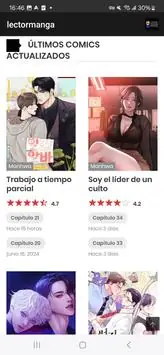
For all the manga lovers with an Android phone or tablet, I’ve found a fantastic solution that changes the game. Say hello to LectorManga, a mobile hub designed specifically for reading comics on the go.

What makes this app so special? It’s built around the idea of free and easy access. Forget about annoying subscription fees or mandatory sign-ups just to start reading. You can dive straight into a massive library of titles without any hassle. And if you’re worried about your data plan or spotty Wi-Fi, the built-in Download Manager is your new best friend. It lets you save chapters directly to your device, creating your own offline library for those moments when you’re traveling or just want to disconnect.

One of the coolest things about LectorManga is its community feel. Got a collection of manga on your device? The app lets you upload and share it with other fans, making the already huge library even more diverse and exciting. It’s a unique way to discover hidden gems and connect with other readers.

Here are the standout features:

  • Massive Free Library: Jump into thousands of manga titles across every genre imaginable without paying a dime.
  • Offline Reading: Use the download manager to save your favorite comics and read them anytime, anywhere, with no internet required.
  • Share Your Collection: A special “User Upload” feature lets you contribute your own manga files for the whole community to enjoy.
  • No Strings Attached: Read to your heart’s content with no registration or subscription required.

Ready to carry an entire universe of manga in your pocket? Download LectorManga and discover a totally free and unrestricted way to enjoy your favorite comics.

Screenshot LectorManga 1
Screenshot LectorManga 2
Screenshot LectorManga 3
Screenshot LectorManga 4

Download LectorManga APK for Android

What's New in Version 10.8

No official changelog provided for LectorManga version 10.8. This update likely includes general stability improvements and bug fixes.

Available Files

  • 10.8 3MB Android 6.0+ universal Download

System Requirements

OS Version
Android 6.0 (Marshmallow) or higher
Architecture
Varies by file (Which one do I need?)
Disk Space
~10 MB free space required
RAM
1 GB
Internet
Not required
Permissions (4)
  • Internet
  • Access Network State
  • Post Notifications
  • Dynamic Receiver Not Exported Permission

APK File Details

Package ID com.lectormanga.lectormanga
Developer Lector Manga
License Free ( No Ads)
Interface Language
English +74

English, Japanese, German, Bulgarian, Thai, Hindi, Vietnamese, Ukrainian, Polish, Korean, Romanian, Arabic, French, Turkish, Czech, Spanish, Italian, Portuguese, Hungarian, Russian, Chinese, + 54 localizations

APK Verification & Virus Scan Results

No Virus Signature Verified Safe & Original

Virus scan: Clean (0/44) View report. The APK file is digitally signed.

Show File Details (SHA-256, SHA-1, MD5)

SHA-1 Signature:

37A79A19DE51F3C18F5C0A5A510E3A1A851D24BB

SHA-256 Hash:

e98748f5f611c72048d5ec656c8c5bef36feae6bcc4784a1dde7a6c33a7959d0

MD5 Checksum:

81222993b8cc52af4bd5960960027d19

Frequently Asked Questions

Is LectorManga safe to download?

Yes, LectorManga is safe to download. The APK is scanned on every update — no malware or viruses detected. You can verify the full scan report in the Security section above.

How to install LectorManga APK on Android?

Download the APK using the button above. Then open the file and tap Install. If prompted, enable "Install from unknown sources" in Settings → Security. The process takes under a minute. Read more

What Android version does LectorManga require?

LectorManga requires Android 6.0 (API 23) or higher. Optimized for Android 14 (API 34).

What processor architecture does LectorManga support?

LectorManga supports universal. If you are unsure about your device architecture, check the Device Info section on this page.

How to enable installation from unknown sources on Android?

Go to Settings → Security (or Settings → Apps → Special access on Android 8+) and enable "Install unknown apps" for your browser or file manager. On Android 8 and above this setting is per-app, not global. Read more

If you have found any issue or are having difficulty with this page, please .

User Reviews & Ratings

Site Rating: 5(1)
Rate this app

5.00

12345

1

Share your experience with other users.