Snapfish: Prints + Photo Books Icon

Snapfish: Prints + Photo Books APK for Android

7M+
Free
Oct 5, 2024

Get 100 pics a month on us! Create Photo Gifts, Tiles, Mugs, Cards + Calendars

Download Snapfish: Prints + Photo Books APK 15.9.0 42MB

What is Snapfish: Prints + Photo Books?

Snapfish is an application with which you can free of charge:

  1. create prints – an image applied in a certain way to paper, fabric, metal, wood, ceramic or other surface;
  2. send prints for printing in order to receive them either by mail or in stores affiliated with our project.

Prints created with the Snapfish application can be used as patterns for business cards, book covers, postcards, as well as for clothes, bedding, bags, accessories, paper garlands, photo gifts, advertising booklets and other things. Prints can also be used as an advertising slogan – this is when a catchy picture is used instead of words.

Patterns are created using the graphic editor integrated in the application Snapfish , but template drawings from Snapfish, the library of which is available for free, as well as photos from the user’s photo gallery, can also be used as patterns. The graphic editor allows you to scale 40;increase, decrease) and flip print patterns.

And a little more, the collection of free prints Snapfish is updated monthly with 100 new items.

Snapfish – how does it work?

  • You choose from the collection of prints you like, or create your own;
  • Create an order: specify the size and number of copies for the selected prints, the application material, etc.;
  • Send prints for printing;
  • You receive your order by mail or in affiliated stores with our project: CVS, Walgreens, Wal-Mart.

All of your user history—prints created and ordered—are stored in Box’s cloud storage, which you can access from any other device.
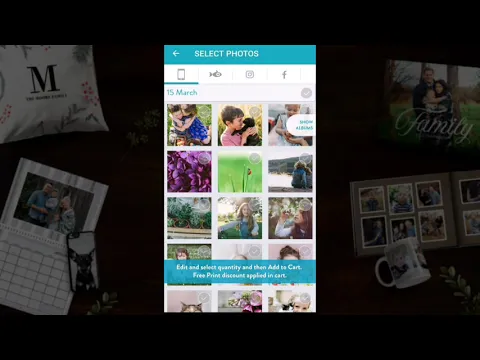
Video of Snapfish: Prints + Photo Books
Screenshot Snapfish: Prints + Photo Books 1
Screenshot Snapfish: Prints + Photo Books 2
Screenshot Snapfish: Prints + Photo Books 3
Screenshot Snapfish: Prints + Photo Books 4
Screenshot Snapfish: Prints + Photo Books 5
Screenshot Snapfish: Prints + Photo Books 6
Screenshot Snapfish: Prints + Photo Books 7
Screenshot Snapfish: Prints + Photo Books 8

Download Snapfish: Prints + Photo Books APK for Android

What's New in Version 15.9.0

- Native support for Android 13
- Stability and performance enhancements

As always, please keep the feedback coming, we love to hear from you!

Available Files

System Requirements

OS Version
Android 6.0 (Marshmallow) or higher
Architecture
Varies by file (Which one do I need?)
Disk Space
~70 MB free space required
RAM
1 GB
Internet
Not required
Permissions (37)
  • Internet
  • Camera
  • Access Network State
  • Read External Storage
  • Write External Storage

APK File Details

Package ID com.snapfish.mobile
Available on Google Play
Developer Snapfish Mobile
License Free ( No Ads)
Content Rating Everyone
Interface Language
English +79

English, German, French, Italian, Japanese, Bulgarian, Thai, Hindi, Vietnamese, Ukrainian, Polish, Korean, Romanian, Arabic, Turkish, Czech, Spanish, Hungarian, Russian, Chinese, Portuguese, Indonesian, + 58 localizations

APK Verification & Virus Scan Results

No Virus Signature Verified Safe & Original

Virus scan: Clean (0/67) View report. This APK is free of malware and its signature matches the official developer release.

Show File Details (SHA-256, SHA-1, MD5)

SHA-1 Signature:

ef232923e56a235b931b09d7c8bfe96ffaa44677

SHA-256 Hash:

49d952a43b5c1af14c0327a8b5b511f405921948a790cb07f2edc6cfe7c3a9c1

MD5 Checksum:

a66fd2244201a4fc600b17bb255a6836

Frequently Asked Questions

Is Snapfish: Prints + Photo Books safe to download?

Yes, Snapfish: Prints + Photo Books is safe to download. The APK is scanned on every update — no malware or viruses detected. You can verify the full scan report in the Security section above.

How to install Snapfish: Prints + Photo Books APK on Android?

Download the APK using the button above. Then open the file and tap Install. If prompted, enable "Install from unknown sources" in Settings → Security. The process takes under a minute. Read more

What Android version does Snapfish: Prints + Photo Books require?

Snapfish: Prints + Photo Books requires Android 6.0 (API 23) or higher. Optimized for Android 13 (API 33).

Is Snapfish: Prints + Photo Books free?

Yes, this app is completely free to download and use.

How to update Snapfish: Prints + Photo Books to the latest version?

Download the latest APK from this page and install it over your existing version — no need to uninstall first. Your data and settings will be preserved. We update the file as soon as a new version is released.

What processor architecture does Snapfish: Prints + Photo Books support?

Snapfish: Prints + Photo Books supports arm64-v8a, armeabi-v7a, x86, x86_64. If you are unsure about your device architecture, check the Device Info section on this page.

How to enable installation from unknown sources on Android?

Go to Settings → Security (or Settings → Apps → Special access on Android 8+) and enable "Install unknown apps" for your browser or file manager. On Android 8 and above this setting is per-app, not global. Read more

If you have found any issue or are having difficulty with this page, please .

User Reviews & Ratings

Global rating(Play Store): 4.6(87.2K)
Rate this app

0.00

12345

not yet rated

Share your experience with other users.