Digital Camera Filter: Cam HD app cover art for Android
Digital Camera Filter: Cam HD Icon

Digital Camera Filter: Cam HD APK for Android

24M+
Free
Aug 26, 2026

Camera and editor with real-time filters and composition grids

Download Digital Camera Filter: Cam HD APK 1.0.9 135MB

What is Digital Camera Filter: Cam HD?

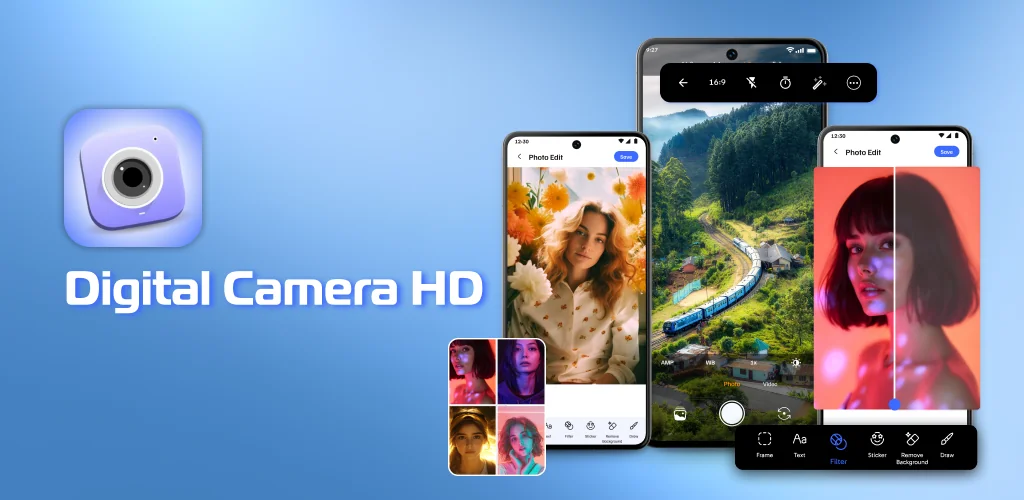
Digital Camera Filter: Cam HD is a photo editor and camera app that captures high-resolution images and applies filters or adjustments in real time. The interface integrates shooting and editing so you can tweak brightness, saturation, and contrast without leaving the camera screen.

The app captures photos and videos in high resolution, then lets you adjust them with sliders for brightness, contrast, and saturation. Filters apply as you shoot, so you see the effect before tapping the shutter. Focus and exposure controls let you tap to set a subject or balance light across the frame. A composition grid overlays the viewfinder with 3×3 or diagonal lines to help align horizons and center subjects. The collage maker combines multiple photos into one layout, with adjustable margins and borders across different grid templates.

Key Features:

  • Capture images and video in high resolution for sharp output without visible compression.
  • Apply filters in real time while framing your shot, so you preview the effect before saving.
  • Edit photos with sliders for brightness, contrast, and saturation, plus other adjustment controls.
  • Build collages by combining multiple photos into grid layouts with customizable margins.
  • Tap the screen to set focus and exposure independently, highlighting your subject or balancing light.
  • Overlay a composition grid in 3×3 or diagonal styles to align elements and balance the frame.

Photo collage layouts and editing workflow

The collage maker pulls photos from your gallery and arranges them in preset grids. You adjust spacing between frames and add borders around the entire layout. The editing tools work the same way whether you're adjusting a single shot or a finished collage, so brightness and saturation changes apply to the whole composition at once. Filters stack on top of manual adjustments, letting you combine a preset look with custom tweaks.

Alternatives to Digital Camera Filter: Cam HD

Snapseed offers selective editing that targets specific areas of a photo and non-destructive filter stacks you can reorder or remove later. Adobe Lightroom adds professional color grading and RAW file support for deeper control over tone and detail. Digital Camera Filter: Cam HD skips those advanced features for a faster workflow built around applying filters and making quick adjustments in one pass.

Digital Camera Filter: Cam HD suits casual mobile photographers who want fast enhancements without learning curves. The app lacks manual controls for shutter speed or ISO, so advanced shooters will hit its ceiling quickly. Free versions of photo utilities typically include ads between edits.

Digital Camera Filter: Cam HD screenshot 1
Digital Camera Filter: Cam HD screenshot 2
Digital Camera Filter: Cam HD screenshot 3
Digital Camera Filter: Cam HD screenshot 4
Digital Camera Filter: Cam HD screenshot 5
Digital Camera Filter: Cam HD screenshot 6

Digital Camera Filter: Cam HD APK Download

What's New in Version 1.0.9

No official changelog provided for Digital Camera Filter: Cam HD version 1.0.9. This update likely includes general stability improvements and bug fixes.

Download Links:

System Requirements

OS Version
Android 10 (Q) or higher
Architecture
Varies by file (Which one do I need?)
Disk Space
~200 MB free space required
RAM
2 GB
Internet
Not required
Google Services
Required   GMS dependent

APK File Details

Package ID com.v1.hdcamera.zoomcamera.procam
Available on Google Play
Developer Inception Technologies Global
License Free
Monetization Contains Ads  
Content Rating Everyone
Interface Language
English +75

English, Arabic, Bulgarian, Czech, German, Spanish, French, Hindi, Hungarian, Indonesian, Italian, Japanese, Korean, Polish, Portuguese, Romanian, Russian, Thai, Turkish, Ukrainian, Vietnamese, Chinese, + 54 localizations

Required Permissions (23)
  • Requires Google Play Services to launch:
    Note: This is an original file. Unlike modded versions with no verification, it validates via your store account. Details
  • Internet
  • Record Audio
  • Camera
  • Access Network State
  • Read External Storage

APK Verification & Virus Scan Results

No Virus Signature Verified Safe & unmodified

Virus scan: Verified safe (0/66) View report. This APK is free of malware and its signature matches the official developer release.

Show File Details (SHA-256, SHA-1, MD5)

SHA-1 Signature:

ce37d16d8632537460435aa238c9fde389f5a325

SHA-256 Hash:

7b5fd8e8a1d7ef646949e72bd5812dac80a43071ca77f4500e71754f4629b5d7

MD5 Checksum:

3d4dcf74f515a78b16bd214ed4041cef

Frequently Asked Questions

Is Digital Camera Filter: Cam HD safe to download?

Yes, Digital Camera Filter: Cam HD is safe to download. The APK is scanned on every update — no malware or viruses detected. You can verify the full scan report in the Security section above.

How to install XAPK file?

XAPK is a split APK package. Standard Android installer cannot open it directly. Use 'SAI' or 'XAPK Installer' — they handle XAPK files automatically. Download the installer, open the XAPK file with it, and follow the on-screen steps. Read more

What Android version does Digital Camera Filter: Cam HD require?

Digital Camera Filter: Cam HD requires Android 10 (API 29) or higher. Optimized for Android 16 (API 36).

Is Digital Camera Filter: Cam HD free?

Yes, it is free to use, but it is ad-supported.

Does Digital Camera Filter: Cam HD require a license check?

Yes, this app performs a license check. You may need to have the Google Play Store installed and be logged in to verify the license.

How to update Digital Camera Filter: Cam HD to the latest version?

Download the latest APK from this page and install it over your existing version — no need to uninstall first. Your data and settings will be preserved. We update the file as soon as a new version is released.

What processor architecture does Digital Camera Filter: Cam HD support?

Digital Camera Filter: Cam HD supports arm64-v8a. This build does not support x86/x86_64 processors, so it will not run on most PC emulators. If you are unsure about your device architecture, check the Device Info section on this page.

Found a problem on this page?

User Reviews & Ratings

Global rating (Play Store): 4.08(85K)
Site Rating: 5(1)
Rate this app

5.00

12345

1

Share your experience with other users.

Download Digital Camera Filter: Cam HD APK - Latest version

Get the official APK file for your Android device. Fast, safe, and free. Download APK