

Photo Collage Maker,Pic Editor app cover art for Android
Photo Collage Maker,Pic Editor Icon

Photo Collage Maker,Pic Editor APK for Android

Leopard V7 Original
30M+
Free
Jan 28, 2026

Effortlessly turn any photos into masterpieces for social media without watermarks.

Download Photo Collage Maker,Pic Editor APK 2.2.1 29MB

What is Photo Collage Maker,Pic Editor?

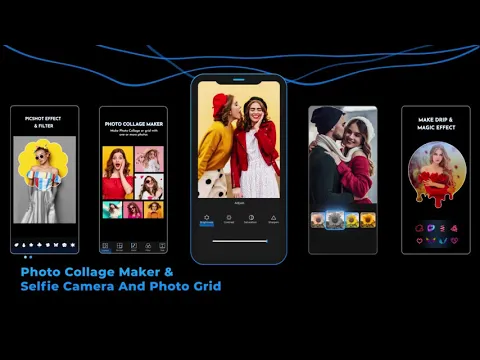
Photo Collage Maker,Pic Editor is a powerful and versatile application for professional photo editing. With it, you can create photo collages and customize images using over 1000 layouts, frames, backgrounds, templates, stickers, and fonts. After finishing, you can save the image in high quality and easily publish it to Instagram, Snapchat, WhatsApp, Facebook, TikTok, and other social networks without watermarks.

This app provides all the necessary features for editing and enhancing your shots. Convenient options allow you to remove backgrounds, work with photoshoots, add effects, and stylish filters. The collage maker will easily help you turn your photos into a true work of art!

Key Advantages:

  • Professional collage creation tool:
  • Supports up to 18 photos simultaneously for creating layouts and grids.
  • Over 200 original effects for unique photo collages.
  • Extensive database of layouts, backgrounds, frames, and filters.
  • Ability to customize collage sizes, proportions, and borders.
  • “Free Style” or “Grid” mode option.
  • Save photos in high resolution for easy publishing.

Creative Templates and Stylish Posters:

  • Around 700 thematic templates — festivals, seasons, regions, and more.
  • Easy photo replacement in templates with the ability to scale or rotate shots.
  • Create uniquely shaped photo collages: heart, diamond, and others.
  • Full text editability and filter application to create the desired atmosphere.

Professional-Level Tools:

  • Versatile cropping and resizing, rotation, or flipping of photos.
  • Fine-tuning of image parameters: brightness, contrast, shadows, sharpness, and so on.
  • Extensive selection of stickers, emojis, text options, and frames for every taste.
  • AI-powered automatic background removal in seconds.
  • Use filters and effects to transform shots into artistic masterpieces.

Photo Collage Maker,Pic Editor helps bring any creative idea to life and adapts to users’ tastes. Install the app right now and start telling your stories with photos easily and without mandatory registration.
Also known as: Photo Collage Maker, Pic Editor, Collage Maker
Video of Photo Collage Maker,Pic Editor
Screenshot Photo Collage Maker,Pic Editor 1
Screenshot Photo Collage Maker,Pic Editor 2
Screenshot Photo Collage Maker,Pic Editor 3
Screenshot Photo Collage Maker,Pic Editor 4
Screenshot Photo Collage Maker,Pic Editor 5
Screenshot Photo Collage Maker,Pic Editor 6
Screenshot Photo Collage Maker,Pic Editor 7
Screenshot Photo Collage Maker,Pic Editor 8

Download Photo Collage Maker,Pic Editor APK for Android

What's New in Version 2.2.1

V2.2.8
🎈Optimized text editing function for easier use
🌟More creative new materials available

V2.2.7
✨Creative special effects feature launched
💖Fixed several issues for improved stability

V2.2.6
👍optimized Some details, better experience

Available Files

System Requirements

OS Version
Android 6.0 (Marshmallow) or higher
Architecture
Varies by file (Which one do I need?)
Disk Space
~40 MB free space required
RAM
1 GB
Internet
Not required
Google Services
Required
Permissions (16)
  • Internet
  • Access Network State
  • Read External Storage
  • Write External Storage
  • Vibrate

APK File Details

Package ID tool.photo.collage.maker.photoeditor
Available on Google Play
Developer Leopard V7
License Free
Monetization Contains Ads   In-App Purchases
Content Rating Everyone
Interface Language
English +97

English, Arabic, Bulgarian, Czech, German, Spanish, French, Hindi, Hungarian, Indonesian, Italian, Japanese, Korean, Polish, Portuguese, Romanian, Russian, Thai, Turkish, Ukrainian, Vietnamese, Chinese, + 76 localizations

APK Verification & Virus Scan Results

No Virus Signature Verified Safe & Original

Virus scan: Clean (0/57) View report. This APK is free of malware and its signature matches the official developer release.

Show File Details (SHA-256, SHA-1, MD5)

SHA-1 Signature:

651fd0ca1b80347c4f457f8510860ffa04b59b29

SHA-256 Hash:

901823b30253f65106708bdafd7957027816001b922d8cb922c2afbc81e9af55

MD5 Checksum:

538cf95e818bba8116562e343ec8e2a2

Frequently Asked Questions

Is Photo Collage Maker,Pic Editor safe to download?

Yes, Photo Collage Maker,Pic Editor is safe to download. The APK is scanned on every update — no malware or viruses detected. You can verify the full scan report in the Security section above.

How to install XAPK file?

XAPK is a split APK package. Standard Android installer cannot open it directly. Use 'SAI' or 'XAPK Installer' — they handle XAPK files automatically. Download the installer, open the XAPK file with it, and follow the on-screen steps. Read more

What Android version does Photo Collage Maker,Pic Editor require?

Photo Collage Maker,Pic Editor requires Android 6.0 (API 23) or higher. Optimized for Android 15 (API 35).

Is Photo Collage Maker,Pic Editor free?

Yes, it is free to download and use, but it contains ads and offers in-app purchases.

How to update Photo Collage Maker,Pic Editor to the latest version?

Download the latest APK from this page and install it over your existing version — no need to uninstall first. Your data and settings will be preserved. We update the file as soon as a new version is released.

What processor architecture does Photo Collage Maker,Pic Editor support?

Photo Collage Maker,Pic Editor supports armeabi-v7a. This build does not support x86/x86_64 processors, so it will not run on most PC emulators. If you are unsure about your device architecture, check the Device Info section on this page.

How to enable installation from unknown sources on Android?

Go to Settings → Security (or Settings → Apps → Special access on Android 8+) and enable "Install unknown apps" for your browser or file manager. On Android 8 and above this setting is per-app, not global. Read more

If you have found any issue or are having difficulty with this page, please .

User Reviews & Ratings

Global rating(Play Store): 4.59(30.6K)
Site Rating: 5(1)
Rate this app

5.00

12345

1

Share your experience with other users.