App Lock - Applock Fingerprint app cover art for Android
App Lock - Applock Fingerprint Icon

App Lock - Applock Fingerprint APK for Android

135M+
Free
Feb 20, 2026

Protect your data and control access to all applications.

Download App Lock - Applock Fingerprint APK 1.6.1 39MB

What is App Lock?

Using App Lock - Applock Fingerprint you can completely secure your smartphone or any application installed on it from unauthorized access. This can be done in several ways, namely setting a pattern key, setting a PIN code or fingerprint.

Complete confidentiality and security:

Application lock

  • Useful function for restricting third-party access to WhatsApp, Instagram, Facebook, etc. Now you don’t have to worry about someone reading your chats or messages in instant messengers.
  • The program completely protects your device and controls access to contacts, photo gallery and videos.
  • Setting protection for personal information stored in a smartphone by setting a PIN code, using a pattern key and a fingerprint.
  • Blocking PayPal and Google Pay services to prevent accidental payments by you or your children.

Storage under constant protection
Hide personal photos and secure some files by making them invisible. Make viewing them possible only after entering a password.

Photo of the intruder
The application will automatically take a photo of any person who tries to unauthorizedly take your smartphone and open the application without knowing the password. Now no one will be able to view your photos without permission.

Disguise any application
A special feature allows you to disguise a specific application and set a false icon on it. This will certainly confuse and mislead the attacker, and will provide you with reliable protection.

Blocking from accidental deletion
Helps you protect important files from accidental deletion, ensuring a high degree of safety on your device.

Unique themes
You are given the opportunity to install any theme on the lock screen, choosing the most suitable one from a large list.

In addition to all these options, you can encrypt your graphic key by hiding it from prying eyes so that others cannot see it. Also, block new applications automatically, because App Lock - Applock Fingerprint is able to monitor and detect new installed applications 24/7.
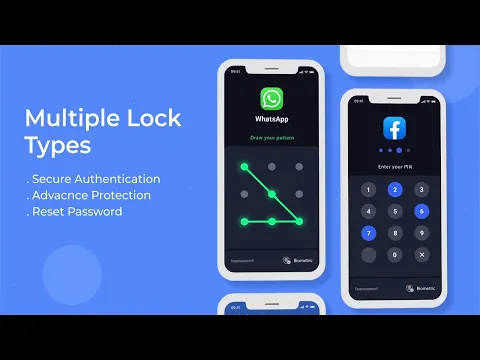
Video of App Lock - Applock Fingerprint
Screenshot App Lock - Applock Fingerprint 1
Screenshot App Lock - Applock Fingerprint 2
Screenshot App Lock - Applock Fingerprint 3
Screenshot App Lock - Applock Fingerprint 4
Screenshot App Lock - Applock Fingerprint 5
Screenshot App Lock - Applock Fingerprint 6

Download App Lock - Applock Fingerprint APK for Android

What's New in Version 1.6.1

No official changelog provided for App Lock - Applock Fingerprint version 1.6.1. This update likely includes general stability improvements and bug fixes.

Available Files

System Requirements

OS Version
Android 6.0 (Marshmallow) or higher
Architecture
Varies by file (Which one do I need?)
Disk Space
~60 MB free space required
RAM
1 GB
Internet
Not required
Permissions (32)
  • Internet
  • Camera
  • Access Network State
  • Read External Storage
  • Write External Storage

APK File Details

Package ID applock.lockapps.fingerprint.password.lockit
Available on Google Play
Developer Trusted Tools
License Free
Monetization Contains Ads   In-App Purchases
Content Rating Everyone
Interface Language
English +77

English, Japanese, Indonesian, German, Bulgarian, Thai, Chinese, Hindi, Vietnamese, Ukrainian, Polish, Korean, Romanian, Arabic, French, Turkish, Czech, Spanish, Italian, Portuguese, Hungarian, Russian, + 56 localizations

APK Verification & Virus Scan Results

No Virus Signature Verified Safe & Original

Virus scan: Clean (0/66) View report. This APK is free of malware and its signature matches the official developer release.

Show File Details (SHA-256, SHA-1, MD5)

SHA-1 Signature:

a9d966efb7eba75b307e26bf0db6c10831193583

SHA-256 Hash:

134b2aa369f2b5a0dd2198ea1e24b5043dce92d653b2b5f1258e4260ffb5e232

MD5 Checksum:

eacd26f00b4f1678c299b2cff9ab9637

Frequently Asked Questions

Is App Lock safe to download?

Yes, App Lock is safe to download. The APK is scanned on every update — no malware or viruses detected. You can verify the full scan report in the Security section above.

How to install App Lock APK on Android?

Download the APK using the button above. Then open the file and tap Install. If prompted, enable "Install from unknown sources" in Settings → Security. The process takes under a minute. Read more

What Android version does App Lock require?

App Lock requires Android 6.0 (API 23) or higher. Optimized for Android 15 (API 35).

Is App Lock free?

Yes, it is free to download and use, but it contains ads and offers in-app purchases.

How to update App Lock to the latest version?

Download the latest APK from this page and install it over your existing version — no need to uninstall first. Your data and settings will be preserved. We update the file as soon as a new version is released.

What processor architecture does App Lock support?

App Lock supports arm64-v8a, armeabi-v7a. This build does not support x86/x86_64 processors, so it will not run on most PC emulators. If you are unsure about your device architecture, check the Device Info section on this page.

How to enable installation from unknown sources on Android?

Go to Settings → Security (or Settings → Apps → Special access on Android 8+) and enable "Install unknown apps" for your browser or file manager. On Android 8 and above this setting is per-app, not global. Read more

If you have found any issue or are having difficulty with this page, please .

User Reviews & Ratings

Global rating(Play Store): 4.73(393.5K)
Site Rating: 5(1)
Rate this app

5.00

12345

1

Share your experience with other users.