
My realme app cover art for Android
My realme Icon

My realme APK for Android

ColorOS Original
500M+
Free
Sep 8, 2025

The key to unlocking your smartphone’s ecosystem

Download My realme APK EXP_9.14.0_2a68116 52MB

What is My realme?

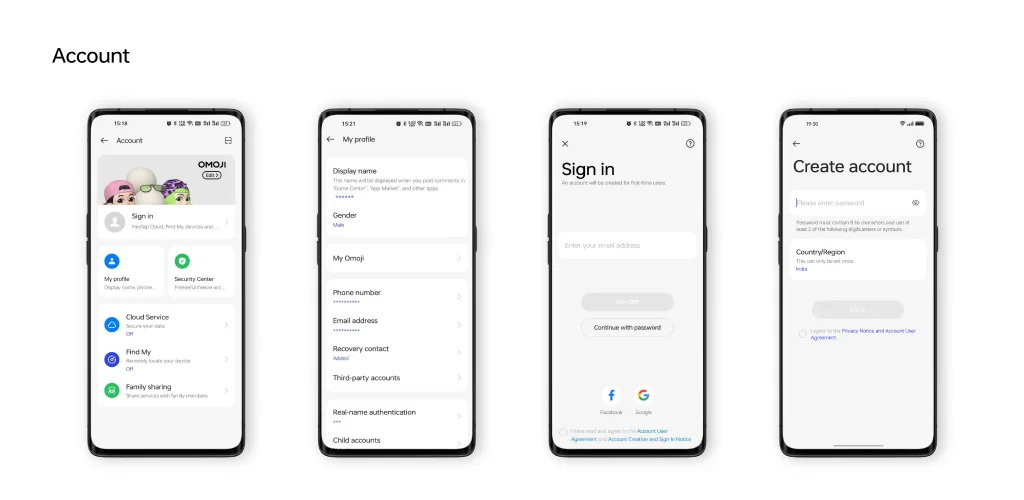
Got a Realme smartphone? Then you’ve probably seen the My realme app and wondered what it’s all about. Think of it as the master key to your entire Realme world. It’s the central spot where you control your account and unlock special perks, making your phone experience smoother and more personal.

At its heart, My realme is your personal command center. It’s where you manage all the important details tied to your device. But it does more than just hold your information; it’s your gateway to the wider Realme ecosystem. Ever worry about security? This app helps keep your account safe by using simple verification methods, like a quick text message, to confirm it’s really you. This service is part of HeyTap, the platform that powers many of the cool internet features on Realme, Oppo, and OnePlus phones.

So, what can you really do with it?

  • Effortless Account Control: Easily update your phone number, email, and password in one location.
  • Rock-Solid Security: Keep your data safe with straightforward identity checks.
  • Find Your Phone: Helps you locate your other linked Realme devices if they go missing.
  • Exclusive Member Perks: Get access to the Realme Community, special offers, and unique themes.

My realme isn’t just a settings page; it’s the bridge between you and your device’s full potential. It works quietly in the background, ensuring your experience is secure and seamless.

Ready to get the most out of your smartphone? Dive into the My realme app and discover how a connected account can completely upgrade your Realme experience.

Also known as: Account Center
Screenshot My realme 1
Screenshot My realme 2
Screenshot My realme 3

Download My realme APK for Android

What's New in Version EXP_9.14.0_2a68116

Feature Update

Available Files

System Requirements

OS Version
Android 6.0 (Marshmallow) or higher
Architecture
Varies by file (Which one do I need?)
Disk Space
~80 MB free space required
RAM
1 GB
Internet
Not required
Permissions (31)
  • Internet
  • Camera
  • Access Network State
  • Read External Storage
  • Write External Storage

APK File Details

Package ID com.heytap.usercenter
Available on Google Play
Developer ColorOS
License Free ( No Ads)
Content Rating Everyone
Interface Language
English +68

English, Japanese, German, Thai, Hindi, Vietnamese, Polish, Korean, Romanian, Arabic, French, Turkish, Czech, Spanish, Italian, Hungarian, Russian, Ukrainian, Bulgarian, Chinese, Portuguese, + 48 localizations

APK Verification & Virus Scan Results

No Virus Signature Verified Safe & Original

Virus scan: Clean (0/65) View report. This APK is free of malware and its signature matches the official developer release.

Show File Details (SHA-256, SHA-1, MD5)

SHA-1 Signature:

ccebdc8a0b5c4ccfb8e0fdbb2e38deedf7f5f40b

SHA-256 Hash:

bba4da7fdcd4d5cf04aa4216509846901b544dec20fe0c4c67efaad9b2aafe73

MD5 Checksum:

e4a976e4e860f79b3a90c7ec11e09da5

Frequently Asked Questions

Is My realme safe to download?

Yes, My realme is safe to download. The APK is scanned on every update — no malware or viruses detected. You can verify the full scan report in the Security section above.

How to install My realme APK on Android?

Download the APK using the button above. Then open the file and tap Install. If prompted, enable "Install from unknown sources" in Settings → Security. The process takes under a minute. Read more

What Android version does My realme require?

My realme requires Android 6.0 (API 23) or higher. Optimized for Android 14 (API 34).

Is My realme free?

Yes, this app is completely free to download and use.

How to update My realme to the latest version?

Download the latest APK from this page and install it over your existing version — no need to uninstall first. Your data and settings will be preserved. We update the file as soon as a new version is released.

Does My realme require Root access?

No root is required for basic use. My realme works on standard Android for CPU info, RAM, battery, sensors, and network stats. Root unlocks a small set of advanced system parameters that Android restricts by default.

What processor architecture does My realme support?

My realme supports arm64-v8a. This build does not support x86/x86_64 processors, so it will not run on most PC emulators. If you are unsure about your device architecture, check the Device Info section on this page.

If you have found any issue or are having difficulty with this page, please .

User Reviews & Ratings

Global rating(Play Store): 3.9(30.5K)
Site Rating: 4(1)
Rate this app

4.00

12345

1

Share your experience with other users.