ocrX: Image to Text AI Scanner app cover art for Android
ocrX: Image to Text AI Scanner Icon

ocrX: Image to Text AI Scanner APK for Android

1M+
Free
Apr 20, 2026

Download ocrX: Image to Text AI Scanner APK 2.53 22MB

What is ocrX: Image to Text AI Scanner?

Tired of manually typing out notes, documents, or even handwritten scribbles? It’s honestly a pain, isn’t it? Finally, an app that understands. ocrX: Image to Text AI Scanner is your ultimate digital assistant, transforming any image into editable text with surprising accuracy. This isn’t just another OCR scanner; it’s a powerful AI text recognition tool that brings the precision of cloud technology right to your Android device.

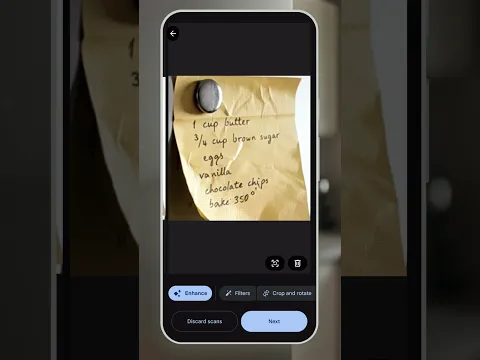
What caught my attention immediately is how effortlessly ocrX: Image to Text AI Scanner handles complex layouts and even multiple languages. You simply snap a picture of a document, a whiteboard, or a book page, and within moments, you get clean, editable text. It feels like magic, but it’s actually advanced cloud AI doing the heavy lifting, ensuring your image to text conversions are virtually flawless. And yes, your data stays secure and encrypted throughout the entire process – privacy is a big deal, right?

This isn’t just for professionals; students will find it incredibly useful for digitizing lecture notes or textbook excerpts. Imagine converting a foreign language menu into editable text on the fly! The app supports over 100 languages, making it a fantastic multi-language text extractor for travel or international studies.

Key Features:

  • Quick Copy-Paste: Instantly grab extracted text and drop it into any other app or document. Super convenient!
  • Smart History: All your past scans are neatly organized and searchable. Never lose an important text snippet again.
  • Handwriting Support: Our AI is trained to recognize handwritten notes and whiteboard content with impressive ease. No more struggling to decipher your own scribbles.

So, if you’re ready to ditch the tedious typing and embrace truly smart document scanning, give ocrX: Image to Text AI Scanner a try. Download it today and experience the future of text digitization firsthand.
Video of ocrX: Image to Text AI Scanner
Screenshot ocrX: Image to Text AI Scanner 1
Screenshot ocrX: Image to Text AI Scanner 2
Screenshot ocrX: Image to Text AI Scanner 3
Screenshot ocrX: Image to Text AI Scanner 4
Screenshot ocrX: Image to Text AI Scanner 5
Screenshot ocrX: Image to Text AI Scanner 6
Screenshot ocrX: Image to Text AI Scanner 7

Download ocrX: Image to Text AI Scanner APK for Android

What's New in Version 2.53

Resolved an issue where Restore Purchase was not working correctly.

Available Files

System Requirements

OS Version
Android 7.0 (Nougat) or higher
Architecture
Varies by file (Which one do I need?)
Disk Space
~30 MB free space required
RAM
1 GB
Internet
Not required
Google Services
Required   GMS dependent
Permissions (16)
  • Requires Google Play Services to launch:
    Note: This is an original file. Unlike modded versions with no verification, it validates via your store account. Details
  • Internet
  • Access Network State
  • Vibrate
  • Wake Lock
  • Post Notifications

APK File Details

Package ID aculix.smart.text.recognizer
Available on Google Play
Developer Aculix Technologies LLP
License Free
Monetization Contains Ads   In-App Purchases
Content Rating Everyone
Interface Language
English +73

English, Arabic, Bulgarian, Czech, German, Spanish, French, Hindi, Hungarian, Italian, Japanese, Korean, Polish, Portuguese, Romanian, Russian, Thai, Turkish, Ukrainian, Vietnamese, Chinese, + 53 localizations

APK Verification & Virus Scan Results

No Virus Signature Verified Safe & Original

Virus scan: Clean (0/64) View report. This APK is free of malware and its signature matches the official developer release.

Show File Details (SHA-256, SHA-1, MD5)

SHA-1 Signature:

70e6ab2300c9406792452ea39a40690b91519c85

SHA-256 Hash:

d5754ee6db1e4628d78c6bc30d82346d2bba578bb25df7f294bcc70baf1290d4

MD5 Checksum:

e5b62d5853bab33034191bf12f355842

Frequently Asked Questions

Is ocrX: Image to Text AI Scanner safe to download?

Yes, ocrX: Image to Text AI Scanner is safe to download. The APK is scanned on every update — no malware or viruses detected. You can verify the full scan report in the Security section above.

How to install XAPK file?

XAPK is a split APK package. Standard Android installer cannot open it directly. Use 'SAI' or 'XAPK Installer' — they handle XAPK files automatically. Download the installer, open the XAPK file with it, and follow the on-screen steps. Read more

What Android version does ocrX: Image to Text AI Scanner require?

ocrX: Image to Text AI Scanner requires Android 7.0 (API 24) or higher. Optimized for Android 15 (API 35).

Is ocrX: Image to Text AI Scanner free?

Yes, it is free to download and use, but it contains ads and offers in-app purchases.

Does ocrX: Image to Text AI Scanner require a license check?

Yes, this app performs a license check. You may need to have the Google Play Store installed and be logged in to verify the license.

How to update ocrX: Image to Text AI Scanner to the latest version?

Download the latest APK from this page and install it over your existing version — no need to uninstall first. Your data and settings will be preserved. We update the file as soon as a new version is released.

Does ocrX: Image to Text AI Scanner require Root access?

No root is required for basic use. ocrX: Image to Text AI Scanner works on standard Android for CPU info, RAM, battery, sensors, and network stats. Root unlocks a small set of advanced system parameters that Android restricts by default.

If you have found any issue or are having difficulty with this page, please .

User Reviews & Ratings

Global rating(Play Store): 4.37(25.4K)
Site Rating: 5(1)
Rate this app

5.00

12345

1

Share your experience with other users.