Ram booster & Cache Cleaner Icon

Ram booster & Cache Cleaner APK for Android

Mar 13, 2019

Find out important information about your mobile device with one touch

Download Ram booster & Cache Cleaner APK 1.1 4MB

What is Ram booster & Cache Cleaner?

Ram booster & Cache Cleaner – with this simple tool, the user can get information regarding the status of their Android mobile device. What will be especially important for owners of smartphones and tablets that are not as powerful as flagships, who often experience a shortage of RAM and physical memory, which leads to slowdown and incorrect operation of the device. Now you can control the main functions of your device by simply launching this small but very useful utility at any time.

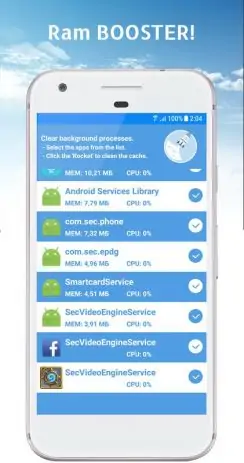
After running Ram booster & Cache Cleaner the user is greeted with a concisely designed interface, in the main menu of which there are such tabs as RAM, battery and physical memory. By going to the appropriate category, the user will be able to see more detailed information, for example, the amount of occupied and free RAM, and if necessary, with one touch, he can optimize it – close programs hanging in the background, clear the cache, and so on.

The “Battery” tab will inform you about the amount of remaining battery charge, give information about the charger used, and find out the time remaining until the device is completely discharged. The “Memory” tab is divided into two sections, the first of them is reserved for the built-in memory, and the second allows you to find out the percentage of filling of the external media (memory card). Initially in the program Ram booster & Cache Cleaner all functions are available, that is, you do not need to buy anything additional from the developers. There are ads, but given that the application is not supposed to be used hourly, this should not be a big problem.

Also known as: Ram booster & Cache Cleaner, Battery saver & Ram booster
Screenshot Ram booster & Cache Cleaner 1
Screenshot Ram booster & Cache Cleaner 2
Screenshot Ram booster & Cache Cleaner 3
Screenshot Ram booster & Cache Cleaner 4
Screenshot Ram booster & Cache Cleaner 5
Screenshot Ram booster & Cache Cleaner 6
Screenshot Ram booster & Cache Cleaner 7

Download Ram booster & Cache Cleaner APK for Android

What's New in Version 1.1

No official changelog provided for Ram booster & Cache Cleaner version 1.1. This update likely includes general stability improvements and bug fixes.

Available Files

System Requirements

OS Version
Android 4.4 (Kit Kat) or higher
Architecture
Varies by file (Which one do I need?)
Disk Space
~10 MB free space required
RAM
1 GB
Internet
Not required
Permissions (22)
  • Internet
  • Access Network State
  • Write External Storage
  • Access Coarse Location
  • Wake Lock

APK File Details

Package ID com.bsaver.ramcleaner
Developer bsaver
License Free ( No Ads)

APK Verification & Virus Scan Results

1 Detections (Low Risk) Signature Verified Not on Play Store

Virus scan: 1/60 Potential Detections View report. Flagged by some engines as a false positive. Signature matches the original developer build.

Show File Details (SHA-256, SHA-1, MD5)

SHA-1 Signature:

80b67e64eac5a899aded80426ae10eac7abf8952

SHA-256 Hash:

34c45dcf085a314500764d3d0ca603c3f2c23f2c88d9fb529b01562e9384e826

MD5 Checksum:

ee5d76a7045b74f08bd583e8c7c69104

Frequently Asked Questions

Is Ram booster & Cache Cleaner safe to download?

A small number of antivirus engines flagged Ram booster & Cache Cleaner. This may be a false positive, but we recommend reviewing the full scan report in the Security section above before downloading. Download at your own risk.

How to install Ram booster & Cache Cleaner APK on Android?

Download the APK using the button above. Then open the file and tap Install. If prompted, enable "Install from unknown sources" in Settings → Security. The process takes under a minute. Read more

Why does installation fail on newer Android versions (14 - 16)?

Newer Android versions strictly block the installation of apps built for older Android versions (API < 23) for security reasons. Standard installation is not possible. Read our step-by-step guide on how to bypass this restriction using ADB or Shizuku.

What Android version does Ram booster & Cache Cleaner require?

Ram booster & Cache Cleaner requires Android 4.4 (API 19) or higher. Optimized for Android 8.1 (API 27).

Does Ram booster & Cache Cleaner require Root access?

No root is required for basic use. Ram booster & Cache Cleaner works on standard Android for CPU info, RAM, battery, sensors, and network stats. Root unlocks a small set of advanced system parameters that Android restricts by default.

What processor architecture does Ram booster & Cache Cleaner support?

Ram booster & Cache Cleaner supports universal. If you are unsure about your device architecture, check the Device Info section on this page.

How to enable installation from unknown sources on Android?

Go to Settings → Security (or Settings → Apps → Special access on Android 8+) and enable "Install unknown apps" for your browser or file manager. On Android 8 and above this setting is per-app, not global. Read more

If you have found any issue or are having difficulty with this page, please .

User Reviews & Ratings

Rate this app

0.00

12345

not yet rated

Share your experience with other users.