Volume Styles - Custom control app cover art for Android
Volume Styles - Custom control Icon

Volume Styles - Custom control APK for Android

Tom Bayley Original
24M+
Free
Jan 5, 2026

Full control over your device's sound and interface.

Download Volume Styles - Custom control APK 4.5.1 9MB

What is Volume Styles?

Take full control of volume adjustment with one of the most functional apps, Volume Styles - Custom control.

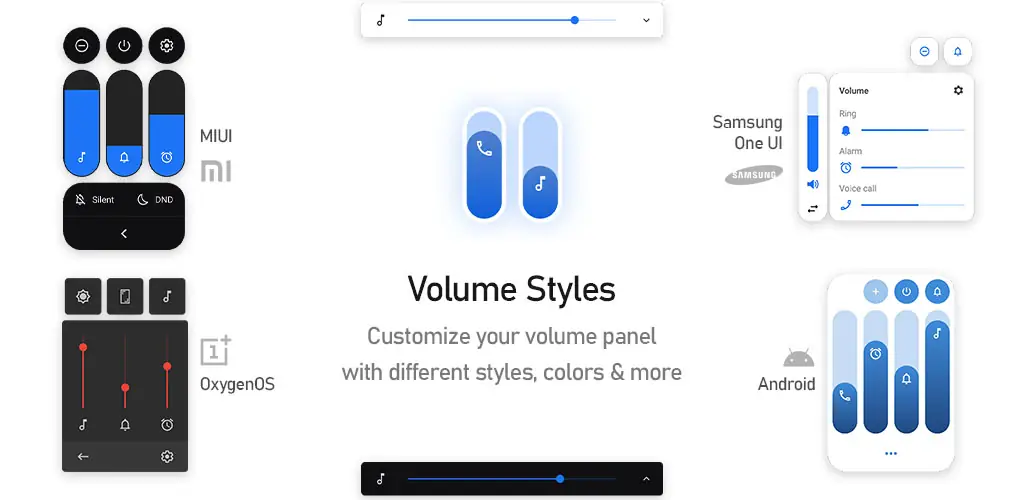
This program gives you the ability to fully personalize the volume panel and sliders. You can change color schemes, use different themes like iOS or MIUI, change the panel’s position, and much more.

Additionally, the app allows you to add convenient shortcuts, including screen brightness control, making interaction with your device much faster and more comfortable.

Easily switch between styles with a single tap. Among the design options:

  • Android 10
  • iOS 13
  • Xiaomi MIUI
  • Samsung One UI
  • OnePlus OxygenOS
  • Android Oreo Horizontal Sliders
  • Huawei EMUI
  • Windows 10
  • RGB
  • ColorOS
  • Paranoid Android
  • Vivo Funtouch OS
  • Realme UI
  • iOS 12
  • Windows Phone
  • Slider, and many more!

Community-created styles can also be conveniently applied or saved to favorites through the built-in style feed. Moreover, with Style Creator, you can create your own unique designs and share them with other users.

Sliders: Select the desired sliders for quick display or add new ones.

  • Media Volume
  • Ringtone Volume
  • Notification Volume
  • Alarm
  • Voice Call Volume
  • System Sounds
  • Bluetooth Volume
  • Audio Casting Control
  • Brightness Adjustment

Settings

Fully customize the volume panel to your preferences:

  • Choose any color for the design
  • Automatic dark mode
  • Adjust panel corner rounding
  • Panel position on the screen
  • Set panel display duration, and more

Shortcuts: Add extra features to keep everything at your fingertips:

  • Screen Auto-rotate Toggle
  • Flashlight On/Off
  • Screen Screenshot
  • Split Screen Mode
  • Quick Access to General Settings
  • Display Off
  • Go to Sound Settings
  • Do Not Disturb Mode
  • Volume Modes Toggle: Silent, Vibrate, Ring
  • Auto-Brightness Control, and more

Volume Styles - Custom control provides the ability to use accessibility services to manage your device’s volume buttons.

Video of Volume Styles - Custom control
Screenshot Volume Styles - Custom control 1
Screenshot Volume Styles - Custom control 2
Screenshot Volume Styles - Custom control 3
Screenshot Volume Styles - Custom control 4
Screenshot Volume Styles - Custom control 5
Screenshot Volume Styles - Custom control 6
Screenshot Volume Styles - Custom control 7
Screenshot Volume Styles - Custom control 8

Download Volume Styles - Custom control APK for Android

What's New in Version 4.5.1

Version 5.1.3
- Added new fire style
- Added particles effects to the wave style
- New app icon
- Bug fixes and improvements

Available Files

System Requirements

OS Version
Android 6.0 (Marshmallow) or higher
Architecture
Varies by file (Which one do I need?)
Disk Space
~20 MB free space required
RAM
1 GB
Internet
Not required
Google Services
Required   GMS dependent
Permissions (24)
  • Requires Google Play Services to launch:
    Note: This is an original file. Unlike modded versions with no verification, it validates via your store account. Details
  • Internet
  • Access Network State
  • Vibrate
  • Wake Lock
  • Access Wifi State

APK File Details

Package ID com.tombayley.volumepanel
Available on Google Play
Developer Tom Bayley
License Free
Monetization Contains Ads   In-App Purchases
Content Rating Everyone
Interface Language
English +76

English, Arabic, Bulgarian, Czech, German, Spanish, French, Hindi, Hungarian, Italian, Japanese, Korean, Polish, Portuguese, Romanian, Russian, Thai, Turkish, Ukrainian, Vietnamese, Chinese, + 56 localizations

APK Verification & Virus Scan Results

No Virus Signature Verified Safe & Original

Virus scan: Clean (0/59) View report. This APK is free of malware and its signature matches the official developer release.

Show File Details (SHA-256, SHA-1, MD5)

SHA-1 Signature:

3f1a9c5666baca14f30a8e5ca3e59cd61c48923d

SHA-256 Hash:

3d64aa971d28850a39492e2c727f4adb1430728f805dcd7bdc022cfbd62f0059

MD5 Checksum:

05a33bee3773b1e2b0692ee971af4e75

Frequently Asked Questions

Is Volume Styles safe to download?

Yes, Volume Styles is safe to download. The APK is scanned on every update — no malware or viruses detected. You can verify the full scan report in the Security section above.

How to install XAPK file?

XAPK is a split APK package. Standard Android installer cannot open it directly. Use 'SAI' or 'XAPK Installer' — they handle XAPK files automatically. Download the installer, open the XAPK file with it, and follow the on-screen steps. Read more

What Android version does Volume Styles require?

Volume Styles requires Android 6.0 (API 23) or higher. Optimized for Android 16 (API 36).

Is Volume Styles free?

Yes, it is free to download and use, but it contains ads and offers in-app purchases.

Does Volume Styles require a license check?

Yes, this app performs a license check. You may need to have the Google Play Store installed and be logged in to verify the license.

How to update Volume Styles to the latest version?

Download the latest APK from this page and install it over your existing version — no need to uninstall first. Your data and settings will be preserved. We update the file as soon as a new version is released.

What processor architecture does Volume Styles support?

Volume Styles supports arm64-v8a. This build does not support x86/x86_64 processors, so it will not run on most PC emulators. If you are unsure about your device architecture, check the Device Info section on this page.

If you have found any issue or are having difficulty with this page, please .

User Reviews & Ratings

Global rating(Play Store): 4.45(149.5K)
Site Rating: 5(1)
Rate this app

5.00

12345

1

Share your experience with other users.