Wifi Analyzer by farproc app cover art for Android
Wifi Analyzer by farproc Icon

Wifi Analyzer by farproc APK for Android

46M+
Free
Dec 26, 2019

Helper in choosing the best channel for your wireless router

Download Wifi Analyzer by farproc APK 3.11.2 2MB

What is Wifi Analyzer by farproc?

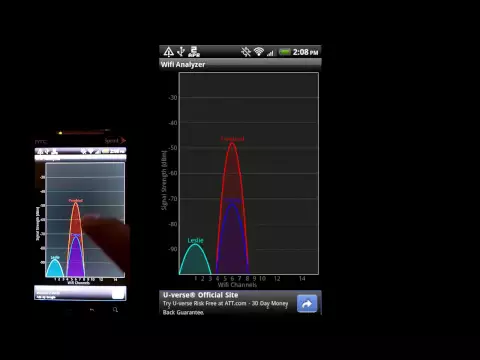
Wifi Analyzer is a visual informative alternative to the standard wireless network search interface. The application automatically detects available WiFi channels and provides detailed information for each of them, presented in the form of graphs, which helps to make the right choice about the appropriateness of connecting to a specific open network. And this tool will also help determine the optimal location of the router in an apartment or office, because the data transfer speed also largely depends on this.

The program interface is intuitive and simple, and from the permissions you only need to give access to the location, remembering that the program does not automatically request it, you must do it manually. Channel chart, time chart, RF band rating, list of available networks, signal meter – these tools will help you make the right choice to ensure sufficient data transfer rate.

In a separate section of the Wifi Analyzer application, you can configure the automatic or manual scanning script, the required interval, the display of interface elements, and so on. Additional useful features of the utility include the quick creation of a screenshot from the chart area, as well as the ability to transfer information to interested users in other convenient ways.

Features:

  • quick selection of a stable and stable Wi-Fi signal;
  • detailed information about each radio frequency band;
  • online signal strength indicator;
  • intuitive visual schemes.
Video of Wifi Analyzer by farproc
Screenshot Wifi Analyzer by farproc 1
Screenshot Wifi Analyzer by farproc 2
Screenshot Wifi Analyzer by farproc 3
Screenshot Wifi Analyzer by farproc 4
Screenshot Wifi Analyzer by farproc 5

Download Wifi Analyzer by farproc APK for Android

What's New in Version 3.11.2

Dependency updated.
OUI db updated.

Available Files

System Requirements

OS Version
Android 6.0 (Marshmallow) or higher
Architecture
Varies by file (Which one do I need?)
Disk Space
~10 MB free space required
RAM
1 GB
Internet
Not required
Permissions (7)
  • Internet
  • Access Network State
  • Write External Storage
  • Access Coarse Location
  • Wake Lock

APK File Details

Package ID com.farproc.wifi.analyzer
Developer farproc
License Free
Monetization Contains Ads  
Interface Language
English +72

English, Chinese, Japanese, German, Bulgarian, Thai, Hindi, Vietnamese, Ukrainian, Polish, Korean, Romanian, Arabic, French, Turkish, Czech, Spanish, Italian, Portuguese, Hungarian, Russian, + 52 localizations

APK Verification & Virus Scan Results

No Virus Signature Verified Safe & Original

Virus scan: Clean (0/63) View report. The APK file is digitally signed.

Show File Details (SHA-256, SHA-1, MD5)

SHA-1 Signature:

50838C085D4DBAF04EC59F6938555C6A6DAE9ECD

SHA-256 Hash:

6ec4fa6ced75854cd067a0583bbcc93310057c14c304420b70080e713c9578ed

MD5 Checksum:

1fa8b2f5f4a38629ad0f6e4a6ec10d3f

Frequently Asked Questions

Is Wifi Analyzer by farproc safe to download?

Yes, Wifi Analyzer by farproc is safe to download. The APK is scanned on every update — no malware or viruses detected. You can verify the full scan report in the Security section above.

How to install Wifi Analyzer by farproc APK on Android?

Download the APK using the button above. Then open the file and tap Install. If prompted, enable "Install from unknown sources" in Settings → Security. The process takes under a minute. Read more

Why does installation fail on newer Android versions (14 - 16)?

Newer Android versions strictly block the installation of apps built for older Android versions (API < 23) for security reasons. Standard installation is not possible. Read our step-by-step guide on how to bypass this restriction using ADB or Shizuku.

What Android version does Wifi Analyzer by farproc require?

Wifi Analyzer by farproc requires Android 6.0 (API 23) or higher.

Is Wifi Analyzer by farproc free?

Yes, it is free to use, but it is ad-supported.

Does Wifi Analyzer by farproc require Root access?

No root is required for basic use. Wifi Analyzer by farproc works on standard Android for CPU info, RAM, battery, sensors, and network stats. Root unlocks a small set of advanced system parameters that Android restricts by default.

What processor architecture does Wifi Analyzer by farproc support?

Wifi Analyzer by farproc supports universal. If you are unsure about your device architecture, check the Device Info section on this page.

If you have found any issue or are having difficulty with this page, please .

User Reviews & Ratings

Global rating(Play Store): 3.62(354.3K)
Site Rating: 3(2)
Rate this app

3.00

12345

2

Share your experience with other users.