Weather app cover art for Android
Weather Icon

Weather APK for Android

52M+
Free
Nov 10, 2026

Hourly updates and 15 day forecasts with severe weather alerts

Download Weather APK 6.0.4.2609151114 63MB

What is Weather?

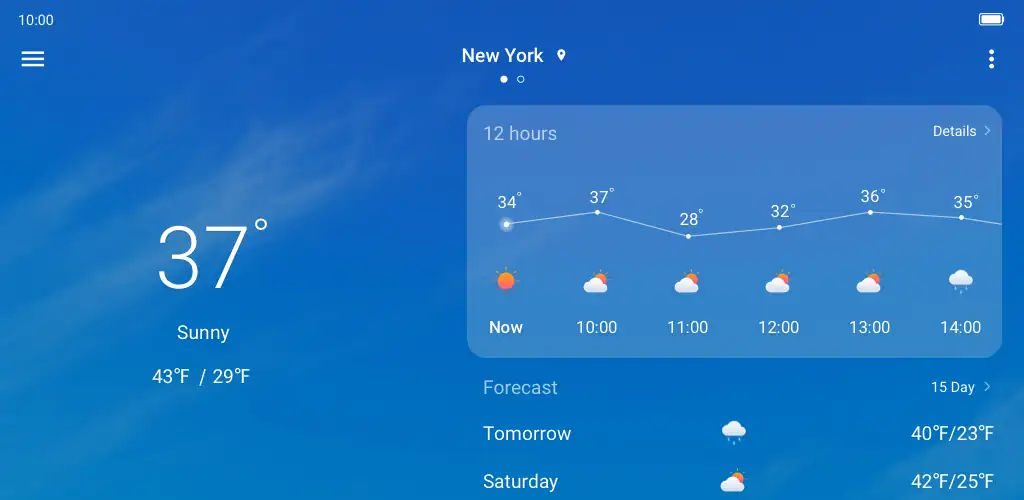
Weather is a weather forecast app that tracks current conditions and projects atmospheric shifts up to 15 days out. It pulls hourly breakdowns and sends alerts when severe conditions are inbound, so you're not caught off guard by a sudden storm or temperature drop.

The interface displays temperature, precipitation chance, wind speed and humidity in a scrollable timeline. Tap any hour to expand the details. The 15-day outlook sits below, showing highs, lows and weather icons for each date. Notifications fire when the app detects incoming severe weather, giving you a few hours to adjust plans or grab an umbrella.

The highlights:

  • Hourly breakdowns show temperature, wind and precipitation changes throughout the day
  • The 15-day forecast extends far enough to plan weekend trips or outdoor work
  • Special weather warnings arrive as push notifications before conditions worsen
  • Atmospheric data covers humidity, pressure and visibility for those tracking patterns

Forecast details you get

Beyond the basics, Weather lists atmospheric pressure, visibility range and UV index when relevant. The hourly view updates every 60 minutes, so morning predictions stay current through the afternoon. You can scroll forward to preview tonight's low or compare tomorrow's forecast against the weekend.

Other weather forecast apps

AccuWeather leans on proprietary RealFeel temperature readings and tracks precipitation minute by minute, while The Weather Channel adds radar overlays and health-related warnings tied to pollen or air quality. Weather sticks to core meteorological data without the extra health layers, which keeps the interface lighter if you only need to know whether it's going to rain.

This works for anyone checking daily forecasts or planning around weather-dependent work. The app contains advertisements throughout, so expect banner placements between hourly blocks and occasional interstitials when opening the extended forecast.

Weather screenshot 1
Weather screenshot 2
Weather screenshot 3
Weather screenshot 4

Weather APK Download

What's New in Version 6.0.4.2609151114

fix known issues

Download Link:

System Requirements

OS Version
Android 8.0 (OREO) or higher
Architecture
Varies by file (Which one do I need?)
Disk Space
~80 MB free space required
RAM
1 GB
Internet
Not required
Google Services
Required

APK File Details

Package ID com.zte.weather
Available on Google Play
Developer ZTECorporation
License Free
Monetization Contains Ads  
Content Rating Everyone
Interface Language
English +0

English

Required Permissions (17)
  • Internet
  • Access Network State
  • Access Fine Location
  • Access Coarse Location
  • Wake Lock

APK Verification & Virus Scan Results

Scan In Queue Signature Verified Safe & unmodified

Full antivirus scan in queue; report will appear here shortly. Signature matches the official developer release.

Show File Details (SHA-256, SHA-1, MD5)

SHA-1 Signature:

855a42e080d104b2a0dd8e7c26e51932c29f27ff

SHA-256 Hash:

a109fed7cd3f9ded541ae67f99b64ca9eb41307cac5799afb4a106900342593a

MD5 Checksum:

005e62ef671608c43bbe8b9cf212d493

Frequently Asked Questions

Is Weather safe to download?

Weather has passed a basic integrity check. A full antivirus scan is pending. You can check the current scan status in the Security section above.

How to install XAPK file?

XAPK is a split APK package. Standard Android installer cannot open it directly. Use 'SAI' or 'XAPK Installer' — they handle XAPK files automatically. Download the installer, open the XAPK file with it, and follow the on-screen steps. Read more

What Android version does Weather require?

Weather requires Android 8.0 (API 26) or higher. Optimized for Android 17 (API 37).

Is Weather free?

Yes, it is free to use, but it is ad-supported.

How to update Weather to the latest version?

Download the latest APK from this page and install it over your existing version — no need to uninstall first. Your data and settings will be preserved. We update the file as soon as a new version is released.

What processor architecture does Weather support?

Weather supports arm64-v8a. This build does not support x86/x86_64 processors, so it will not run on most PC emulators. If you are unsure about your device architecture, check the Device Info section on this page.

How to enable installation from unknown sources on Android?

Go to Settings → Security (or Settings → Apps → Special access on Android 8+) and enable "Install unknown apps" for your browser or file manager. On Android 8 and above this setting is per-app, not global. Read more

Found a problem on this page?

User Reviews & Ratings

Global rating (Play Store): 4.42★ (6.1K)
Site Rating: 5★ (1)
Rate this app

5.00

12345

1

Share your experience with other users.

Download Weather APK - Latest version

Get the official APK file for your Android device. Fast, safe, and free. Download APK