What is Music Volume EQ?
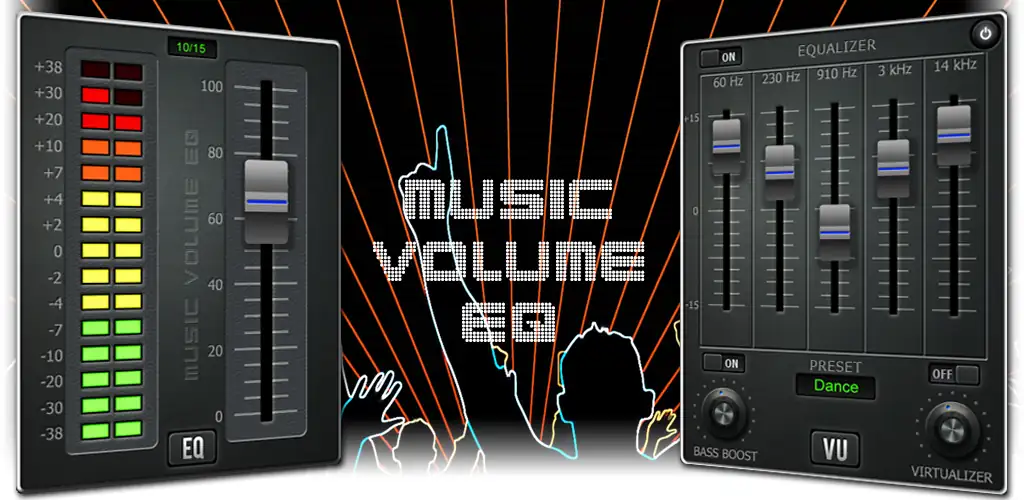
Music Volume EQ - Equalizer is an audio equalizer and sound booster that adjusts frequency levels, volume, and effects on whatever music or video is currently playing. It runs alongside other apps, so a change made mid-song stays applied even if the screen locks or you switch to something else.
The app centers on a multi-band equalizer, offering a simple 5-band layout or a more detailed 10-band one for finer control over bass, mids, and treble. Loudness and preamp controls push quiet tracks and audiobooks up to a comfortable level, while a dedicated bass boost adds low-end depth without muddying the rest of the mix. Headphone users get a 3D surround effect for a wider soundstage, plus Auto EQ profiles that tune supported headphones automatically. A left/right balance slider fixes the common annoyance of one ear sounding louder than the other, and every combination of settings can be saved as a custom preset for switching between music, video, or audiobook listening.
Key Features:
- A 10-band equalizer gives finer frequency control than the standard 5-band layout.
- Auto EQ applies optimized profiles for supported headphones without manual adjustment.
- The 3D surround virtualizer widens the stereo image, mainly noticeable on headphones.
- Channel balance controls let you raise or lower volume independently on each ear.
- A live music visualizer and an animated live wallpaper visualizer run alongside playback.
- 15 EQ presets come ready to use, on top of any custom profiles you save.
Customizing your sound profile
Presets are built for switching contexts rather than sticking to one sound. A profile tuned for bass-heavy playlists can sit next to one flattened out for spoken-word audiobooks, and both are one tap away. The app also limits specific frequencies at high volumes to cut down on harsh or distorted output, which matters more once you start pushing bass or loudness controls past their default position. Access doesn't require opening the full app each time: a Quick Settings tile, home screen widgets, and a persistent notification all expose the same controls, and four themes let you change the interface's look without touching functionality.
Alternatives to Music Volume EQ - Equalizer
Equalizer FX covers similar ground, bass boost, presets, a multi-band EQ, but wraps it in a different interface and preset workflow, so the choice largely comes down to which layout feels more natural. Viper4Android goes further with root-level audio processing that reaches deeper into the system, at the cost of requiring a rooted device, something Music Volume EQ - Equalizer never asks of you.
This suits listeners who want more control over their audio than a phone's stock settings allow, without needing root access or technical audio knowledge. The live visualizers and background processing that keep effects running during lock screen playback add up over a day, and battery drain is worth watching if you leave the app active constantly.



Share your experience with other users.