Form Editor for Google Forms app cover art for Android
Form Editor for Google Forms Icon

Form Editor for Google Forms APK for Android

113K+
Free
Oct 7, 2025

Build smarter surveys and forms that work offline and even take payments.

Download Form Editor for Google Forms APK 1.0.11 41MB

What is Form Editor for Google Forms?

Ever been stuck needing to create a sign-up sheet or a quick poll, but your computer was miles away? It’s a common frustration. While you can manage your Google Forms with your phone, what if you could do so much more? That’s where Form Editor for Google Forms comes in, transforming your Android device into a powerful data collection tool.

At its core, Form Editor for Google Forms lets you handle all your Google Forms on the go. You can create new forms, edit existing ones, and check responses without being chained to a desk. But the real magic happens when you discover the extra features packed inside. Imagine collecting feedback at an event, even with spotty Wi-Fi, or turning a sale right from a contact form. This app makes it possible.

It’s designed for everyone, from small business owners to event coordinators. Instead of just making a form, you can build an interactive experience.

Here’s a look at what you can do:

  • Go Completely Offline: Build and fill out forms without needing an internet connection. Your data syncs up later.
  • Turn Your Device into a Kiosk: Lock your screen to a single form, making it perfect for collecting feedback or registrations at a front desk.
  • Accept Payments Easily: Integrate payment gateways like PayPal and Stripe to sell products or collect donations directly.
  • Get Instant Alerts: Receive a push notification on your phone the moment someone submits a response.

Stop limiting your forms to the basics. Download Form Editor for Google Forms and experience how easy and powerful mobile data collection can be!
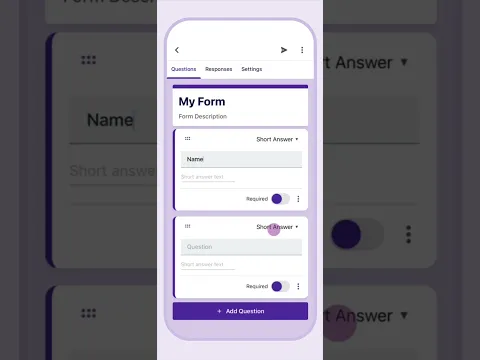
Video of Form Editor for Google Forms
Screenshot Form Editor for Google Forms 1
Screenshot Form Editor for Google Forms 2
Screenshot Form Editor for Google Forms 3
Screenshot Form Editor for Google Forms 4
Screenshot Form Editor for Google Forms 5
Screenshot Form Editor for Google Forms 6
Screenshot Form Editor for Google Forms 7
Screenshot Form Editor for Google Forms 8

Download Form Editor for Google Forms APK for Android

What's New in Version 1.0.11

No official changelog provided for Form Editor for Google Forms version 1.0.11. This update likely includes general stability improvements and bug fixes.

Available Files

System Requirements

OS Version
Android 7.0 (Nougat) or higher
Architecture
Varies by file (Which one do I need?)
Disk Space
~50 MB free space required
RAM
1 GB
Internet
Not required
Google Services
Required
Permissions (12)
  • Internet
  • Access Network State
  • Wake Lock
  • Android.gms.permission.ad Id
  • Access Wifi State

APK File Details

Package ID com.jotform.gforms
Developer Jotform Inc
License Free ( No Ads)
Interface Language
English +1

English, French

APK Verification & Virus Scan Results

Scan In Queue Signature Verified Removed from Play Store

Antivirus scan in queue, will be scanned soon. The APK file is digitally signed.

Show File Details (SHA-256, SHA-1, MD5)

SHA-1 Signature:

9df6e8d8af3d7cb7673ee689ec6ac17787daf157

SHA-256 Hash:

9186d73026a55aa974bd638e8c645fb3f809d39981fe4081d6864f137f88960b

MD5 Checksum:

ba3f3af24b47df134dcb8e7aea7e1b0c

Frequently Asked Questions

Is Form Editor for Google Forms safe to download?

Form Editor for Google Forms has passed a basic integrity check. A full antivirus scan is pending. You can check the current scan status in the Security section above.

How to install XAPK file?

XAPK is a split APK package. Standard Android installer cannot open it directly. Use 'SAI' or 'XAPK Installer' — they handle XAPK files automatically. Download the installer, open the XAPK file with it, and follow the on-screen steps. Read more

What Android version does Form Editor for Google Forms require?

Form Editor for Google Forms requires Android 7.0 (API 24) or higher. Optimized for Android 16 (API 36).

Is Form Editor for Google Forms free?

Yes, this app is completely free to download and use.

Does Form Editor for Google Forms require Root access?

No root is required for basic use. Form Editor for Google Forms works on standard Android for CPU info, RAM, battery, sensors, and network stats. Root unlocks a small set of advanced system parameters that Android restricts by default.

What processor architecture does Form Editor for Google Forms support?

Form Editor for Google Forms supports arm64-v8a. This build does not support x86/x86_64 processors, so it will not run on most PC emulators. If you are unsure about your device architecture, check the Device Info section on this page.

How to enable installation from unknown sources on Android?

Go to Settings → Security (or Settings → Apps → Special access on Android 8+) and enable "Install unknown apps" for your browser or file manager. On Android 8 and above this setting is per-app, not global. Read more

If you have found any issue or are having difficulty with this page, please .

User Reviews & Ratings

Global rating(Play Store): 4.11(874)
Site Rating: 5(1)
Rate this app

5.00

12345

1

Share your experience with other users.