Artrace: AR Easy Draw & Sketch app cover art for Android
Artrace: AR Easy Draw & Sketch Icon

Artrace: AR Easy Draw & Sketch APK for Android

Braly JSC Original
Also known as: Artrace: AR Easy Draw & Sketch, AR Drawing
57M+
Free
Aug 7, 2026

Projects real photos onto your paper so you trace proportions instead of guessing them

Download Artrace: AR Easy Draw & Sketch APK 1.9.68 43MB

What is Artrace: AR Easy Draw & Sketch?

Artrace: AR Easy Draw & Sketch is an AR drawing and tracing app that turns your phone camera into a lightbox. Prop the phone on a stand, point it at a blank sheet, and an image overlays the screen so you trace exactly what you see instead of guessing proportions freehand.

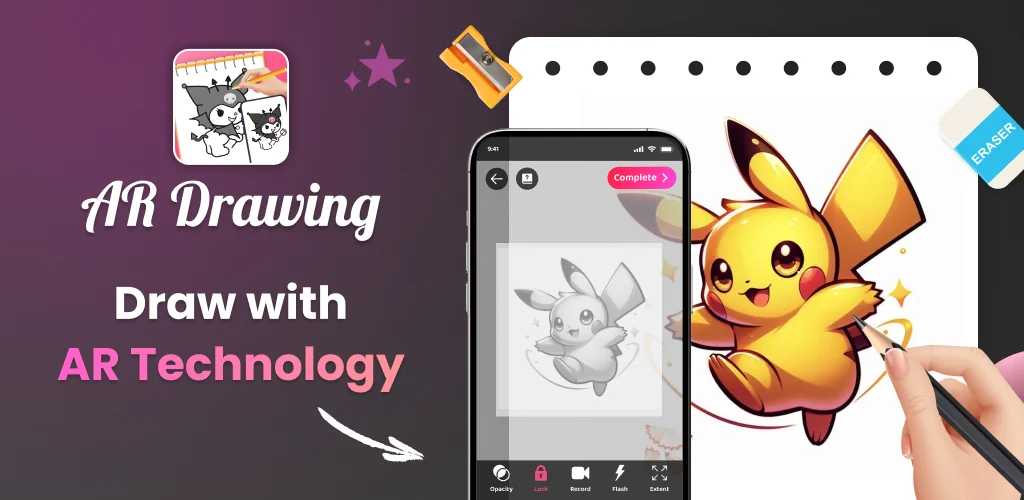
The core mechanic is straightforward: place the phone on a stand, pick a photo or aim the camera at a real object, and sketch the outline that appears on screen. The app draws from a sample library covering anime, cartoon, animal, food, chibi, vehicle, and other categories, or you can import a photo from your own gallery. Lessons are split into three difficulty levels, each adding harder exercises so the jump from stick figures to full scenes doesn't happen overnight. While drawing, you can adjust opacity to see the paper beneath the projection, zoom in on tricky details, toggle the flash for low light, and extend the drawing area past the edge of a single frame. A profile screen logs time spent drawing and lessons finished, which works as a rough progress log rather than a graded course.

Key Features:

  • Camera-based tracing projects sample images or real objects onto the screen so you sketch what you actually see
  • Three difficulty levels move from simple outlines to more demanding exercises
  • Opacity control lets you dial the overlay up or down to match your paper and lighting
  • Built-in video recording captures the whole drawing process for later playback
  • Zoom and flash toggles handle close detail work and dim rooms without extra apps
  • A personal profile tracks total drawing time and completed lessons

Drawing modes and customization

Beyond the basic trace-and-sketch loop, the app groups its tools into four sections: Draw through camera, Learn to Draw Easily, Unlimited Creativity with AR Drawing, and Share Your Masterpiece. The learning mode turns complex photos into simplified outlines, which is closer to a guided practice sheet than free drawing. The creativity mode is where the customization lives: pull from the sample library or your gallery, then adjust the image with the opacity, zoom, and extend tools before you commit pencil to paper. Once a piece is done, the sharing mode posts it to the community or lets you download the recorded drawing video to rewatch your own process, which is handy for spotting where a sketch went sideways.

Alternatives to Artrace: AR Easy Draw & Sketch

SketchAR leans harder into AI-assisted lessons and a different AR interface, better suited to users who want structured, interactive coaching rather than a straight camera overlay. Da Vinci Eye targets a more professional, grid-based projection workflow for artists who want precise scaling over guided practice. Artrace: AR Easy Draw & Sketch sits between the two: less automated teaching than SketchAR, less rigid projection control than Da Vinci Eye, but simpler to pick up for someone who just wants to trace what's in front of them.

Artrace: AR Easy Draw & Sketch suits beginners who need a visual crutch to learn proportion and hobbyists who want to mix drawn art with real backgrounds. Every lesson runs on the same trace-what-you-see mechanic across all three difficulty levels, so the app never branches into a different drawing method once you've outgrown the basics.

Artrace: AR Easy Draw & Sketch screenshot 1
Artrace: AR Easy Draw & Sketch screenshot 2
Artrace: AR Easy Draw & Sketch screenshot 3
Artrace: AR Easy Draw & Sketch screenshot 4
Artrace: AR Easy Draw & Sketch screenshot 5
Artrace: AR Easy Draw & Sketch screenshot 6
Artrace: AR Easy Draw & Sketch screenshot 7
Artrace: AR Easy Draw & Sketch screenshot 8

Artrace: AR Easy Draw & Sketch APK Download

What's New in Version 1.9.68

Version 1.9.67 - 03/07/2026
- Improve performance
- Fix bugs

System Requirements

OS Version
Android 7.0 (Nougat) or higher
Architecture
Varies by file (Which one do I need?)
Disk Space
~60 MB free space required
RAM
1 GB
Internet
Not required
Google Services
Required   GMS dependent

APK File Details

Package ID com.draw.sketch.ardrawing.trace.anime.paint
Available on Google Play
Developer Braly JSC
License Free
Monetization Contains Ads   In-App Purchases
Content Rating Everyone
Interface Language
English +75

English, Arabic, Bulgarian, Czech, German, Spanish, French, Hindi, Hungarian, Indonesian, Italian, Japanese, Korean, Polish, Portuguese, Romanian, Russian, Thai, Turkish, Ukrainian, Vietnamese, Chinese, + 54 localizations

Required Permissions (24)
  • Requires Google Play Services to launch:
    Note: This is an original file. Unlike modded versions with no verification, it validates via your store account. Details
  • Internet
  • Camera
  • Access Network State
  • Read External Storage
  • Write External Storage

APK Verification & Virus Scan Results

Scan In Queue Signature Verified Safe & unmodified

Full antivirus scan in queue; report will appear here shortly. Signature matches the official developer release.

Show File Details (SHA-256, SHA-1, MD5)

SHA-1 Signature:

add41a593c2a14fbd44d4a5e37caa187d9107c0e

SHA-256 Hash:

d4eb708007adb8974606eff7fa74864464e83c8d4b0a64ad3cad2a0434662071

MD5 Checksum:

5ace00b3ce94eee0cd81d224d2ae969c

Frequently Asked Questions

Is Artrace: AR Easy Draw & Sketch safe to download?

Artrace: AR Easy Draw & Sketch has passed a basic integrity check. A full antivirus scan is pending. You can check the current scan status in the Security section above.

How to install XAPK file?

XAPK is a split APK package. Standard Android installer cannot open it directly. Use 'SAI' or 'XAPK Installer' — they handle XAPK files automatically. Download the installer, open the XAPK file with it, and follow the on-screen steps. Read more

What Android version does Artrace: AR Easy Draw & Sketch require?

Artrace: AR Easy Draw & Sketch requires Android 7.0 (API 24) or higher. Optimized for Android 15 (API 35).

Is Artrace: AR Easy Draw & Sketch free?

Yes, it is free to download and use, but it contains ads and offers in-app purchases.

Does Artrace: AR Easy Draw & Sketch require a license check?

Yes, this app performs a license check. You may need to have the Google Play Store installed and be logged in to verify the license.

How to update Artrace: AR Easy Draw & Sketch to the latest version?

Download the latest APK from this page and install it over your existing version — no need to uninstall first. Your data and settings will be preserved. We update the file as soon as a new version is released.

What processor architecture does Artrace: AR Easy Draw & Sketch support?

Artrace: AR Easy Draw & Sketch supports armeabi-v7a. This build does not support x86/x86_64 processors, so it will not run on most PC emulators. If you are unsure about your device architecture, check the Device Info section on this page.

Found a problem on this page?

User Reviews & Ratings

Global rating (Play Store): 4.6(280.9K)
Site Rating: 5(1)
Rate this app

5.00

12345

1

Share your experience with other users.

Download Artrace: AR Easy Draw & Sketch APK - Latest version

Get the official APK file for your Android device. Fast, safe, and free. Download APK