
Widgeet-Color Widgets(Widget) app cover art for Android
Widgeet-Color Widgets(Widget) Icon

Widgeet-Color Widgets(Widget) APK for Android

11M+
Free
Apr 16, 2026

Reclaim your home screen with personalized, functional widgets.

Download Widgeet-Color Widgets(Widget) APK 1.1.3.2 19MB

What is Widgeet-Color Widgets(Widget)?

Most Android home screens feel like a digital junk drawer – cluttered, uninspired, and frankly, a bit boring. You scroll past the same old icons, wishing for something more personal, more you. That’s exactly how I felt until I stumbled upon Widgeet-Color Widgets(Widget). It doesn’t just offer a few widget options; it completely rethinks how your phone’s front page can look and function.

What made me stop scrolling? The sheer variety. Unlike most apps that give you a handful of static choices, Widgeet-Color Widgets(Widget) opens up a whole new world of customization. I was immediately curious about how deep this rabbit hole went. Could I really make my home screen feel fresh, not just rearranged? Turns out, yes. This app lets you transform your home screen with an almost overwhelming collection of widgets, from practical tools to pure aesthetic joy.

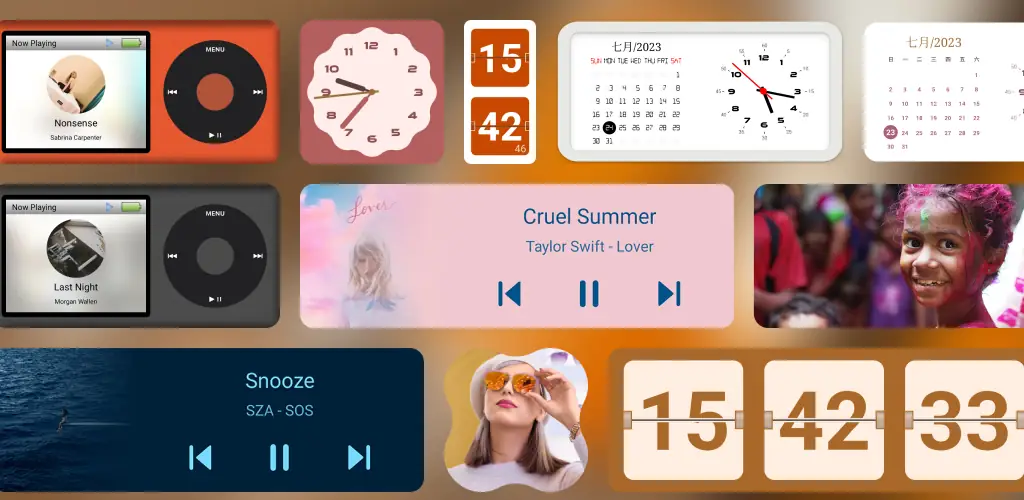
I spent an afternoon playing around, and the experience was genuinely satisfying. Imagine having a retro iPod music player right on your screen 🎶, or a flip clock that feels straight out of a vintage movie. You can even monitor your phone’s health with a real-time device info widget. It’s not just about looks; these widgets are incredibly functional, letting you control music, check your calendar, or display a rotating slideshow of your favorite photos without ever opening another app. And the best part? It integrates smoothly, without draining your battery.

What stands out:

  • Music Player Widget → Control your tunes and see album art directly from your home screen, with styles from classic to modern.
  • Flip Clock Widget → Add a touch of retro charm with a customizable flip display, complete with second-hand options.
  • Calendar Widget → Keep your schedule visible and organized, blending seamlessly with other time-telling widgets.
  • Device Information Widget → Monitor app usage, storage, and memory at a glance, helping you keep your phone running smoothly.
  • Photo Widget → Showcase cherished memories with a slideshow of your favorite pictures, always fresh and visible.

If you’re tired of the same old Android interface and crave a home screen that truly reflects your style and needs, you owe it to yourself to check out Widgeet-Color Widgets(Widget). It’s a powerful toolkit for anyone ready to ditch the dull and embrace a personalized, efficient smartphone experience.
Also known as: Widgeet-Color Widgets (Widget), Widgeet
Video of Widgeet-Color Widgets(Widget)
Screenshot Widgeet-Color Widgets(Widget) 1
Screenshot Widgeet-Color Widgets(Widget) 2
Screenshot Widgeet-Color Widgets(Widget) 3
Screenshot Widgeet-Color Widgets(Widget) 4
Screenshot Widgeet-Color Widgets(Widget) 5
Screenshot Widgeet-Color Widgets(Widget) 6
Screenshot Widgeet-Color Widgets(Widget) 7
Screenshot Widgeet-Color Widgets(Widget) 8

Download Widgeet-Color Widgets(Widget) APK for Android

What's New in Version 1.1.3.2

No official changelog provided for Widgeet-Color Widgets(Widget) version 1.1.3.2. This update likely includes general stability improvements and bug fixes.

Available Files

System Requirements

OS Version
Android 8.0 (OREO) or higher
Architecture
Varies by file (Which one do I need?)
Disk Space
~30 MB free space required
RAM
1 GB
Internet
Not required
Google Services
Required
Permissions (17)
  • Internet
  • Access Network State
  • Read External Storage
  • Wake Lock
  • Foreground Service

APK File Details

Package ID art.widgeet.android
Available on Google Play
Developer Hello Widget
License Free
Monetization Contains Ads   In-App Purchases
Content Rating Everyone
Interface Language
English +37

English, Portuguese, Spanish, Arabic, French, Russian, Italian, Thai, Ukrainian, Vietnamese, Bulgarian, Chinese, Japanese, Korean, Romanian, Turkish, German, Polish, Czech, Hungarian, + 18 localizations

APK Verification & Virus Scan Results

No Virus Signature Verified Safe & Original

Virus scan: Clean (0/42) View report. This APK is free of malware and its signature matches the official developer release.

Show File Details (SHA-256, SHA-1, MD5)

SHA-1 Signature:

499df664ed3c5ec7f53bf2998cf779723fc0f75c

SHA-256 Hash:

e58c51ec4abbaaa39805d6a90e497c83e3bb86427b7ae603a672ebec180a5160

MD5 Checksum:

847edd0810299b3de201ad51c1f2c699

Frequently Asked Questions

Is Widgeet-Color Widgets(Widget) safe to download?

Yes, Widgeet-Color Widgets(Widget) is safe to download. The APK is scanned on every update — no malware or viruses detected. You can verify the full scan report in the Security section above.

How to install XAPK file?

XAPK is a split APK package. Standard Android installer cannot open it directly. Use 'SAI' or 'XAPK Installer' — they handle XAPK files automatically. Download the installer, open the XAPK file with it, and follow the on-screen steps. Read more

What Android version does Widgeet-Color Widgets(Widget) require?

Widgeet-Color Widgets(Widget) requires Android 8.0 (API 26) or higher.

Is Widgeet-Color Widgets(Widget) free?

Yes, it is free to download and use, but it contains ads and offers in-app purchases.

How to update Widgeet-Color Widgets(Widget) to the latest version?

Download the latest APK from this page and install it over your existing version — no need to uninstall first. Your data and settings will be preserved. We update the file as soon as a new version is released.

What processor architecture does Widgeet-Color Widgets(Widget) support?

Widgeet-Color Widgets(Widget) supports arm64-v8a, armeabi-v7a. This build does not support x86/x86_64 processors, so it will not run on most PC emulators. If you are unsure about your device architecture, check the Device Info section on this page.

How to enable installation from unknown sources on Android?

Go to Settings → Security (or Settings → Apps → Special access on Android 8+) and enable "Install unknown apps" for your browser or file manager. On Android 8 and above this setting is per-app, not global. Read more

If you have found any issue or are having difficulty with this page, please .

User Reviews & Ratings

Global rating(Play Store): 4.44(129.7K)
Site Rating: 5(1)
Rate this app

5.00

12345

1

Share your experience with other users.