Control Widget - Themed Panels app cover art for Android
Control Widget - Themed Panels Icon

Control Widget - Themed Panels APK for Android

27M+
Free
Aug 19, 2026

A themeable home screen widget for toggling settings and launching favorite apps

Download Control Widget - Themed Panels APK 2.3 75MB

What is Control Widget?

Control Widget - Themed Panels is a system customization tool that puts a control panel on your home screen for toggling settings and jumping into your most-used apps without digging through menus. Its main draw is the ability to skin that panel to match whatever look you're going for.

The panel works as a single Control Widget placed anywhere on the home screen, and from there it hooks into Android's own settings to flip things like Wi-Fi, Bluetooth, and screen brightness with one tap. Beyond system toggles, you can pin shortcuts to specific apps so the widget doubles as a launcher for the handful of things you open constantly. Setup is straightforward: drop the widget, pick a theme, then assign the toggles and shortcuts you actually reach for. There's no deeper menu structure underneath it, the widget is the whole app.

Key Features:

  • Switches between multiple themed panels so the widget's look can match your wallpaper or icon pack
  • Toggles core hardware settings like Wi-Fi and Bluetooth straight from the home screen
  • Lets you pin app shortcuts next to system toggles for one-tap launching
  • Reads and writes directly to Android system settings instead of opening a separate settings app
  • Runs as a single Control Widget rather than a full app you have to open

Customizing the control panel

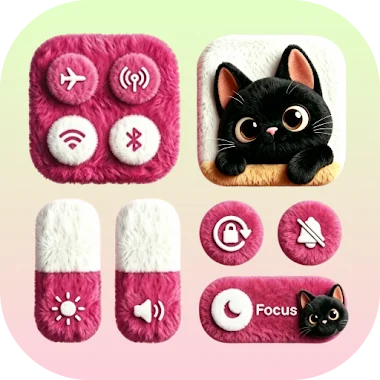
Themes here aren't just color swaps. Each panel style changes the layout and icon set for the toggles, so switching themes can shift where Bluetooth or brightness sits on the grid. That matters for anyone who has muscle memory for a specific button position, since a new theme sometimes means relearning the layout for a day or two. The app leans on this visual flexibility as its main selling point, and it shows in how many panel styles are on offer compared to a bare-bones toggle widget.

Apps like Control Widget - Themed Panels

Power Shade covers similar ground but stays focused on replacing the notification shade and quick settings panel with its own themes, rather than sitting as a standalone home screen widget. Control Center iOS 15 takes the opposite approach, copying the iOS control center's exact look instead of offering a range of custom styles. Control Widget - Themed Panels sits between the two: it's a widget-first tool that trades a system-wide shade replacement for flexibility in how the panel looks and what shortcuts it holds.

This suits Android users who want faster access to toggles and apps without leaving the home screen, and who care more about matching a theme than about replacing the stock notification shade. The widget covers toggles and app shortcuts and nothing else, so anyone wanting deeper automation or scheduling will need a separate tool.

Control Widget - Themed Panels screenshot 1
Control Widget - Themed Panels screenshot 2
Control Widget - Themed Panels screenshot 3
Control Widget - Themed Panels screenshot 4
Control Widget - Themed Panels screenshot 5
Control Widget - Themed Panels screenshot 6

Control Widget APK Download

What's New in Version 2.3

New Version Released!
- Enhanced stability and bug fixes for better performance.

Download Link:

System Requirements

OS Version
Android 6.0 (Marshmallow) or higher
Architecture
Varies by file (Which one do I need?)
Disk Space
~90 MB free space required
RAM
1 GB
Internet
Not required
Google Services
Required   GMS dependent

APK File Details

Package ID com.ioscontrol.themed.control.center.smart
Available on Google Play
Developer iControl Tools
License Free
Monetization Contains Ads   In-App Purchases
Content Rating Everyone
Interface Language
English +16

English, Arabic, German, Spanish, French, Hindi, Italian, Japanese, Korean, Portuguese, Russian, Thai, Turkish, Vietnamese, Chinese, + 2 localizations

Required Permissions (112)
  • Requires Google Play Services to launch:
    Note: This is an original file. Unlike modded versions with no verification, it validates via your store account. Details
  • Internet
  • Record Audio
  • Camera
  • Access Network State
  • Read External Storage

APK Verification & Virus Scan Results

Scan In Queue Signature Verified Safe & unmodified

Full antivirus scan in queue; report will appear here shortly. Signature matches the official developer release.

Show File Details (SHA-256, SHA-1, MD5)

SHA-1 Signature:

fb59a243661a7bbe6ce5d430067748550a7c8fd5

SHA-256 Hash:

a97ec71d59c3fe3c0f0c47fc3f79464aa88f1c90e727f0a178adb6d015336b80

MD5 Checksum:

90e4eed79a8c58145aa6910b8335a108

Frequently Asked Questions

Is Control Widget safe to download?

Control Widget has passed a basic integrity check. A full antivirus scan is pending. You can check the current scan status in the Security section above.

How to install XAPK file?

XAPK is a split APK package. Standard Android installer cannot open it directly. Use 'SAI' or 'XAPK Installer' — they handle XAPK files automatically. Download the installer, open the XAPK file with it, and follow the on-screen steps. Read more

What Android version does Control Widget require?

Control Widget requires Android 6.0 (API 23) or higher. Optimized for Android 16 (API 36).

Is Control Widget free?

Yes, it is free to download and use, but it contains ads and offers in-app purchases.

Does Control Widget require a license check?

Yes, this app performs a license check. You may need to have the Google Play Store installed and be logged in to verify the license.

How to update Control Widget to the latest version?

Download the latest APK from this page and install it over your existing version — no need to uninstall first. Your data and settings will be preserved. We update the file as soon as a new version is released.

What processor architecture does Control Widget support?

Control Widget supports arm64-v8a. This build does not support x86/x86_64 processors, so it will not run on most PC emulators. If you are unsure about your device architecture, check the Device Info section on this page.

Found a problem on this page?

User Reviews & Ratings

Global rating (Play Store): 4.5(816.9K)
Site Rating: 5(1)
Rate this app

5.00

12345

1

Share your experience with other users.

Download Control Widget APK - Latest version

Get the official APK file for your Android device. Fast, safe, and free. Download APK