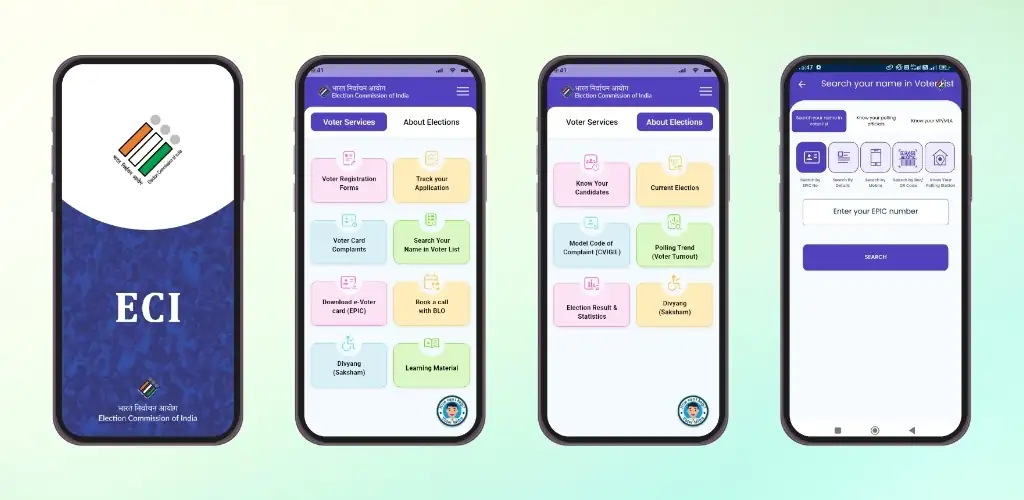

ECINET app cover art for Android
ECINET Icon

ECINET APK for Android

27M+
Free
Sep 25, 2026

Download ECINET APK v1.9.42 166MB

What is ECINET?

You need to check your voter registration status, find your polling booth, or track election results, but bouncing between government websites gets old fast. ECINET is a government services and election information portal that consolidates everything the Election Commission of India manages into one app for both citizens and officials.

Citizens can pull up electoral rolls, confirm voter registration, locate their polling station, and follow live election updates as results come in. Officials log in through mobile number authentication and land in a workspace tailored to their administrative role, whether that’s updating records, coordinating across districts, or managing polling logistics. The access layer keeps each user in their lane.

What citizens and officials access

  • Citizens search the electoral roll by name or ID and confirm registration without calling a helpline.
  • Polling station addresses load with a tap, so you know exactly where to vote before election day.
  • Live election updates stream results and turnout data as counting progresses, no need to refresh a dozen news sites.

Official tools and authentication

Election Commission staff need verification before they can touch administrative functions. You authenticate with a registered mobile number, then the app surfaces tools matched to your role. A district officer sees coordination dashboards. A booth-level officer gets field entry forms. The separation keeps workflows clean and prevents accidental edits outside your jurisdiction.

Other government information apps

Voter Helpline handles registration, roll searches, and complaint filing but stops short of the internal admin layer ECINET covers. Gov.in Portal casts wider, linking to services across ministries, while ECINET stays focused on election operations and voter data under one department.

ECINET works for anyone checking their voter status or tracking election night results. Officials get the targeted access their work requires. The mobile number gate means you need a registered credential to unlock official features, so casual users stay in the citizen view only.

ECINET screenshot 1
ECINET screenshot 2
ECINET screenshot 3
ECINET screenshot 4
ECINET screenshot 5

ECINET APK Download

What's New in Version v1.9.42

1) Updated PRO module for PC BYE Elections.

Download Links:

System Requirements

OS Version
Android 8.0 (OREO) or higher
Architecture
Varies by file (Which one do I need?)
Disk Space
~200 MB free space required
RAM
2 GB
Internet
Not required
Google Services
Required   GMS dependent

APK File Details

Package ID in.gov.eci.app
Available on Google Play
Developer Election Commission of India
License Free ( No Ads)
Content Rating Rated for 3+
Interface Language
English +75

English, Arabic, Bulgarian, Czech, German, Spanish, French, Hindi, Hungarian, Indonesian, Italian, Japanese, Korean, Polish, Portuguese, Romanian, Russian, Thai, Turkish, Ukrainian, Vietnamese, Chinese, + 54 localizations

Required Permissions (24)
  • Requires Google Play Services to launch:
    Note: This is an original file. Unlike modded versions with no verification, it validates via your store account. Details
  • Internet
  • Record Audio
  • Camera
  • Access Network State
  • Read External Storage

APK Verification & Virus Scan Results

Scan In Queue Signature Verified Safe & unmodified

Full antivirus scan in queue; report will appear here shortly. Signature matches the official developer release.

Show File Details (SHA-256, SHA-1, MD5)

SHA-1 Signature:

ae77f9965336943118be97d41d3605e0f6ee9dc5

SHA-256 Hash:

e735c9a0944338c8dcab35824fe4ae17b288f044b216607c3aa711893a506423

MD5 Checksum:

bb2729f212c0d4ba7f10a5386890c162

Frequently Asked Questions

Is ECINET safe to download?

ECINET has passed a basic integrity check. A full antivirus scan is pending. You can check the current scan status in the Security section above.

How to install XAPK file?

XAPK is a split APK package. Standard Android installer cannot open it directly. Use 'SAI' or 'XAPK Installer' — they handle XAPK files automatically. Download the installer, open the XAPK file with it, and follow the on-screen steps. Read more

What Android version does ECINET require?

ECINET requires Android 8.0 (API 26) or higher. Optimized for Android 15 (API 35).

Is ECINET free?

Yes, this app is completely free to download and use.

Does ECINET require a license check?

Yes, this app performs a license check. You may need to have the Google Play Store installed and be logged in to verify the license.

How to update ECINET to the latest version?

Download the latest APK from this page and install it over your existing version — no need to uninstall first. Your data and settings will be preserved. We update the file as soon as a new version is released.

What processor architecture does ECINET support?

ECINET supports arm64-v8a. This build does not support x86/x86_64 processors, so it will not run on most PC emulators. If you are unsure about your device architecture, check the Device Info section on this page.

Found a problem on this page?

User Reviews & Ratings

Global rating (Play Store): 4.08★ (46K)
Site Rating: 5★ (1)
Rate this app

5.00

12345

1

Share your experience with other users.

Download ECINET APK - Latest version

Get the official APK file for your Android device. Fast, safe, and free. Download APK