PDF Reader, PDF Viewer app cover art for Android
PDF Reader, PDF Viewer Icon

PDF Reader, PDF Viewer APK for Android

Also known as:  PDF Reader, PDF Viewer
14M+
Free
Jul 20, 2026

All-in-one PDF reader, editor, converter, and document scanner.

Download PDF Reader, PDF Viewer APK 1.7.9 127MB

What is PDF Reader, PDF Viewer?

PDF Reader, PDF Viewer APK offers a comprehensive suite for managing PDF documents directly on your Android device. This application integrates a fast PDF reader, a capable editor, a versatile converter, and a document scanner into a single utility. It aims to streamline various document tasks, from casual reading to complex file manipulation.

What is PDF Reader, PDF Viewer?

PDF Reader, PDF Viewer functions as a central hub for all things PDF. Users can open PDF files instantly with a high-quality viewer, ensuring smooth scrolling and crisp text rendering. The interface allows for quick navigation, including direct page jumps and text searches, making it simple to locate specific information within contracts, reports, or study materials. Zoom controls provide comfortable reading for any document size.

Beyond mere viewing, the app provides tools to modify and organize documents. You can annotate PDFs with highlights, notes, and various markup options, which is particularly useful for reviewing business documents or personal study notes. It also supports bookmarking pages for rapid access to critical sections.

Key Features:

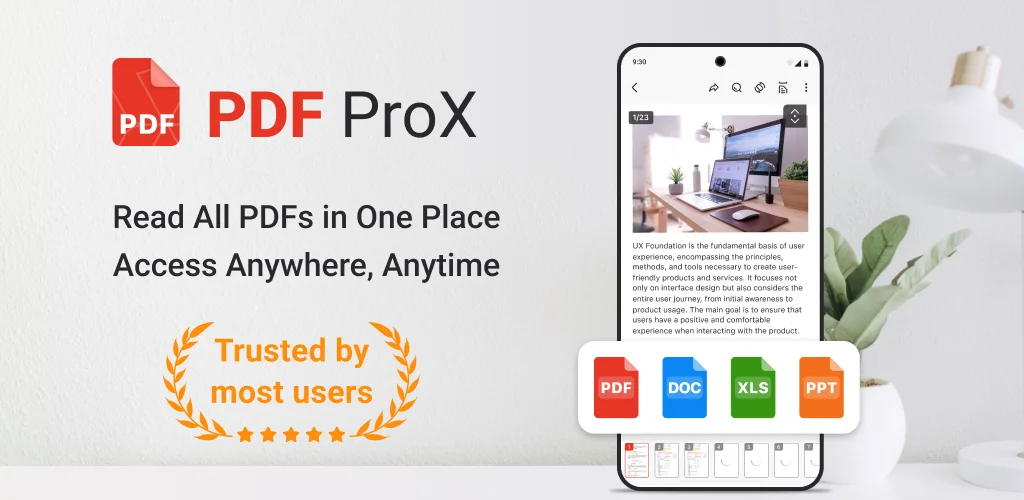
  • Multi-Format Document Support: Open not just PDFs, but also Word, Excel, and PowerPoint files directly within the app, eliminating the need to switch between different office applications.
  • Integrated PDF Converter: Transform images into PDF documents, or convert existing PDFs back into image formats. Crucially, it also handles conversions from Word and Excel files into PDFs.
  • Robust Document Scanner: Utilize your device’s camera to scan physical documents, receipts, or forms. The app includes auto-scan and smart detection features to produce clear, digital PDF copies.
  • Advanced File Management: Merge multiple PDFs into one cohesive document, or dissect larger files into individual pages. Users can rename, sort, delete, and organize their PDF library efficiently.
  • Password Protection: Safeguard sensitive PDF files with password encryption, adding a layer of security for confidential documents.

Practical Use Cases for PDF Reader, PDF Viewer

This application serves a broad spectrum of users. Students can consolidate lecture notes and research papers, annotating key passages for revision. Business professionals might use it to review contracts, convert spreadsheets to PDF for sharing, or scan expense receipts on the go. For general users, it simplifies managing e-books, digital manuals, and personal records, all within one consistent environment. Basically, if you interact with various document types on your phone, this app streamlines the process.

PDF Reader, PDF Viewer vs similar apps

Compared to basic viewers like Google PDF Viewer, PDF Reader, PDF Viewer offers a vastly expanded feature set, including editing, conversion, and scanning capabilities. When stacked against more specialized tools like Adobe Acrobat Reader, which often gates advanced features behind a subscription, PDF Reader, PDF Viewer provides a more comprehensive toolkit upfront, particularly for file conversion and document scanning. Xodo PDF Reader & Editor excels in annotation, but PDF Reader, PDF Viewer differentiates itself with its integrated multi-format support and robust file management, making it a stronger all-in-one choice for users who need to handle diverse document types beyond just PDFs.

For users seeking a single application that handles reading, editing, converting, scanning, and organizing PDFs along with other office documents, PDF Reader, PDF Viewer presents a compelling option. However, its extensive feature set means the app’s installation size might be larger than a minimalist PDF reader, which is a consideration for devices with limited storage.

Screenshot PDF Reader, PDF Viewer 1
Screenshot PDF Reader, PDF Viewer 2
Screenshot PDF Reader, PDF Viewer 3
Screenshot PDF Reader, PDF Viewer 4
Screenshot PDF Reader, PDF Viewer 5
Screenshot PDF Reader, PDF Viewer 6
Screenshot PDF Reader, PDF Viewer 7

PDF Reader, PDF Viewer APK Download

What's New in Version 1.7.9

No official changelog provided for PDF Reader, PDF Viewer version 1.7.9-Office. This update likely includes general stability improvements and bug fixes.

System Requirements

OS Version
Android 8.0 (OREO) or higher
Architecture
Varies by file (Which one do I need?)
Disk Space
~200 MB free space required
RAM
2 GB
Internet
Not required
Google Services
Required

APK File Details

Package ID com.trusted.pdfeditor.pdfreader
Available on Google Play
Developer Office Suite Pro
License Free
Monetization Contains Ads   In-App Purchases
Content Rating PEGI 3
Interface Language
English +54

English, Arabic, Bulgarian, Czech, German, Spanish, French, Hindi, Hungarian, Italian, Japanese, Korean, Polish, Portuguese, Romanian, Russian, Thai, Turkish, Ukrainian, Vietnamese, Chinese, + 34 localizations

Required Permissions (20)
  • Internet
  • Camera
  • Access Network State
  • Read External Storage
  • Write External Storage

APK Verification & Virus Scan Results

Scan In Queue Signature Verified Safe & Original

Antivirus scan in queue, will be scanned soon. This APK is free of malware and its signature matches the official developer release.

Show File Details (SHA-256, SHA-1, MD5)

SHA-1 Signature:

c42de2c17fea11a250ef5fa208783dbea3244da9

SHA-256 Hash:

629127482c59857caca44fc8aea97e370297db287e67f8ce0a4a059041393f1f

MD5 Checksum:

6bede36707806aeae59e1805b8b8298f

Frequently Asked Questions

Is PDF Reader, PDF Viewer safe to download?

PDF Reader, PDF Viewer has passed a basic integrity check. A full antivirus scan is pending. You can check the current scan status in the Security section above.

How to install XAPK file?

XAPK is a split APK package. Standard Android installer cannot open it directly. Use 'SAI' or 'XAPK Installer' — they handle XAPK files automatically. Download the installer, open the XAPK file with it, and follow the on-screen steps. Read more

What Android version does PDF Reader, PDF Viewer require?

PDF Reader, PDF Viewer requires Android 8.0 (API 26) or higher. Optimized for Android 15 (API 35).

Is PDF Reader, PDF Viewer free?

Yes, it is free to download and use, but it contains ads and offers in-app purchases.

How to update PDF Reader, PDF Viewer to the latest version?

Download the latest APK from this page and install it over your existing version — no need to uninstall first. Your data and settings will be preserved. We update the file as soon as a new version is released.

What processor architecture does PDF Reader, PDF Viewer support?

PDF Reader, PDF Viewer supports arm64-v8a. This build does not support x86/x86_64 processors, so it will not run on most PC emulators. If you are unsure about your device architecture, check the Device Info section on this page.

How to enable installation from unknown sources on Android?

Go to Settings → Security (or Settings → Apps → Special access on Android 8+) and enable "Install unknown apps" for your browser or file manager. On Android 8 and above this setting is per-app, not global. Read more

If you have found any issue or are having difficulty with this page, please .

User Reviews & Ratings

Global rating(Play Store): 3.48(21.5K)
Site Rating: 5(1)
Rate this app

5.00

12345

1

Share your experience with other users.

Download PDF Reader, PDF Viewer APK - Latest version

Get the official APK file for your Android device. Fast, safe, and free. Download APK