PDF Editor & PDF Reader | Xodo app cover art for Android
PDF Editor & PDF Reader | Xodo Icon

PDF Editor & PDF Reader | Xodo APK for Android

31M+
Free
Dec 12, 2019

Viewing and editing electronic documents

Download PDF Editor & PDF Reader | Xodo APK 4.7.4 29MB

What is PDF Editor & PDF Reader | Xodo?

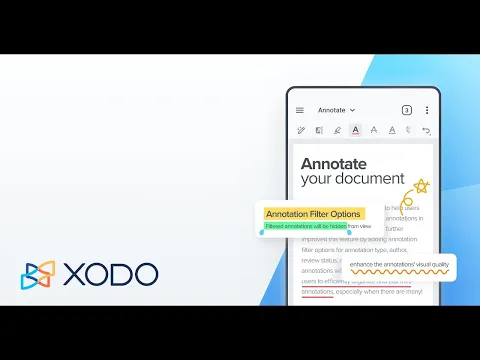
Xodo PDF Reader & Editor – the functionality of this useful Android tool allows you not only to view documents in PDF format, but also to edit them: highlight and underline paragraphs, leave any notes and comments, sign documents, and so on . In addition, owners of mobile devices with KitKat and Lollipop OS have access to the printing function directly from the application interface.

The PDF viewing function provides many useful settings, for example, saving selected pages in favorites with further access to the material at any time, night mode for comfortable PDF reading in low ambient light conditions, continuous vertical scrolling of pages, fast movement through sections and chapters , keyword search and many other interesting features.

But the most valuable feature of the PDF Reader and Editor application from the company Xodo Technologies Inc. is, of course, the powerful prospects for changing the source material. Write and draw, use geometric shapes to highlight text, and digitally sign documents using SPen and other styluses supported by your Android device. Any action, for example an erroneous one, can be canceled with one touch, which makes working with a text document even more convenient.

Using the built-in mobile camera, you can take a photo of any text and automatically convert it into a PDF file, which is available for any further changes. Xodo PDF Reader & Editor is an excellent tool that, thanks to its intuitive interface, even a person far from modern technology can understand. An additional useful feature of the utility is its integration with cloud storage (Google Drive and Dropbox) – all changes made by the user are instantly synchronized in the selected service.
Also known as: Xodo Docs
Video of PDF Editor & PDF Reader | Xodo
Screenshot PDF Editor & PDF Reader | Xodo 1
Screenshot PDF Editor & PDF Reader | Xodo 2
Screenshot PDF Editor & PDF Reader | Xodo 3
Screenshot PDF Editor & PDF Reader | Xodo 4
Screenshot PDF Editor & PDF Reader | Xodo 5
Screenshot PDF Editor & PDF Reader | Xodo 6
Screenshot PDF Editor & PDF Reader | Xodo 7
Screenshot PDF Editor & PDF Reader | Xodo 8

Download PDF Editor & PDF Reader | Xodo APK for Android

What's New in Version 4.7.4

Bug Fixes and Improvements

Available Files

System Requirements

OS Version
Android 4.1 (Jelly Bean) or higher
Architecture
Varies by file (Which one do I need?)
Disk Space
~50 MB free space required
RAM
1 GB
Internet
Not required
Permissions (13)
  • Internet
  • Record Audio
  • Access Network State
  • Read External Storage
  • Write External Storage

APK File Details

Package ID com.xodo.pdf.reader
Available on Google Play
Developer Apryse Software Inc.
License Free ( No Ads)
Monetization In-App Purchases
Content Rating Everyone
Interface Language
English +76

English, Japanese, German, Bulgarian, Thai, Hindi, Vietnamese, Ukrainian, Polish, Korean, Romanian, French, Turkish, Czech, Spanish, Italian, Hungarian, Russian, Chinese, Portuguese, Indonesian, Arabic, + 55 localizations

APK Verification & Virus Scan Results

No Virus Signature Verified Safe & Original

Virus scan: Clean (0/60) View report. This APK is free of malware and its signature matches the official developer release.

Show File Details (SHA-256, SHA-1, MD5)

SHA-1 Signature:

AC5061A39DFA5BC48FC9A1912E15C12E0CE8CD3F

SHA-256 Hash:

8becd4504dcd49226b21668441a5a05a6db94631bd6647ed7bb97d550142ba30

MD5 Checksum:

34721723183e550af2d980c1e004f277

Frequently Asked Questions

Is PDF Editor & PDF Reader | Xodo safe to download?

Yes, PDF Editor & PDF Reader | Xodo is safe to download. The APK is scanned on every update — no malware or viruses detected. You can verify the full scan report in the Security section above.

How to install PDF Editor & PDF Reader | Xodo APK on Android?

Download the APK using the button above. Then open the file and tap Install. If prompted, enable "Install from unknown sources" in Settings → Security. The process takes under a minute. Read more

Why does installation fail on newer Android versions (14 - 16)?

Newer Android versions strictly block the installation of apps built for older Android versions (API < 23) for security reasons. Standard installation is not possible. Read our step-by-step guide on how to bypass this restriction using ADB or Shizuku.

What Android version does PDF Editor & PDF Reader | Xodo require?

PDF Editor & PDF Reader | Xodo requires Android 4.1 (API 16) or higher. Optimized for Android 9.0 (API 28).

Is PDF Editor & PDF Reader | Xodo free?

Yes, the app is free to download, but it contains in-app purchases for additional content.

How to update PDF Editor & PDF Reader | Xodo to the latest version?

Download the latest APK from this page and install it over your existing version — no need to uninstall first. Your data and settings will be preserved. We update the file as soon as a new version is released.

What processor architecture does PDF Editor & PDF Reader | Xodo support?

PDF Editor & PDF Reader | Xodo supports arm64-v8a. This build does not support x86/x86_64 processors, so it will not run on most PC emulators. If you are unsure about your device architecture, check the Device Info section on this page.

If you have found any issue or are having difficulty with this page, please .

User Reviews & Ratings

Global rating(Play Store): 4.54(426.8K)
Site Rating: 4.54(4)
Rate this app

4.25

12345

4

Share your experience with other users.