Video Editor APP - VivaCut Icon

Video Editor APP - VivaCut APK for Android

282M+
Free
Feb 1, 2024

A set of tools for creating professional videos

Download Video Editor APP - VivaCut APK 3.5.4 148MB Old versions

What is Video Editor APP?

VivaCut is a mobile platform for creative experiments, containing dozens of tools necessary for editing and creating spectacular videos. Gone are the days when a computer and a professional editor were required to create a clip, now every user can create and experiment on the screen of a smartphone or tablet.

Add materials from the memory of a mobile device to a new project – frame-by-frame breakdown occurs automatically, and the user only has to get rid of unsuccessful frames, adjust the smoothness of transitions, playback speed, saturation and contrast, select visual VFX effects and apply audio accompaniment.

Complete the video with emotional stickers and thematic inscriptions by pre-configuring the style, size and color of the text. Use filters, change the background, duplicate, experiment with proportions, save the result and send the clips to your friends and get rave reviews in return.

Features:

  • timeline for the most accurate video cropping;
  • luxurious cinematic transitions;
  • overlay music and sounds on the video;
  • use stickers and text;
  • select save quality;
  • is free and without ads.

In order to master the work in the editor VivaCut no special knowledge is required – an intuitive interface and a preview of any changes made will save you from possible errors. For even more valuable information and answers to common questions, there is a help tab, which we strongly recommend that you study.

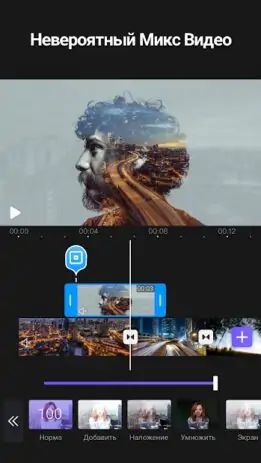
Screenshot Video Editor APP - VivaCut 1
Screenshot Video Editor APP - VivaCut 2
Screenshot Video Editor APP - VivaCut 3
Screenshot Video Editor APP - VivaCut 4
Screenshot Video Editor APP - VivaCut 5
Screenshot Video Editor APP - VivaCut 6
Screenshot Video Editor APP - VivaCut 7
Screenshot Video Editor APP - VivaCut 8

Download Video Editor APP - VivaCut APK for Android

What's New in Version 3.5.4

1.All brand new editing UI
2.Now,you can change language in settings

Other versions

System Requirements

OS Version
Android 5.0 (Lollipop) or higher
Architecture
Varies by file (Which one do I need?)
Disk Space
~250 MB free space required
RAM
2 GB
Internet
Not required
Permissions (28)
  • Internet
  • Record Audio
  • Access Network State
  • Read External Storage
  • Write External Storage

APK File Details

Package ID com.videoeditorpro.android
Available on Google Play
Developer VivaCut professional video editor
License Free
Monetization Contains Ads   In-App Purchases
Content Rating Everyone
Interface Language
18 languages

Japanese, German, Thai, Hindi, Vietnamese, Korean, Arabic, French, Turkish, Spanish, Italian, Russian, Chinese, Portuguese, + 4 localizations

APK Verification & Virus Scan Results

No Virus Signature Verified Safe & Original

Virus scan: Clean (0/60) View report. This APK is free of malware and its signature matches the official developer release.

Show File Details (SHA-256, SHA-1, MD5)

SHA-1 Signature:

0f048c9b6906431764256acb3f9300e4b093b737

SHA-256 Hash:

9b792dd5fc0cfc0a6f812edf97d8b1ae1d3ea3f1025a1de2ce549f51fd50b5da

MD5 Checksum:

c392b40c4c221238662364a6190a8631

Frequently Asked Questions

Is Video Editor APP safe to download?

Yes, Video Editor APP is safe to download. The APK is scanned on every update — no malware or viruses detected. You can verify the full scan report in the Security section above.

How to install Video Editor APP APK on Android?

Download the APK using the button above. Then open the file and tap Install. If prompted, enable "Install from unknown sources" in Settings → Security. The process takes under a minute. Read more

What Android version does Video Editor APP require?

Video Editor APP requires Android 5.0 (API 21) or higher. Optimized for Android 13 (API 33).

Is Video Editor APP free?

Yes, it is free to download and use, but it contains ads and offers in-app purchases.

How to update Video Editor APP to the latest version?

Download the latest APK from this page and install it over your existing version — no need to uninstall first. Your data and settings will be preserved. We update the file as soon as a new version is released.

What processor architecture does Video Editor APP support?

Video Editor APP supports arm64-v8a, armeabi-v7a. This build does not support x86/x86_64 processors, so it will not run on most PC emulators. If you are unsure about your device architecture, check the Device Info section on this page.

How to enable installation from unknown sources on Android?

Go to Settings → Security (or Settings → Apps → Special access on Android 8+) and enable "Install unknown apps" for your browser or file manager. On Android 8 and above this setting is per-app, not global. Read more

If you have found any issue or are having difficulty with this page, please .

User Reviews & Ratings

Global rating(Play Store): 4.88(1.3M)
Site Rating: 4(1)
Rate this app

4.00

12345

1

Share your experience with other users.