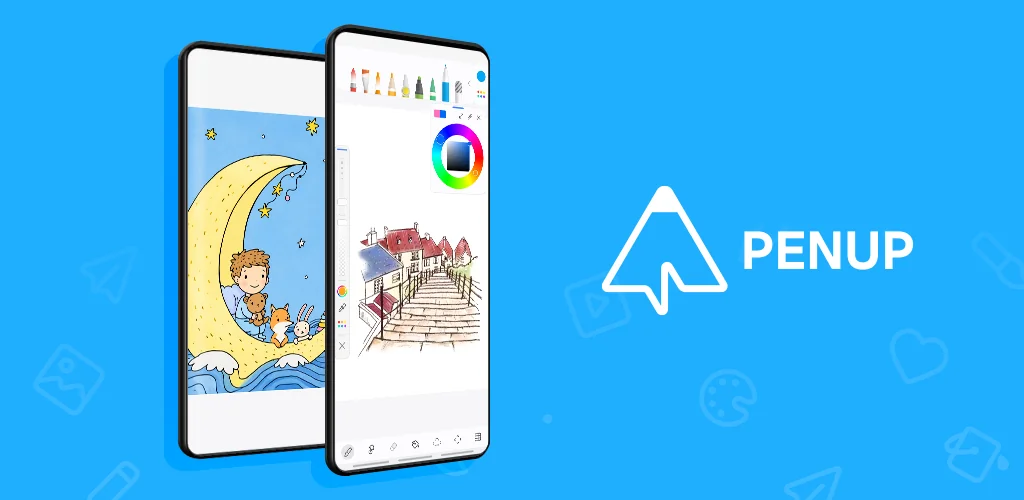
PENUP – Drawing-sharing SNS app cover art for Android
PENUP – Drawing-sharing SNS Icon

PENUP – Drawing-sharing SNS APK for Android

218M+
Free
Jul 28, 2026

Transform your doodles into shared masterpieces.

Download PENUP – Drawing-sharing SNS APK 3.9.22.32 97MB

What is PENUP?

Most drawing apps feel like isolated tools, a blank canvas with no guidance. But what if you craved more than just lines and colors? What if you wanted to learn, share, and connect? PENUP – Drawing-sharing SNS steps in, offering a vibrant art community alongside its creative toolkit.

Imagine you’re scrolling through social media, feeling a creative itch, but unsure where to begin with a blank page. Or perhaps you’ve tried drawing before, only to get frustrated by complex tools. This is where PENUP – Drawing-sharing SNS truly shines. It provides a welcoming space to pick up a digital pen, offering guided drawing experiences that build confidence from the first stroke.

I spent hours exploring its features, from simple coloring pages to more advanced tutorials. Honestly, the interface felt intuitive, never overwhelming. You can trace over photos to get started, or follow step-by-step video lessons. Curiosity led me to the challenges, pushing me to try new styles. Then, sharing my creations felt natural, and seeing others’ art on the Trending Works feed was genuinely inspiring. It’s more than just an art app; it’s a place to grow your skills and find your artistic tribe.

What stands out:

  • Live Drawing → Follow video tutorials to master new techniques at your own pace.
  • Photo Drawing → Use your own photos as a guide to easily create stunning art.
  • Drawing Challenges → Test your creativity and improve skills with diverse themed prompts.
  • Trending Works Feed → Discover inspiring art from a global community and share your own.
  • Coloring Book Pages → Relax and express yourself with a wide selection of pre-designed pages.

If you’re looking for a digital canvas that also connects you to a supportive global community, PENUP – Drawing-sharing SNS is worth exploring. It’s a rewarding space for anyone, from casual doodlers to aspiring artists, to learn, create, and share. Give your creative spark the platform it deserves.

Screenshot PENUP – Drawing-sharing SNS 1
Screenshot PENUP – Drawing-sharing SNS 2
Screenshot PENUP – Drawing-sharing SNS 3
Screenshot PENUP – Drawing-sharing SNS 4
Screenshot PENUP – Drawing-sharing SNS 5
Screenshot PENUP – Drawing-sharing SNS 6
Screenshot PENUP – Drawing-sharing SNS 7
Screenshot PENUP – Drawing-sharing SNS 8

PENUP APK Download

What's New in Version 3.9.22.32

• New brush added as drawing tool
• Supports Dual Brush
• Added Draft File Export feature
• Lasso (Added Auto-selection option)
• Supports Landscape mode
• Sync with Samsung account email

System Requirements

OS Version
Android 9.0 (Pie) or higher
Architecture
Varies by file (Which one do I need?)
Disk Space
~150 MB free space required
RAM
1 GB
Internet
Not required

APK File Details

Package ID com.sec.penup
Available on Google Play
Developer Samsung Electronics Co., Ltd.
License Free ( No Ads)
Content Rating Teen
Interface Language
English +86

English, Japanese, German, Bulgarian, Thai, Hindi, Vietnamese, Ukrainian, Polish, Korean, Romanian, Arabic, French, Turkish, Czech, Spanish, Italian, Portuguese, Hungarian, Russian, Chinese, Indonesian, + 65 localizations

Required Permissions (36)
  • Internet
  • Access Network State
  • Write External Storage
  • Vibrate
  • Wake Lock

APK Verification & Virus Scan Results

No Virus Signature Verified Safe & Original

Virus scan: Clean (0/63) View report. This APK is free of malware and its signature matches the official developer release.

Show File Details (SHA-256, SHA-1, MD5)

SHA-1 Signature:

c6d9aa7a2514dd893c30d7e037803bad94f81ee9

SHA-256 Hash:

8cae232601997dbfbb499736137082999e342c2aefec880b3f519be3b34a7dfe

MD5 Checksum:

243e72c9b8852c6be94791c0c9073e61

Frequently Asked Questions

Is PENUP safe to download?

Yes, PENUP is safe to download. The APK is scanned on every update — no malware or viruses detected. You can verify the full scan report in the Security section above.

How to install PENUP APK on Android?

Download the APK using the button above. Then open the file and tap Install. If prompted, enable "Install from unknown sources" in Settings → Security. The process takes under a minute. Read more

What Android version does PENUP require?

PENUP requires Android 9.0 (API 28) or higher. Optimized for Android 16 (API 36).

Is PENUP free?

Yes, this app is completely free to download and use.

How to update PENUP to the latest version?

Download the latest APK from this page and install it over your existing version — no need to uninstall first. Your data and settings will be preserved. We update the file as soon as a new version is released.

What processor architecture does PENUP support?

PENUP supports arm64-v8a, armeabi-v7a, x86, x86_64. If you are unsure about your device architecture, check the Device Info section on this page.

How to enable installation from unknown sources on Android?

Go to Settings → Security (or Settings → Apps → Special access on Android 8+) and enable "Install unknown apps" for your browser or file manager. On Android 8 and above this setting is per-app, not global. Read more

If you have found any issue or are having difficulty with this page, please .

User Reviews & Ratings

Global rating(Play Store): 4.53(221.4K)
Site Rating: 5(1)
Rate this app

5.00

12345

1

Share your experience with other users.

Download PENUP APK - Latest version

Get the official APK file for your Android device. Fast, safe, and free. Download APK