Home Design 3D: Draw & Plan app cover art for Android
Home Design 3D: Draw & Plan Icon

Home Design 3D: Draw & Plan APK for Android

Anuman Original
24M+
Free
Jan 3, 2026

The only complete app that allows you to create and customize your plans!

Download Home Design 3D: Draw & Plan APK 5.4.1 422MB Old versions

What is Home Design 3D: Draw & Plan?

Home Design 3D is a professional tool with which you can visualize any project – a plot, house, apartment or just a separate room, as well as design – exterior and interior of the project.

The application allows you to:

  • Draw project drawings;
  • Give objects sizes, volumes, textures and colors;
  • Furnish interiors and decorate exteriors.

Work algorithm.
The application contains 12 video lessons on how to start designing and how to decorate the finished project:

  1. Draw a project – a plot, a house on a plot, floors and partitions in a house that divide the interior space houses into rooms and corridors.
  2. Furnish the rooms, decorate the exterior and paint the environment – the landscape.
  3. Dimensions, volumes, textures and colors, furniture, decorations and their location – all this can be changed as the project progresses.
  4. View finished projects in 3D, you can do this both inside and outside the objects.
  5. The day and night mode allows you to see how the project will look at the corresponding time of the day.
  6. Compass – it will help you rotate the rental relative to the four cardinal points in such a way as to see at what angle the natural light will penetrate into the project premises.
  7. Share finished projects with friends and followers on social networks or via email, or via storage clouds Dropbox, OneDrive and others. This option also allows several people – application users – to work on the same project at the same time.

Some features:

  • The application contains a collection of furniture, decorations and accessories, which is periodically updated with new items.
  • The application also contains the tools needed to match unique colors and paint surfaces with pixel precision.
  • Background images – you can import them and select them for the project until you achieve the desired effect.
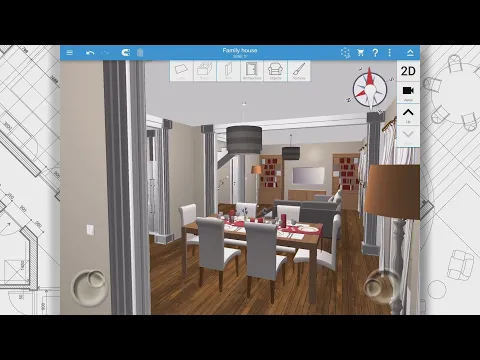
Video of Home Design 3D: Draw & Plan
Screenshot Home Design 3D: Draw & Plan 1
Screenshot Home Design 3D: Draw & Plan 2
Screenshot Home Design 3D: Draw & Plan 3
Screenshot Home Design 3D: Draw & Plan 4
Screenshot Home Design 3D: Draw & Plan 5
Screenshot Home Design 3D: Draw & Plan 6
Screenshot Home Design 3D: Draw & Plan 7
Screenshot Home Design 3D: Draw & Plan 8

Download Home Design 3D: Draw & Plan APK for Android

What's New in Version 5.4.1

Bug fixes and improvements

Other versions

System Requirements

OS Version
Android 8.0 (OREO) or higher
Architecture
Varies by file (Which one do I need?)
Disk Space
~600 MB free space required
RAM
2 GB
Internet
Not required
Google Services
Required   GMS dependent
Permissions (18)
  • Requires Google Play Services to launch:
    Note: This is an original file. Unlike modded versions with no verification, it validates via your store account. Details
  • Internet
  • Camera
  • Access Network State
  • Read External Storage
  • Write External Storage

APK File Details

Package ID fr.anuman.HomeDesign3D
Available on Google Play
Developer Anuman
License Free
Monetization Contains Ads   In-App Purchases
Content Rating Everyone
Interface Language
English +79

English, Japanese, Indonesian, German, Bulgarian, Thai, Chinese, Hindi, Vietnamese, Ukrainian, Polish, Korean, Romanian, Arabic, French, Turkish, Czech, Spanish, Italian, Portuguese, Hungarian, Russian, + 58 localizations

APK Verification & Virus Scan Results

No Virus Signature Verified Safe & Original

Virus scan: Clean (0/64) View report. This APK is free of malware and its signature matches the official developer release.

Show File Details (SHA-256, SHA-1, MD5)

SHA-1 Signature:

89dcb11fd48878986ad5d81e87b696d6e0b007d7

SHA-256 Hash:

7bd87e081c25a20fc4256dbd97d2d5e204a1223c7ad9954a3a1b33d9f41ea291

MD5 Checksum:

447989db7a6af93d5ccd2c0d687abc12

Frequently Asked Questions

Is Home Design 3D: Draw & Plan safe to download?

Yes, Home Design 3D: Draw & Plan is safe to download. The APK is scanned on every update — no malware or viruses detected. You can verify the full scan report in the Security section above.

How to install XAPK file?

XAPK is a split APK package. Standard Android installer cannot open it directly. Use 'SAI' or 'XAPK Installer' — they handle XAPK files automatically. Download the installer, open the XAPK file with it, and follow the on-screen steps. Read more

What Android version does Home Design 3D: Draw & Plan require?

Home Design 3D: Draw & Plan requires Android 8.0 (API 26) or higher. Optimized for Android 14 (API 34).

Is Home Design 3D: Draw & Plan free?

Yes, it is free to download and use, but it contains ads and offers in-app purchases.

Does Home Design 3D: Draw & Plan require a license check?

Yes, this app performs a license check. You may need to have the Google Play Store installed and be logged in to verify the license.

How to update Home Design 3D: Draw & Plan to the latest version?

Download the latest APK from this page and install it over your existing version — no need to uninstall first. Your data and settings will be preserved. We update the file as soon as a new version is released.

What processor architecture does Home Design 3D: Draw & Plan support?

Home Design 3D: Draw & Plan supports arm64-v8a. This build does not support x86/x86_64 processors, so it will not run on most PC emulators. If you are unsure about your device architecture, check the Device Info section on this page.

If you have found any issue or are having difficulty with this page, please .

User Reviews & Ratings

Global rating(Play Store): 3.43(34.1K)
Site Rating: 3.33(15)
Rate this app

3.33

12345

15