Launcher для Android app cover art for Android
Launcher для Android Icon

Launcher для Android APK for Android

6M+
Free
Mar 1, 2021

Smartphone workspace reorganization tool

Download Launcher для Android APK v1.4.6 8MB

What is Launcher для Android?

Launcher for Android™ is an application for a total transformation of the user interface, endowed with an impressive set of useful features. All this is designed to bring maximum comfort to the operation of a mobile device and provide aesthetic pleasure from an elegant and modern design. The novelty is primarily aimed at fans of experiments who are not satisfied with the standard design of the smartphone workspace.

First, the launcher makes a dramatic change in the design of icons, allowing you to customize their size, shape and style, as well as the number of objects in the grid. Secondly, the search bar smoothly moves to the bottom of the screen, which looks unusual, but in fact it turns out to be extremely convenient for the end user. Thirdly, the utility supports gesture control and allows you to configure the action assigned to the Home button.

Features:

  • personalize the workspace style as you wish;
  • miniature icon for quick access to settings;
  • collection of high quality HD wallpapers and original themes;
  • detailed settings for each interface element;
  • screen lock on double tap.

The features of the Launcher for Android ™ application include the change in the transition format between desktops – it is the only one, and scrolling is not from right to left, but down – unusual, but again extremely convenient. Additionally, the application comes with a set of themes and wallpapers, for convenience, organized according to the principle of division into thematic and color categories.
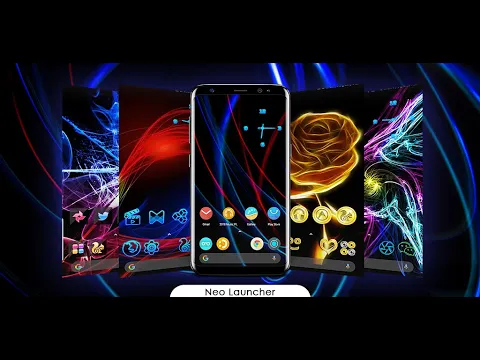
Also known as: Launcher для Android ™, Launcher for Android, Neo Launcher
Video of Launcher для Android
Screenshot Launcher для Android 1
Screenshot Launcher для Android 2
Screenshot Launcher для Android 3
Screenshot Launcher для Android 4
Screenshot Launcher для Android 5
Screenshot Launcher для Android 6
Screenshot Launcher для Android 7
Screenshot Launcher для Android 8

Download Launcher для Android APK for Android

What's New in Version v1.4.6

🔥 THE SPEED & POWER UPDATE IS HERE 🔥

We didn’t just tweak Neox Launcher; we put it into overdrive.

⚡ Blistering Performance: We completely ripped out the old rendering engine. Say hello to zero-lag, butter-smooth scrolling.
🧠 Widgets That Actually Work. Our newly engineered Smart Widgets anticipate what you need—whether it’s work, social, or finance
🎨 Next-Level Visuals: dynamic wallpapers and themes. Glassmorphism, neon, minimal—your home screen is about to look expensive

Available Files

System Requirements

OS Version
Android 5.0 (Lollipop) or higher
Architecture
Varies by file (Which one do I need?)
Disk Space
~20 MB free space required
RAM
1 GB
Internet
Not required
Permissions (18)
  • Internet
  • Access Network State
  • Read External Storage
  • Write External Storage
  • Read Phone State

APK File Details

Package ID com.nkart.launcher
Available on Google Play
Developer Wallpapers and Themes
License Free
Monetization Contains Ads  
Content Rating Mature 17+
Interface Language
English +75

English, Japanese, German, Bulgarian, Thai, Hindi, Vietnamese, Ukrainian, Polish, Korean, Romanian, Arabic, French, Turkish, Czech, Spanish, Italian, Portuguese, Hungarian, Russian, Chinese, + 55 localizations

APK Verification & Virus Scan Results

No Virus Signature Verified Safe & Original

Virus scan: Clean (0/64) View report. This APK is free of malware and its signature matches the official developer release.

Show File Details (SHA-256, SHA-1, MD5)

SHA-1 Signature:

B5771986B6D844F7E55015A36A245CA9CC161297

SHA-256 Hash:

08f4c134f776386ab260fcd79e55fbd50023e032fd4a757a17cc14120fd515a8

MD5 Checksum:

f268fc6578d1a9d4e68a6c9e5ec1be06

Frequently Asked Questions

Is Launcher для Android safe to download?

Yes, Launcher для Android is safe to download. The APK is scanned on every update — no malware or viruses detected. You can verify the full scan report in the Security section above.

How to install Launcher для Android APK on Android?

Download the APK using the button above. Then open the file and tap Install. If prompted, enable "Install from unknown sources" in Settings → Security. The process takes under a minute. Read more

Why does installation fail on newer Android versions (14 - 16)?

Newer Android versions strictly block the installation of apps built for older Android versions (API < 23) for security reasons. Standard installation is not possible. Read our step-by-step guide on how to bypass this restriction using ADB or Shizuku.

What Android version does Launcher для Android require?

Launcher для Android requires Android 5.0 (API 21) or higher. Optimized for Android 10 (API 29).

Is Launcher для Android free?

Yes, it is free to use, but it is ad-supported.

How to update Launcher для Android to the latest version?

Download the latest APK from this page and install it over your existing version — no need to uninstall first. Your data and settings will be preserved. We update the file as soon as a new version is released.

What processor architecture does Launcher для Android support?

Launcher для Android supports universal. If you are unsure about your device architecture, check the Device Info section on this page.

If you have found any issue or are having difficulty with this page, please .

User Reviews & Ratings

Global rating(Play Store): 4.39(14.2K)
Rate this app

0.00

12345

not yet rated

Share your experience with other users.