Shelf app cover art for Android
Shelf Icon

Shelf APK for Android

HeyTap Original
544M+
Free
Sep 15, 2025

Your personal dashboard for everything important

Download Shelf APK 16.11.5 60MB

What is Shelf?

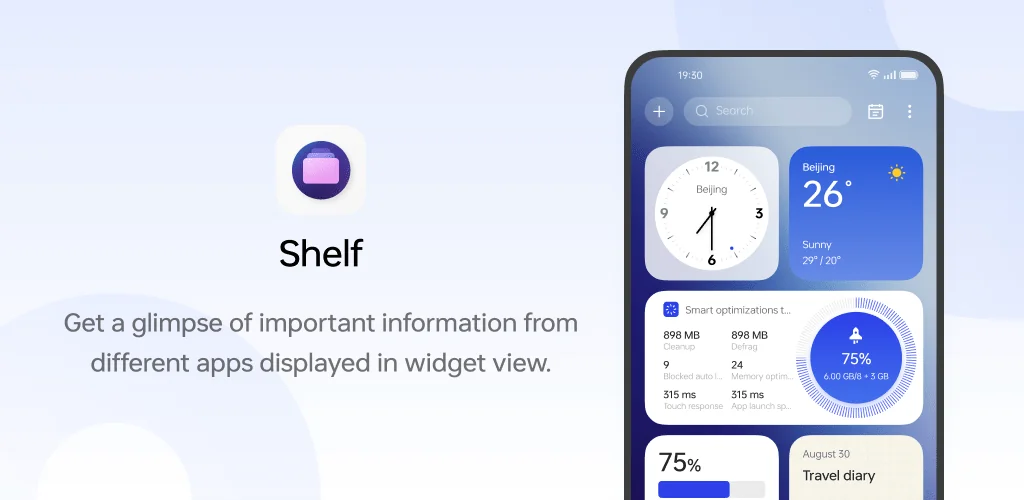
Tired of jumping between apps to check the weather, skip a song, or see how many steps you’ve taken? What if all that important info could live in one convenient spot? On many Android phones running ColorOS (like OPPO and Realme devices), it can! Say hello to Shelf, your personal dashboard that’s just a swipe away.

Simply swipe down on your home screen, and you’ll find a customizable space where you can place widgets for your most-used apps. Think of it as a smart bulletin board for your phone. You can see the latest news headlines, your calendar events, or even control your music without needing to open three different applications. It’s all about making your life easier by bringing the best parts of your apps into one central hub.

The beauty of Shelf is how you can tailor it to your needs. Arrange widgets by dragging them, resize them to prioritize what’s important, and add new ones whenever you like.

Key features you’ll enjoy:

  • At-a-Glance Info: Get quick updates from your favorite apps with a variety of widgets.
  • Total Customization: Add, remove, and rearrange widgets to create your perfect dashboard.
  • Effortless Access: A simple swipe down on your home screen is all it takes to open it.
  • Service Integration: It works smoothly with other services to display things like fitness tracking data or media controls.

Stop digging through app drawers and start living in the moment. Download Shelf today and create a home screen experience that is uniquely yours!
Also known as: Quick Glance
Video of Shelf
Screenshot Shelf 1
Screenshot Shelf 2
Screenshot Shelf 3
Screenshot Shelf 4
Screenshot Shelf 5
Screenshot Shelf 6
Screenshot Shelf 7
Screenshot Shelf 8

Download Shelf APK for Android

What's New in Version 16.11.5

Optimize some functions

Available Files

System Requirements

OS Version
Android 8.0 (OREO) or higher
Architecture
Varies by file (Which one do I need?)
Disk Space
~100 MB free space required
RAM
1 GB
Internet
Not required
Permissions (58)
  • Internet
  • Access Network State
  • Read External Storage
  • Read Contacts
  • Access Fine Location

APK File Details

Package ID com.coloros.assistantscreen
Available on Google Play
Developer HeyTap
License Free ( No Ads)
Content Rating Everyone
Interface Language
English +25

English, Japanese, German, Thai, Hindi, Vietnamese, Korean, Arabic, French, Spanish, Italian, Portuguese, Russian, Chinese, + 12 localizations

APK Verification & Virus Scan Results

No Virus Signature Verified Safe & Original

Virus scan: Clean (0/61) View report. This APK is free of malware and its signature matches the official developer release.

Show File Details (SHA-256, SHA-1, MD5)

SHA-1 Signature:

16ecbd5bfa0c9601d5d469dc2ae49939c5406cfc

SHA-256 Hash:

526383765ba6845884ee3ce73c02bb1ea8864ed0d4d31865faada1324986e927

MD5 Checksum:

d1d0f72c12b06af9bb3578dd083caedf

Frequently Asked Questions

Is Shelf safe to download?

Yes, Shelf is safe to download. The APK is scanned on every update — no malware or viruses detected. You can verify the full scan report in the Security section above.

How to install Shelf APK on Android?

Download the APK using the button above. Then open the file and tap Install. If prompted, enable "Install from unknown sources" in Settings → Security. The process takes under a minute. Read more

What Android version does Shelf require?

Shelf requires Android 8.0 (API 26) or higher. Optimized for Android 16 (API 36).

Is Shelf free?

Yes, this app is completely free to download and use.

How to update Shelf to the latest version?

Download the latest APK from this page and install it over your existing version — no need to uninstall first. Your data and settings will be preserved. We update the file as soon as a new version is released.

What processor architecture does Shelf support?

Shelf supports arm64-v8a. This build does not support x86/x86_64 processors, so it will not run on most PC emulators. If you are unsure about your device architecture, check the Device Info section on this page.

How to enable installation from unknown sources on Android?

Go to Settings → Security (or Settings → Apps → Special access on Android 8+) and enable "Install unknown apps" for your browser or file manager. On Android 8 and above this setting is per-app, not global. Read more

If you have found any issue or are having difficulty with this page, please .

User Reviews & Ratings

Global rating(Play Store): 2.53(19.3K)
Site Rating: 4(1)
Rate this app

4.00

12345

1

Share your experience with other users.