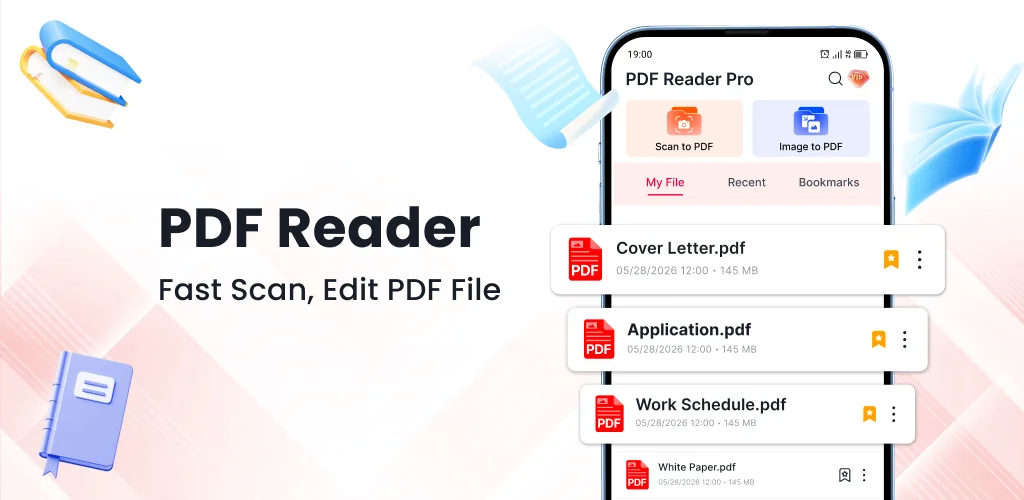
PDF Reader - Viewer, Edit PDF app cover art for Android
PDF Reader - Viewer, Edit PDF Icon

PDF Reader - Viewer, Edit PDF APK for Android

5M+
Free
Oct 27, 2026

Scan, compress, and annotate PDFs without switching apps

Download PDF Reader - Viewer, Edit PDF APK 1.0.8 47MB

What is PDF Reader?

PDF Reader - Viewer, Edit PDF is a PDF reader and editor that handles document scans, annotations, and file compression in one place. The camera scan works for receipts and invoices, and the compression tool shrinks large files without making text unreadable.

You open a PDF and the pages load quickly. Highlight a paragraph, underline a sentence, or draw on the page to mark up reports and assignments. The annotation tools stay simple: tap what you need, apply it, and move on. The scanner turns paper into digital files by framing the document in your camera and tapping once. Scanned invoices and notes save as PDFs immediately.

Key Features:

  • Document scanning uses your phone's camera to digitize receipts, invoices, and paper notes as high-quality PDFs
  • Compression reduces file size while keeping text readable for easier storage and sharing
  • Highlight text, underline key information, and draw on pages to organize reports and assignments
  • Merge multiple files into a single PDF to keep related documents in one place
  • Convert image files to the PDF format

PDF annotation and file management

The app bookmarks pages so you can jump back to a section without scrolling. Rename files to keep your library organized, and share PDFs directly from the viewer. Print support handles physical copies when you need them. The editing tools cover the basics without burying you in options.

Other PDF readers

Adobe Acrobat Reader offers cloud integration and advanced form-filling, while CamScanner focuses on high-quality scanning with optical character recognition. PDF Reader - Viewer, Edit PDF combines scanning, compression, and annotation in a single interface, which suits users who need to digitize, edit, and manage documents without switching between apps.

The app serves professionals, students, and anyone managing documents on a phone. In-app purchases range from $9.99 to $49.99, and ads appear during use.

PDF Reader - Viewer, Edit PDF screenshot 1
PDF Reader - Viewer, Edit PDF screenshot 2
PDF Reader - Viewer, Edit PDF screenshot 3
PDF Reader - Viewer, Edit PDF screenshot 4

PDF Reader APK Download

What's New in Version 1.0.8

No official changelog provided for PDF Reader - Viewer, Edit PDF version 1.0.8. This update likely includes general stability improvements and bug fixes.

Download Links:

System Requirements

OS Version
Android 10 (Q) or higher
Architecture
Varies by file (Which one do I need?)
Disk Space
~60 MB free space required
RAM
1 GB
Internet
Not required
Google Services
Required   GMS dependent

APK File Details

Package ID com.zenstack.pdfreader.pdf.viewer.editor
Available on Google Play
Developer Zenstack Labs
License Free
Monetization Contains Ads   In-App Purchases
Content Rating Everyone
Interface Language
English +77

English, Arabic, Bulgarian, Czech, German, Spanish, French, Hindi, Hungarian, Indonesian, Italian, Japanese, Korean, Polish, Portuguese, Romanian, Russian, Thai, Turkish, Ukrainian, Vietnamese, Chinese, + 56 localizations

Required Permissions (23)
  • Requires Google Play Services to launch:
    Note: This is an original file. Unlike modded versions with no verification, it validates via your store account. Details
  • Internet
  • Access Network State
  • Read External Storage
  • Write External Storage
  • Vibrate

APK Verification & Virus Scan Results

Scan In Queue Signature Verified Safe & unmodified

Full antivirus scan in queue; report will appear here shortly. Signature matches the official developer release.

Show File Details (SHA-256, SHA-1, MD5)

SHA-1 Signature:

37ec6187339db30488d45a133c9147ade4222c7a

SHA-256 Hash:

8d3b992142daa7cc6addb3b433923a8144d9f959d74e3aa4b924d6b267a0ab3b

MD5 Checksum:

b880823cab6a8806e3b2607efd19038c

Frequently Asked Questions

Is PDF Reader safe to download?

PDF Reader has passed a basic integrity check. A full antivirus scan is pending. You can check the current scan status in the Security section above.

How to install XAPK file?

XAPK is a split APK package. Standard Android installer cannot open it directly. Use 'SAI' or 'XAPK Installer' — they handle XAPK files automatically. Download the installer, open the XAPK file with it, and follow the on-screen steps. Read more

What Android version does PDF Reader require?

PDF Reader requires Android 10 (API 29) or higher. Optimized for Android 17 (API 37).

Is PDF Reader free?

Yes, it is free to download and use, but it contains ads and offers in-app purchases.

Does PDF Reader require a license check?

Yes, this app performs a license check. You may need to have the Google Play Store installed and be logged in to verify the license.

How to update PDF Reader to the latest version?

Download the latest APK from this page and install it over your existing version — no need to uninstall first. Your data and settings will be preserved. We update the file as soon as a new version is released.

Does PDF Reader require Root access?

No root is required for basic use. PDF Reader works on standard Android for CPU info, RAM, battery, sensors, and network stats. Root unlocks a small set of advanced system parameters that Android restricts by default.

Found a problem on this page?

User Reviews & Ratings

Global rating (Play Store): 2.82★ (6.9K)
Site Rating: 5★ (1)
Rate this app

5.00

12345

1

Share your experience with other users.

Download PDF Reader APK - Latest version

Get the official APK file for your Android device. Fast, safe, and free. Download APK