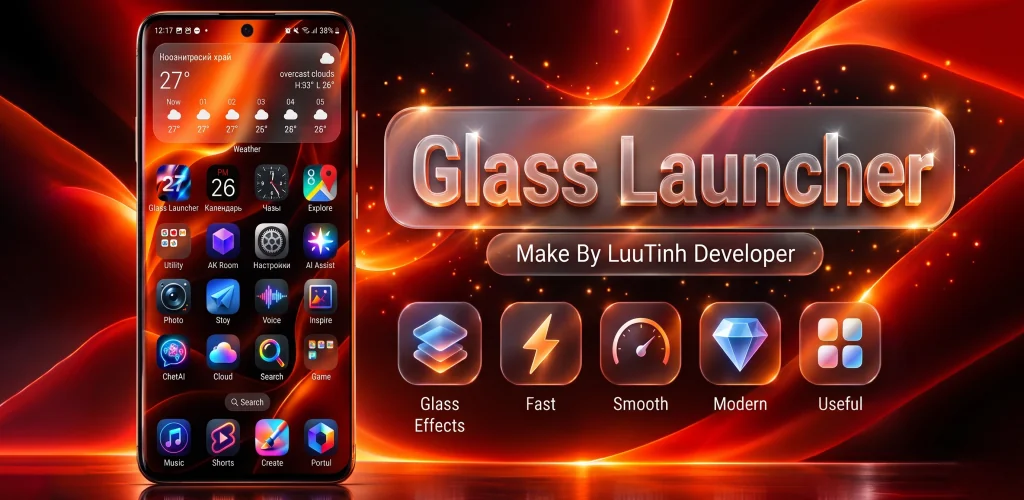
Glass Launcher app cover art for Android
Glass Launcher Icon

Glass Launcher APK for Android

17M+
Free
Nov 17, 2026

Transform your Android with sleek, familiar iPhone style and seamless control.

Download Glass Launcher APK 9.5.5 18MB Old versions

What is Glass Launcher?

Ever wished your Android phone could have that sleek, familiar iPhone vibe? We totally get it! Glass Launcher is here to make that dream a reality, effortlessly transforming your device into an iOS-inspired masterpiece. This isn’t just about looks; it’s about bringing a touch of iPhone’s intuitive design and functionality right to your fingertips, making your daily phone use surprisingly seamless and stylish.

Imagine navigating your Android with the elegance and simplicity you’ve admired in iOS. Glass Launcher delivers an authentic iPhone look and feel, from the icons to the overall layout. It’s perfect for anyone looking to refresh their phone’s appearance or for those who’ve switched from an iPhone and miss its distinctive user experience. You’ll appreciate how easy it is to customize your device, giving it a truly unique touch that still feels familiar.

What caught my attention is how Glass Launcher integrates key iOS-inspired features, making your Android feel genuinely enhanced. Tired of digging through menus for basic settings? This app solves that!

Key Features:

  • Authentic iOS Interface: Get the sleek, polished design and familiar layout of an iPhone directly on your Android device.
  • Intuitive Control Center: Swipe up from the bottom to instantly access essential functions like Wi-Fi, Bluetooth, brightness, and volume, just like iOS.
  • Handy Quick Access: Enjoy a floating button for quick shortcuts to your favorite apps and actions, similar to the convenient AssistiveTouch feature.
  • Personalized Wallpapers: Easily set and change your background to truly make your device your own, reflecting your style with ease.

Ready to give your Android a stunning makeover? Download Glass Launcher today and elevate your phone’s style and functionality. Why settle for ordinary when you can experience the best of both worlds?

Also known as: Launcher iOS 27, iOS Launcher
Glass Launcher screenshot 1
Glass Launcher screenshot 2
Glass Launcher screenshot 3
Glass Launcher screenshot 4

Download Glass Launcher APK for Android

What's New in Version 9.5.5

Glass Launcher Made by LuuTinh Developer
THIS UPDATE
- Glass effect to all widget
- Add Protect Apps to App Library
- Optimization fps, unlock anim
- Fixes issue report by user
NEXT UPDATE
- Liquid Glass for another view
1. IF YOU HAVE ANY ERRORS, PLEASE SEND IMAGES OR VIDEOS WITH ERRORS TO MY EMAIL [email protected]. WE WILL REPAIR IT ASAP.
2. TO CONTINUE TO DEVELOP AND SUPPORT USERS WE HAVE TO ADD SOME ADS IN MY APP. WE WISH FOR YOUR UNDERSTANDING.
THANK YOU SO MUCH FOR USING MY APP :)

Other versions

System Requirements

OS Version
Android 5.0 (Lollipop) or higher
Architecture
Varies by file (Which one do I need?)
Disk Space
~30 MB free space required
RAM
1 GB
Internet
Not required
Permissions (27)
  • Internet
  • Access Network State
  • Read External Storage
  • Write External Storage
  • Read Contacts

APK File Details

Package ID com.luutinhit.launcherios
Available on Google Play
Developer LuuTinh Developer
License Free
Monetization Contains Ads  
Content Rating Everyone
Interface Language
English +76

English, Japanese, German, Bulgarian, Thai, Hindi, Vietnamese, Ukrainian, Polish, Korean, Romanian, Arabic, French, Turkish, Czech, Spanish, Italian, Portuguese, Hungarian, Russian, Chinese, + 56 localizations

APK Verification & Virus Scan Results

No Virus Signature Verified Safe & unmodified

Virus scan: Verified safe (0/64) View report. This APK is free of malware and its signature matches the official developer release.

Show File Details (SHA-256, SHA-1, MD5)

SHA-1 Signature:

f12b4aa3206d3e36ad1ef017d149d330e5cb1739

SHA-256 Hash:

4597154550eff47b87bbd8af0eac2331ffb4f6fd566ee5719db4ced3f75299b1

MD5 Checksum:

c36044230b1d805f95e8bf54e25b954b

Frequently Asked Questions

Is Glass Launcher safe to download?

Yes, Glass Launcher is safe to download. The APK is scanned on every update — no malware or viruses detected. You can verify the full scan report in the Security section above.

How to install Glass Launcher APK on Android?

Download the APK using the button above. Then open the file and tap Install. If prompted, enable "Install from unknown sources" in Settings → Security. The process takes under a minute. Read more

What Android version does Glass Launcher require?

Glass Launcher requires Android 5.0 (API 21) or higher. Optimized for Android 17 (API 37).

Is Glass Launcher free?

Yes, it is free to use, but it is ad-supported.

How to update Glass Launcher to the latest version?

Download the latest APK from this page and install it over your existing version — no need to uninstall first. Your data and settings will be preserved. We update the file as soon as a new version is released.

What processor architecture does Glass Launcher support?

Glass Launcher supports arm64-v8a, armeabi-v7a, x86, x86_64. If you are unsure about your device architecture, check the Device Info section on this page.

How to enable installation from unknown sources on Android?

Go to Settings → Security (or Settings → Apps → Special access on Android 8+) and enable "Install unknown apps" for your browser or file manager. On Android 8 and above this setting is per-app, not global. Read more

Found a problem on this page?

User Reviews & Ratings

Global rating (Play Store): 4.58★ (235.2K)
Site Rating: 5★ (1)
Rate this app

5.00

12345

1

Share your experience with other users.